


පින්තුරේ ඇතුලේ හන්ගමු
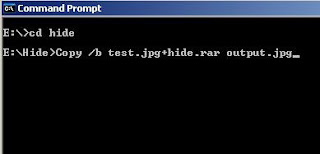
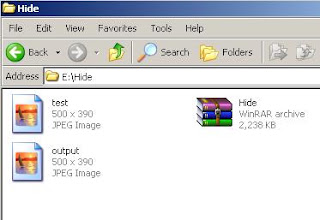
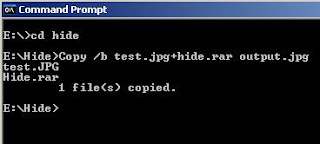 [FONT="]එවිට hide ෆොල්වඩරය තුල output නමින් අලුත් පින්තුරයක් නිර්මානය වි ඇත. දැන් එම පින්තුරය තුල අපි rar කරගත් ෆයිල් සියල්ල සැගවි අත.
 [/FONT]
[FONT="]මෙහි test.jpg යනු ෆයිල් සැගවිමට යොදා ගන්නා පින්තුරයයි[/FONT]
[FONT="]hide.rar යනු සගවන ෆයිල් අඩංගු ෆොල්ඩරයයි[/FONT]
[FONT="]output.jpg යනු ෆයිල් සැගවු පසු ලබෙන පින්තුරයයි.[/FONT]
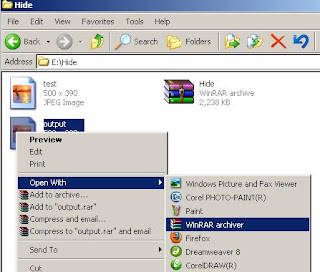
 [FONT="]සැගවි ඇති ෆයිල් බැලිම සදහා output.jpg නැමැති පින්තුරය මත right click කර winrar වලින් open කර ගන්න.
 [/FONT]

[FONT="]අපි[/FONT][FONT="]ඉගෙනගන්න[/FONT][FONT="]යන්නෙ[/FONT][FONT="]කිසිම[/FONT][FONT="]මෘදුකාංගයක්[/FONT][FONT="]බාවිතා[/FONT][FONT="]නොකර[/FONT][FONT="]පිතුරයක්[/FONT][FONT="]ඇතුලෙ[/FONT][FONT="]ෆයිල්ස්[/FONT][FONT="]හන්ගන්න[/FONT][FONT="]පුලුවන්[/FONT][FONT="]ලේසි[/FONT][FONT="]ක්[/FONT][FONT="][/FONT][FONT="]රමයක්[/FONT][FONT="]. [/FONT][FONT="]මෙකට[/FONT][FONT="]ඔනි[/FONT][FONT="]වෙන්නෙ[/FONT][FONT="] WinRar [/FONT][FONT="]මෘදුකාංගය[/FONT][FONT="]සහ[/FONT][FONT="] Command Prompt [/FONT][FONT="]එක[/FONT][FONT="]පමනයි[/FONT][FONT="].[/FONT]
[FONT="]මුලින්ම[/FONT][FONT="]මම “E” Drive [/FONT][FONT="]එකේ[/FONT][FONT="] Hide [/FONT][FONT="]කියල[/FONT][FONT="] Folder [/FONT][FONT="]එකක්[/FONT][FONT="]හදා[/FONT][FONT="]ගන්න[/FONT][FONT="]ම්[/FONT][FONT="].[/FONT]
 [FONT="]ඊට[/FONT][FONT="]පස්සෙ[/FONT][FONT="]ඒ[/FONT][FONT="]තුලට[/FONT][FONT="]පින්තුර[/FONT][FONT="]සහ[/FONT][FONT="]ෆයිල්[/FONT][FONT="]ටිකක්[/FONT][FONT="] Copy [/FONT][FONT="]කර[/FONT][FONT="]ගන්න[/FONT][FONT="]. [/FONT]
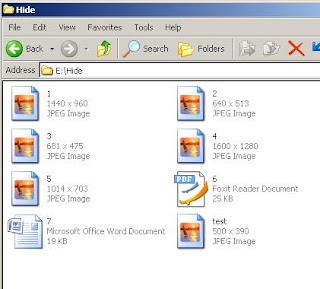
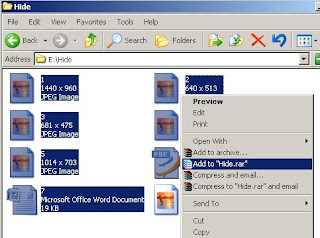
[FONT="]දැන්[/FONT][FONT="]එයින්[/FONT][FONT="]එක්[/FONT][FONT="]පින්තුරයක්[/FONT][FONT="] ( test) [/FONT][FONT="]හැ[/FONT][FONT="]ර[/FONT][FONT="]අනිකුත්[/FONT][FONT="]ෆයිල්[/FONT][FONT="]සියල්ල[/FONT][FONT="] Winrar [/FONT][FONT="]ෆොල්ඩරයක්[/FONT][FONT="]තුලට[/FONT][FONT="] Copy [/FONT][FONT="]කර[/FONT][FONT="]ගන්න[/FONT][FONT="]. [/FONT]
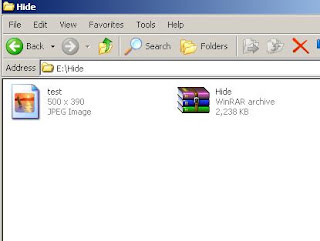
[FONT="]දැන්[/FONT][FONT="]ඉතිරි[/FONT][FONT="]කරගත්[/FONT][FONT="]පින්තුරය[/FONT][FONT="] ( test ) [/FONT][FONT="]සහ[/FONT][FONT="] Winrar [/FONT][FONT="]ෆොල්ඩරය[/FONT][FONT="]හැර[/FONT][FONT="]අනිත්[/FONT][FONT="]ෆයිල්[/FONT][FONT="]ටික[/FONT][FONT="]මකා[/FONT][FONT="]දමන්න[/FONT][FONT="]. එවිට ඔබට මෙ විදියට දකින්න ලැබෙයි.[/FONT]
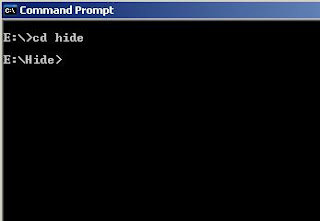
[FONT="]ඉන්[/FONT][FONT="]පසු[/FONT][FONT="] Command Prompt [/FONT][FONT="]වෙත[/FONT][FONT="]පිවිස[/FONT][FONT="]එහි[/FONT][FONT="] “E” Drive [/FONT][FONT="]එකට[/FONT][FONT="]ගොස් Hide ෆොල්ඩරය තුලට යන්න.[/FONT]
[FONT="]මුලින්ම[/FONT][FONT="]මම “E” Drive [/FONT][FONT="]එකේ[/FONT][FONT="] Hide [/FONT][FONT="]කියල[/FONT][FONT="] Folder [/FONT][FONT="]එකක්[/FONT][FONT="]හදා[/FONT][FONT="]ගන්න[/FONT][FONT="]ම්[/FONT][FONT="].[/FONT]


[FONT="]දැන්[/FONT][FONT="]එයින්[/FONT][FONT="]එක්[/FONT][FONT="]පින්තුරයක්[/FONT][FONT="] ( test) [/FONT][FONT="]හැ[/FONT][FONT="]ර[/FONT][FONT="]අනිකුත්[/FONT][FONT="]ෆයිල්[/FONT][FONT="]සියල්ල[/FONT][FONT="] Winrar [/FONT][FONT="]ෆොල්ඩරයක්[/FONT][FONT="]තුලට[/FONT][FONT="] Copy [/FONT][FONT="]කර[/FONT][FONT="]ගන්න[/FONT][FONT="]. [/FONT]

[FONT="]දැන්[/FONT][FONT="]ඉතිරි[/FONT][FONT="]කරගත්[/FONT][FONT="]පින්තුරය[/FONT][FONT="] ( test ) [/FONT][FONT="]සහ[/FONT][FONT="] Winrar [/FONT][FONT="]ෆොල්ඩරය[/FONT][FONT="]හැර[/FONT][FONT="]අනිත්[/FONT][FONT="]ෆයිල්[/FONT][FONT="]ටික[/FONT][FONT="]මකා[/FONT][FONT="]දමන්න[/FONT][FONT="]. එවිට ඔබට මෙ විදියට දකින්න ලැබෙයි.[/FONT]

[FONT="]ඉන්[/FONT][FONT="]පසු[/FONT][FONT="] Command Prompt [/FONT][FONT="]වෙත[/FONT][FONT="]පිවිස[/FONT][FONT="]එහි[/FONT][FONT="] “E” Drive [/FONT][FONT="]එකට[/FONT][FONT="]ගොස් Hide ෆොල්ඩරය තුලට යන්න.[/FONT]

[FONT="]දැන් එහි මෙම code එක type කර enter කරන්න.[/FONT]
[FONT="]Copy /b test.jpg + hide.rar output.jpg[/FONT]
[FONT="]Copy /b test.jpg + hide.rar output.jpg[/FONT]

 [/FONT]
[FONT="]මෙහි test.jpg යනු ෆයිල් සැගවිමට යොදා ගන්නා පින්තුරයයි[/FONT]
[FONT="]hide.rar යනු සගවන ෆයිල් අඩංගු ෆොල්ඩරයයි[/FONT]
[FONT="]output.jpg යනු ෆයිල් සැගවු පසු ලබෙන පින්තුරයයි.[/FONT]
 [/FONT]


[FONT="]වැඩෙ ගොඩ. දැන් එම පින්තුරය තුල අනිත් ෆයිල් සියල්ල සැගවිල ඇති.
හොදනම් මටත් සලකලා අඩුම ගැනේ බම්ප් එකක්වත් දාලා පලයල්ලා
 - අදුරු වෘකයා -
[/FONT]
හොදනම් මටත් සලකලා අඩුම ගැනේ බම්ප් එකක්වත් දාලා පලයල්ලා
- අදුරු වෘකයා - [/FONT]
[FONT="]උපුටා ගැනීමකි[/FONT]


