මට උදවිවක් දියෝ..............

sameerasugath

Well-known member
  • Dec 1, 2008
    1,571
    111
    63
    මට උදවිවක් දියෝ..............

    මට කවිරු හරි කියනවද ඊ මේල් එකකට Pictures add කර ගන්නේ කොහොමද කියල
    සාමාන්‍යෙයන් දාන්න දෙන්නෙ ඇමිණුමක් විදිහටනේ...
    මට ඕන ඊ මේල් එක open වෙනකොටම Pictures ටිකත් මේල් එකේම open වෙන්න..
    අපේ එලකිරියේ ත්‍රෙඩිවල Pictures දානව වගේ..
    කවිරු හරි දන්න මචෙක් හරි මචියක් හරි කියල දීපල්ලකෝ.....
     

    niroshansl

    Well-known member
  • Feb 17, 2009
    3,980
    1
    1,184
    113
    Try to copy and paste the picture. Click, highlight and drag your mouse over the picture to copy and then paste it onto your email body by right clicking and select "paste"
     

    gudaya

    Well-known member
  • Jan 9, 2009
    14,379
    1,491
    113
    ළිඳේ ♥♥♥♥
    <img src="www.somewhere.com/picture.jpg">

    highlight karala thiyena thanata image path eka denna
    or

    • Click on settings in the upper right corner of your Gmail interface. In the settings page, click on the Labs tab.
    • Scroll Down to find the Inserting Images lab feature.
    • Enable it and save the settings.
    easy-way-to-attach-images-in-gmail-messages.png


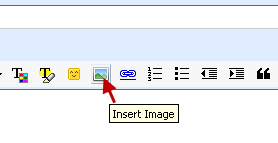
    Now you can easily attach inline images in Gmail messages by simply clicking on the add image button.
    add-images-in-gmail-without-attachments.png

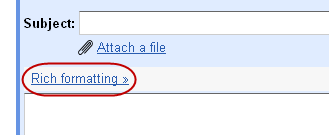
    Important Note - If you don’t see the rich formatting toolbar in your compose mail editor, then simply click on the Rich Formatting link to enable it.
    enable-rich-formatting-in-gmail.png


    add-images-in-gmail-without-attachments.png
     
    Last edited: