මම අලුතෙන් office එකකට join වුන IT Admin කෙනෙක් විදිහට. Networking පැත්තෙන් course ටිකක් කරලා තියනවා. කලින් වැඩ කරපු තැන users ලා 5 හිටියේ. ඒ හින්ද කිසි අවුලක් නැතිව pc ටික network කරලා file share වලට windows server එකක් ගහගෙන ලස්සනට හිටිය. අලුත් office එකේ users ඔක්කොම 30 ක් ඉන්නවා. හැම users කෙනෙක් ම network එකට connect වෙන්නේ laptop එකෙන් wifi . office එකේ network setup එක වෙන්නේ Slt ලාගෙන් ගත්තු fiber router එකකට tp-link 1gbps 8 port switch ekak connect කරලා තියෙන්නේ. switch ekata tp -link access point දෙකක් connect karala හැම user කෙනෙක්ම AP එකට connect wela තමා router එක හරහා internet යන්නේ. office එකේ structure එක අනුව cable වලට යන්න තාම අදහසක් නැ . wifi AP දෙකත් overlap වෙන්න නැතිව තමයි තියලා තියෙන්නේ. හැම users කෙනෙක්ටම හොදටම AP එක හරහා සිග්නල් තියනවා. internet එකට access වෙන කොට තමයි ප්රශ්නය පටන් ගන්නේ. Internet එක slow වෙනවා හැම users ලටම වේලාවෙන් වෙලාවට. access -point එකත් switch එකත් connect කරලා තියෙන්නේ cat 6 cable වලින්. file share server එකත් cat 6 cable එකෙන් switch එකට connect කරලා තියෙන්නේ. Internet එකට connect වෙන users ල ගාන වැඩි හින්දද මේ issue එක එන්නේ නැත්නම් network setup එකේ changes කරන්න ඕනද?

Latest ads
-
 AWS Certified Solutions Architect-Associate + AWS Certified Cloud Practitioner
- Sanjeewani95
- Updated:
-
 🚀 එක පැකේජ් එකයි - මාසෙටම Unlimited Internet! 🌐
- sayuru bandara
- Updated:
-
 🎬 CapCut Pro 1 Month Access! LKR 600
- sayuru bandara
- Updated:
-
 🚀 Google One AI PRO Plan (Gemini Pro Activation) – 18 Months Access! LKR 2200
- sayuru bandara
- Updated:
-
 Canva Pro Lifetime Own Mail Activation LKR 500
- sayuru bandara
- Updated:
ලොකු උදව්වක් ඕන networking field එකේ ඉන්න යාලුවන්ගෙන්.
- Thread starter Shenal2025
- Start date
You are using an out of date browser. It may not display this or other websites correctly.
You should upgrade or use an alternative browser.
You should upgrade or use an alternative browser.


මේකට උත්තර දෙන්න මේ දේවල් ටිකත් කිව්වානම්.
switch එකේ මොඩෙල් එක
Access point වල model
ෆයිල් සර්වර් එකත් එක්ක ශෙයා කරන ෆයිල් වල සයිස්
ස්ලොව් වෙන්නේ specific websitte වලටද. PC or laptop direct switch එකට ගහලා වැඩ කරද්දිත් ඒ slowness එක තියනවාද?
switch එකේ මොඩෙල් එක
Access point වල model
ෆයිල් සර්වර් එකත් එක්ක ශෙයා කරන ෆයිල් වල සයිස්
ස්ලොව් වෙන්නේ specific websitte වලටද. PC or laptop direct switch එකට ගහලා වැඩ කරද්දිත් ඒ slowness එක තියනවාද?


මේකට උත්තර දෙන්න මේ දේවල් ටිකත් කිව්වානම්.
switch එකේ මොඩෙල් එක
Access point වල model
ෆයිල් සර්වර් එකත් එක්ක ශෙයා කරන ෆයිල් වල සයිස්
ස්ලොව් වෙන්නේ specific websitte වලටද. PC or laptop direct switch එකට ගහලා වැඩ කරද්දිත් ඒ slowness එක තියනවාද?
switch da router da ?


To start with your network setup if fucking insecure (has nothing to do directly with the performance). Incase you don't have the funds try to get a basic firewall setup (something like pfsense)මම අලුතෙන් office එකකට join වුන IT Admin කෙනෙක් විදිහට. Networking පැත්තෙන් course ටිකක් කරලා තියනවා. කලින් වැඩ කරපු තැන users ලා 5 හිටියේ. ඒ හින්ද කිසි අවුලක් නැතිව pc ටික network කරලා file share වලට windows server එකක් ගහගෙන ලස්සනට හිටිය. අලුත් office එකේ users ඔක්කොම 30 ක් ඉන්නවා. හැම users කෙනෙක් ම network එකට connect වෙන්නේ laptop එකෙන් wifi . office එකේ network setup එක වෙන්නේ Slt ලාගෙන් ගත්තු fiber router එකකට tp-link 1gbps 8 port switch ekak connect කරලා තියෙන්නේ. switch ekata tp -link access point දෙකක් connect karala හැම user කෙනෙක්ම AP එකට connect wela තමා router එක හරහා internet යන්නේ. office එකේ structure එක අනුව cable වලට යන්න තාම අදහසක් නැ . wifi AP දෙකත් overlap වෙන්න නැතිව තමයි තියලා තියෙන්නේ. හැම users කෙනෙක්ටම හොදටම AP එක හරහා සිග්නල් තියනවා. internet එකට access වෙන කොට තමයි ප්රශ්නය පටන් ගන්නේ. Internet එක slow වෙනවා හැම users ලටම වේලාවෙන් වෙලාවට. access -point එකත් switch එකත් connect කරලා තියෙන්නේ cat 6 cable වලින්. file share server එකත් cat 6 cable එකෙන් switch එකට connect කරලා තියෙන්නේ. Internet එකට connect වෙන users ල ගාන වැඩි හින්දද මේ issue එක එන්නේ නැත්නම් network setup එකේ changes කරන්න ඕනද?
If the slowness is coming time to time there can be multiple reasons
- Some asshole downloading stuff from the internet since you haven't controlled that
- Network congestion because of the number of users using wifi (not sure how many can be handled using a single AP. You need to check that)

depends on the where the network bottleneck is
btw what's the internet link in the office? is there any monitoring done on this uplink?
is it going through a firewall? is your server segment located in a seperate vlan or is everything located in the same lan?
I think it would be better if you post a rough diagram with link info.
I doubt it's a problem with your cabling
btw what's the internet link in the office? is there any monitoring done on this uplink?
is it going through a firewall? is your server segment located in a seperate vlan or is everything located in the same lan?
I think it would be better if you post a rough diagram with link info.
I doubt it's a problem with your cabling
http://www.squid-cache.org/ wage proxy ekak danna wei inbetween internet connection and AP. anika mata hithenne 30ppl nag local network eketh bottelneck ekak athi
switch.switch da router da ?
issue එක තියෙන්නේ wifi AP වල ද කියලා isolate කරන්න ඕනේ.

Client Lap ekaka windows update ekak giyath oya wage network ekak slow wenawa.. PfSense wage firewall ekak dala per IP speed limit kraganna  AP & Switches wala bottleneck thiyennath puluwan.
AP & Switches wala bottleneck thiyennath puluwan.
Try this. you can setup a basic firewall and monitor your network whole day. check local and internet usage of every user. if someone's downloading big files from your local file server then other users getting a network lag sometimes. I don't think its AP problem because now most of APs can handle 30-40 users at the same time. but check it.To start with your network setup if fucking insecure (has nothing to do directly with the performance). Incase you don't have the funds try to get a basic firewall setup (something like pfsense)
If the slowness is coming time to time there can be multiple reasons
- Some asshole downloading stuff from the internet since you haven't controlled that
- Network congestion because of the number of users using wifi (not sure how many can be handled using a single AP. You need to check that)
switch -මේකට උත්තර දෙන්න මේ දේවල් ටිකත් කිව්වානම්.
switch එකේ මොඩෙල් එක
Access point වල model
ෆයිල් සර්වර් එකත් එක්ක ශෙයා කරන ෆයිල් වල සයිස්
ස්ලොව් වෙන්නේ specific websitte වලටද. PC or laptop direct switch එකට ගහලා වැඩ කරද්දිත් ඒ slowness එක තියනවාද?
TL-SG1008D | 8-Port Gigabit Desktop Switch
access point model
TL-WA901ND | 450Mbps Wireless N Access Point
file wala size eka 10mb-40mb range eke thiyenne..
server eke thiyana quickbook kiyana accounting software eke files thama local computer eken open karanne..eka serayak open karata passe use karanna puluwan ai ai load wenna nethiwa.
specific website walata neme.. hama site ekatamaa gmail.... direct router ekata gahuwth speed test eken 140mbps speed uth hamaba wenawa samahara welatata.
test kara. eka eka pc wala eka eka speed pennanne.. okkmama slow wunata passeth samahara lap wala witharak 30mbps speed pennanawa but internet eka gmail load wenawa..slow wena welawata speed test ekak daala balapan user laptop eken..
------ Post added on Apr 15, 2021 at 11:33 PM
router ekata switch eka gahala thiyenne.. direct gahuwa nam router ekata hari switch ekata hari okkama isolate karala single lap ekak full speed wada..switch da router da ?
------ Post added on Apr 15, 2021 at 11:34 PM

450mbps tp link ap dekak set karala thiyenne.. ekata thama hama user kenekma conenct wenne.. same network SSID AND PASSWORD dela thiyenne..Wireless AP eka powerful natuwa athi users la 30k handle karanna.
1. we have no control or monitoring in place. this may be the issue..To start with your network setup if fucking insecure (has nothing to do directly with the performance). Incase you don't have the funds try to get a basic firewall setup (something like pfsense)
If the slowness is coming time to time there can be multiple reasons
- Some asshole downloading stuff from the internet since you haven't controlled that
- Network congestion because of the number of users using wifi (not sure how many can be handled using a single AP. You need to check that)
2. tplink 450mbps access point. two of them handling user load.
slt fiber connection. no monitoring done on uplink.depends on the where the network bottleneck is
btw what's the internet link in the office? is there any monitoring done on this uplink?
is it going through a firewall? is your server segment located in a seperate vlan or is everything located in the same lan?
I think it would be better if you post a rough diagram with link info.
I doubt it's a problem with your cabling
not going trhough firewall
all are in same lan
no cabling is done. all laptop are connected via wifi. only server is connected with cable.
------ Post added on Apr 15, 2021 at 11:46 PM
Attachments
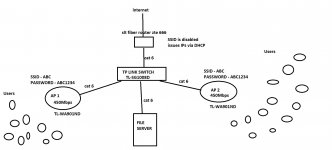
If you got the budgets try to buy a fortigate firewall. A entry level one will do. You can replace tplink switch the firewall. It will act as a router and a firewall. Will also provide you monitoring and control as well.1. we have no control or monitoring in place. this may be the issue..
2. tplink 450mbps access point. two of them handling user load.
slt fiber connection. no monitoring done on uplink.
not going trhough firewall
all are in same lan
no cabling is done. all laptop are connected via wifi. only server is connected with cable.
------ Post added on Apr 15, 2021 at 11:46 PM
ow. oya seen eka wenawa kochchara update nawaththala thibath samahara welawata.. pfsense eka server ekata dala server eka haraha internet denna puluwanda..Client Lap ekaka windows update ekak giyath oya wage network ekak slow wenawa.. PfSense wage firewall ekak dala per IP speed limit kraganna

owow. oya seen eka wenawa kochchara update nawaththala thibath samahara welawata.. pfsense eka server ekata dala server eka haraha internet denna puluwanda..
ethakota ape server machine ekata network port dekak set karanna ona ne.. ekak router ekata server eken. anith eka switch ekata.. server eka thama firewall eka widihata inne..
isolate karama issue ekak ne.. laptop ekak dekak use karana kota.switch.
issue එක තියෙන්නේ wifi AP වල ද කියලා isolate කරන්න ඕනේ.
------ Post added on Apr 15, 2021 at 11:58 PM
Similar threads


- Replies
- 23
- Views
- 1K
- Replies
- 2
- Views
- 151


