


මචන්ලා මට පොඩි හෙල්ප් එකක් ඕන.
මන් fiber line එකක් ගත්ත. මේ මගුලේ data නිකන් tap එක අරිය වගේ ඇවිත් data ඉවර වෙන නිසා මන් Elakiri eke ඉන්න අයගෙනුයි ඉන්ටෙර්නෙට් එකෙයි search කරලා IP QOS තියෙන router එකක් ගත්ත main router එකේ ඉදන් LAN to WAN connection එකක් දෙන්න හිතාගෙන. ඒ කරලා devices TP LINK එකෙන් connect කරලා bandwidth control කරන්නයි මට ඕන.
main router එක Huawei HG8245H5 (SLT එකෙන් දෙන එක fiber සහ PEO TV දාල තියෙන එක.)
මන් ගත්ත router එක TP LINK TD-W8968
Note - මේ router එකේ මෙන්න මෙහෙම option එකකුත් තියෙනවා.
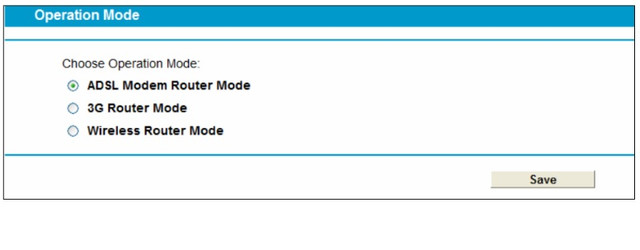
දැන් මට තියෙන ප්රශ්නේ මේකයි. Internet එකේ තියෙන නොයෙකුත් options try කරලා බැලුව.මොන දේ කරත් මට ඕන දේ කර ගන්න බෑ.
මෙන්න මේ options තමයි මන් ට්රයි කරේ.
option 01 -
Main Router LAN IP 192.168.1.1. DHCP Enabled / Disabled both tried. IP Range from 2 to 50
TP Link Router LAN IP changed to 192.168.2.1
DHCP enable kara mata devices eken connect karanna ona nisa. IP Range 192.168.2.2 to 50
Then TP Link router eke WAN settings wala Static IP ekak damma mehema. 192.168.1.51
Same subnet as Main router
Default Gateway - 192.168.1.1
මෙන්න මේ විදියට සෙට්ටින්ග්ස් දැම්මම වෙන්නේ මේකයි.
මන් උඩ කිව්වා option දෙකෙන් ADSL ROUTER MODE එක use කරාම IP Assign වෙනවා Main Router එකෙන්. ඉතින් එක වැඩක් න නේ. මට ඕන TP LINK එකෙන් IP එකක් අරන් bandwidth control කරන්න.
ඊළඟට Wireless Router option එකට ගියාම IP එක TP LINK එකෙන් assign වෙනවා.හැබැයි.No Internet Access කියල තමයි වැටෙන්නේ,
option 02 -
මේක මට එළකිරි එකේ කොල්ලෙක් කිවේ හැබැයි එයා කරලා තියෙන්නේ TENDA කියල router එකකින්. මේකයි කරේ
Main Router LAN IP - 192.168.1.1 - DHCP Disabled
TP Link Router LAN IP Changed to 192.168.1.1 DHCP Enabled. IP Range 192.168.1.2 to 50
මේ method එකට මචන් දෙකම success. ඒ කියන්නේ IP එක assign වෙනවා Router 02 එකෙන්. Internet ත් වැඩ. හැබැයි Bandwidth Control එක වැඩ කරන්නේ නැ .
ඕකත් හැබැයි වැඩ කරන්නේ ADSL ROUTER MODE එකෙන්, Wireless Router mode එකෙන් No Internet Access
Option -03
මේ TP LINK Router එක WDS support කරනවා. සෝ routers දෙක Wireless Bridge කරා. IP Assign වෙනවා TP LINK එකෙන් හැබැයි No Internet Access
Bandwidth Control karanna තියෙන procedure එක මේකයි.

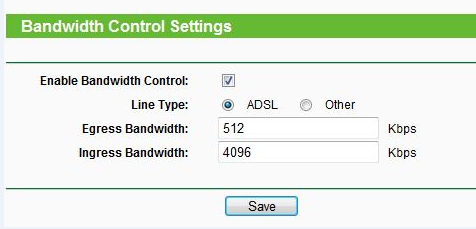
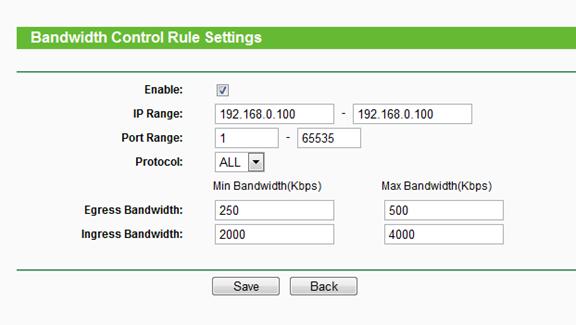
මට මේ ටික බලල උදව්වක් කරන්න පුළුවන් ද bandwidth එක control කරන්න.
මන් fiber line එකක් ගත්ත. මේ මගුලේ data නිකන් tap එක අරිය වගේ ඇවිත් data ඉවර වෙන නිසා මන් Elakiri eke ඉන්න අයගෙනුයි ඉන්ටෙර්නෙට් එකෙයි search කරලා IP QOS තියෙන router එකක් ගත්ත main router එකේ ඉදන් LAN to WAN connection එකක් දෙන්න හිතාගෙන. ඒ කරලා devices TP LINK එකෙන් connect කරලා bandwidth control කරන්නයි මට ඕන.
main router එක Huawei HG8245H5 (SLT එකෙන් දෙන එක fiber සහ PEO TV දාල තියෙන එක.)
මන් ගත්ත router එක TP LINK TD-W8968
Note - මේ router එකේ මෙන්න මෙහෙම option එකකුත් තියෙනවා.
දැන් මට තියෙන ප්රශ්නේ මේකයි. Internet එකේ තියෙන නොයෙකුත් options try කරලා බැලුව.මොන දේ කරත් මට ඕන දේ කර ගන්න බෑ.
මෙන්න මේ options තමයි මන් ට්රයි කරේ.
option 01 -
Main Router LAN IP 192.168.1.1. DHCP Enabled / Disabled both tried. IP Range from 2 to 50
TP Link Router LAN IP changed to 192.168.2.1
DHCP enable kara mata devices eken connect karanna ona nisa. IP Range 192.168.2.2 to 50
Then TP Link router eke WAN settings wala Static IP ekak damma mehema. 192.168.1.51
Same subnet as Main router
Default Gateway - 192.168.1.1
මෙන්න මේ විදියට සෙට්ටින්ග්ස් දැම්මම වෙන්නේ මේකයි.
මන් උඩ කිව්වා option දෙකෙන් ADSL ROUTER MODE එක use කරාම IP Assign වෙනවා Main Router එකෙන්. ඉතින් එක වැඩක් න නේ. මට ඕන TP LINK එකෙන් IP එකක් අරන් bandwidth control කරන්න.
ඊළඟට Wireless Router option එකට ගියාම IP එක TP LINK එකෙන් assign වෙනවා.හැබැයි.No Internet Access කියල තමයි වැටෙන්නේ,
option 02 -
මේක මට එළකිරි එකේ කොල්ලෙක් කිවේ හැබැයි එයා කරලා තියෙන්නේ TENDA කියල router එකකින්. මේකයි කරේ
Main Router LAN IP - 192.168.1.1 - DHCP Disabled
TP Link Router LAN IP Changed to 192.168.1.1 DHCP Enabled. IP Range 192.168.1.2 to 50
මේ method එකට මචන් දෙකම success. ඒ කියන්නේ IP එක assign වෙනවා Router 02 එකෙන්. Internet ත් වැඩ. හැබැයි Bandwidth Control එක වැඩ කරන්නේ නැ .
ඕකත් හැබැයි වැඩ කරන්නේ ADSL ROUTER MODE එකෙන්, Wireless Router mode එකෙන් No Internet Access
Option -03
මේ TP LINK Router එක WDS support කරනවා. සෝ routers දෙක Wireless Bridge කරා. IP Assign වෙනවා TP LINK එකෙන් හැබැයි No Internet Access
Bandwidth Control karanna තියෙන procedure එක මේකයි.

මට මේ ටික බලල උදව්වක් කරන්න පුළුවන් ද bandwidth එක control කරන්න.


