Questions CI/CD pipeline ගැන දන්න වැඩ්ඩෝ එන්නකෝ | DevOps

DevOps_Boy

Active member
  • Jul 28, 2023
    238
    120
    43
    මචන් මම අලුතින් ඩිවොප්ස් වලට අවේ. මට ඔෆිස් එකෙන් ටාස්ක් එකක් දුන්නා. මේක ගොඩ දාගන්න ඔනේ කොහොමහරි. මේකට පොඩි ගයිඩන්ස් එකක් දෙන්නකෝ. ලොකු උදව්වක්.මේකයි සිද්දිය.මට දුන්න ටාස්ක් එක උනේ මැනුවලි රිලීස් කරන ඇප්කලිකේශන් එකක් ඔටෝ සර්වර් එකට ඩිප්ලෝයි වෙන්න හදන්න CI/CD පයිප් ලයින් එකක් යූස් කරලා. අපේ එක රිලීස් එකකදී ඩිප්ලෝයිමන්ට් දෙකක් කරන්න ඕනේ.
    මැනුවලි කරන්නෙ මම මෙහෙම,
    1. එකක් තමයි ඩිවලොපර් WAR file දෙක GitHub එකට දානවා.මම එකෙන් පුල් කරල තමයි සර්වර් එකට දාන්නේ. අපේ වෙබ් සර්වර් එක ඇපාචේ ටොම්කැට් එකක්. එක තියෙන්නෙ CentOS 7 server එකක. කලින් ඩිවලොපර් දුන්න .WAR ෆයිල් දෙක ටොම්කැට් එකෙ Webapp Folder එකට දාල එකෙන් හැදෙන ෆයිල් එකේ චේන්ජස් ටික කරල රීස්ටර්ට් කරනව ටොම්කැට් එක. මෙකෙන් එක රිලීස් එකක් ඉවරයි.

    2. අනිත් එක තමයි පල්ලෙහා තියෙනවා වගේ ෆයිල් සෙට් එකක් ජිට් හබ් එකට අප්ලෝඩ් කරනවා ඩිවලොපර්. ඊටපස්සෙ මම ඒක ජිට් හබ් එකෙන් පුල් කරල එකේ තියන env file එකේ variables change කරනවා. ඊටපස්සේ src කියන ෆයිල් එක ඇතුලේ තියනව තව තීම් කියල ෆොල්ඩෙර් එකක්. එකේ ඇතුලේ තියන ඉමේජ්ස් ටික චේන්ජ් කරනව.
    අවසානෙදි npm install , npm run build command වලින් කෝඩ් එක බිල්ඩ් කරලා එකේන් එන ෆයිල් ටික CentOS 7 server එකේ /var/www/<domain_name>/public_html ෆෝල්ඩර එක ඇතුලට දානවා. මේකෙදි වෙන විශේශ දේ තමයි මට ඔනේ env file එකයි src folder එක ඇතුලේ තියන තීම් කියන ෆොල්ඩර් එකයි වෙනම ජිට් හබ් රිපෝ එකක තියල පුල් වෙද්දී ඒ අදාල තැනින් ෆයිල් සෙට් ටික අරගෙන ඔටෝ බිල්ඩ් වෙන විදියට.
    මේ ටික තමයි මට ඔටෝ ඩිප්ලෝයි වෙන්න කරන්න ඕනෙ දේවල් ටික. අනේ කවුරු හරි ඉන්නවනම් මට මෙක කරගන්න පොඩි ගයිඩ් එකක් දෙන්නකො...
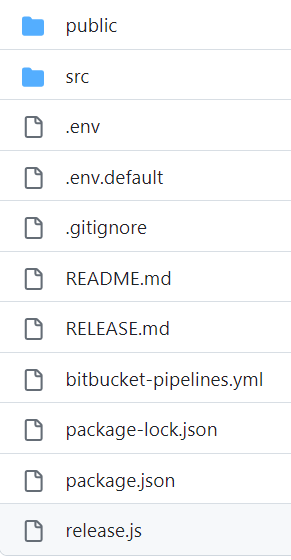
    1690573008866.png
     

    SLHodahitha

    Well-known member
  • Nov 8, 2017
    3,088
    2,977
    113
    ::0
    elakiri.com

    KandyMalli

    Well-known member
  • Feb 15, 2018
    4,393
    4,023
    113
    Github workflow
    Ansible/ bash script

    Meewa oni wei

    Sure, here is a script that you can use to get a pull when a commit is made to the main branch and deploy the WAR file to the Tomcat server, then restart it:

    ```
    #!/bin/bash

    # Get the current branch name
    branch_name=$(git rev-parse --abbrev-ref HEAD)

    # If the current branch is main, then deploy the WAR file
    if [[ $branch_name == "main" ]]; then

    # Get the WAR file
    war_file=target/my-app.war

    # Deploy the WAR file to Tomcat
    cp $war_file $CATALINA_HOME/webapps

    # Restart Tomcat
    service tomcat restart
    fi
    ```

    This script will first get the current branch name using the `git rev-parse --abbrev-ref HEAD` command. If the current branch is main, then the script will get the WAR file using the `target/my-app.war` path. The WAR file will then be deployed to Tomcat using the `cp` command. Finally, Tomcat will be restarted using the `service tomcat restart` command.

    To run this script, you can save it as a `.sh` file and then run it from the command line. For example, if you saved the script as `deploy.sh`, you could run it by typing the following command into the command line:

    ```
    bash deploy.sh
    ```

    This will deploy the WAR file to Tomcat and restart the server.

    ----

    ChatGPT walin ahanna mcn. Dan wada lesii
    ------ Post added on Jul 29, 2023 at 1:49 AM
     

    SkullVamp

    Well-known member
  • Mar 8, 2013
    783
    326
    63
    Oya use karana CICD tool eka anuwa meka wenas wenasa. Me dekama tikak simple task nisa oyata Jenkins job ekakin meka karannath puluwan (Pipeline ekakma one naha)

    1. War file eka GitHub dana eka honda practice ekak newei. Jenkins, Freestyle Project ekak create karala Build section eke bash script select karala ara uda KandyMalli dala thiyena script eka oyata galapena vidiyata wenas karanna. Auto meka run wennanan repo eka poll karanna puluwan Poll SCM option eka daala. Server restart ekata remotely karanna sshpass use karala command pass karanna.

    2. Mekanan pipeline ekak vidiyata ganna puluwan build stage ekakwath thiyena nisa.
    Meka oya Modify, Build, Deploy stages thunakata kadala script karanna.
    Code checkout eken passe env file eka wenas karanna puluwan bash script ekak hadanna (Use sed command — ChatGPT use karanna)
    Then next stage eke npm install and build
    Then next stage eke dist folder eke hadena set eka ara server ekata copy karanna. Oyata mekata scp commands use karanna puluwan. Eka oya pipeline eka run wena server eke install karala thiyanna. Bash script eken e command eka use karala oya folder eka recursively public folder ekata copy karanna.

    oya thawa details dunnoth specific vidiyata help karanna puluwan.
    Mage idea ekanan 1st project eka nisa godak tools patalawagan nathuwa bash and cicd tool vitharak use karala wade karanna kiyala..
     

    DevOps_Boy

    Active member
  • Jul 28, 2023
    238
    120
    43
    hmm, ube original account ekak tiyanawada?

    ubala use karanne github nam ithin https://github.blog/2022-02-02-build-ci-cd-pipeline-github-actions-four-steps/ or else ubala java karana nisa (no need to be a java only but) jenkins https://www.jenkins.io/doc/pipeline/tour/hello-world/ use karannath puluwan oya tika karaganna man danna widihata.

    I am not a programmer.
    Thanks machan

    Github workflow
    Ansible/ bash script

    Meewa oni wei

    Sure, here is a script that you can use to get a pull when a commit is made to the main branch and deploy the WAR file to the Tomcat server, then restart it:

    ```
    #!/bin/bash

    # Get the current branch name
    branch_name=$(git rev-parse --abbrev-ref HEAD)

    # If the current branch is main, then deploy the WAR file
    if [[ $branch_name == "main" ]]; then

    # Get the WAR file
    war_file=target/my-app.war

    # Deploy the WAR file to Tomcat
    cp $war_file $CATALINA_HOME/webapps

    # Restart Tomcat
    service tomcat restart
    fi
    ```

    This script will first get the current branch name using the `git rev-parse --abbrev-ref HEAD` command. If the current branch is main, then the script will get the WAR file using the `target/my-app.war` path. The WAR file will then be deployed to Tomcat using the `cp` command. Finally, Tomcat will be restarted using the `service tomcat restart` command.

    To run this script, you can save it as a `.sh` file and then run it from the command line. For example, if you saved the script as `deploy.sh`, you could run it by typing the following command into the command line:

    ```
    bash deploy.sh
    ```

    This will deploy the WAR file to Tomcat and restart the server.

    ----

    ChatGPT walin ahanna mcn. Dan wada lesii
    ------ Post added on Jul 29, 2023 at 1:49 AM
    Thanks machan mama meka try karala balannam
    ------ Post added on Jul 29, 2023 at 8:31 AM

    Issella kiyahan mokkada uba use karana tools and Cloud the host karanne?
    ehenam AWS da Azure da dahan, ethakota oka easily kiyala denda puluwan
    මෙහෙමයි මචන්. අපේ සර්වර්ස් තියෙන්නේ IDC(dialog data center) එකේ. හැබැයි AWS lightsail වලත් instance තියනවා. Cloud Hosted වෙන්නෙ. ටූල් ගැන කිව්වොත් මම හිතන් ඉන්නෙ මුලින් ලේසි එකකින් කරන්න ජෙන්කින්ස් වගේ එකක්. ජිට් හබ් workflow පස්සෙ try කරන්න බැලුවේ. අනේ මචන් පොඩ්ඩ්ක් මේක ගොඩ දාගන්න හෙල්ප් එකක් දෙන්නකෝ.
    ------ Post added on Jul 29, 2023 at 8:37 AM
     
    • Like
    Reactions: Psiko

    DevOps_Boy

    Active member
  • Jul 28, 2023
    238
    120
    43
    Oya use karana CICD tool eka anuwa meka wenas wenasa. Me dekama tikak simple task nisa oyata Jenkins job ekakin meka karannath puluwan (Pipeline ekakma one naha)

    1. War file eka GitHub dana eka honda practice ekak newei. Jenkins, Freestyle Project ekak create karala Build section eke bash script select karala ara uda KandyMalli dala thiyena script eka oyata galapena vidiyata wenas karanna. Auto meka run wennanan repo eka poll karanna puluwan Poll SCM option eka daala. Server restart ekata remotely karanna sshpass use karala command pass karanna.
    මචන් මේක නම් ටිකක් කරගන්න පුලුවන් කියලා හිතෙනවා.මම ට්‍රයි කරලා බලන්නම්. මචන් sshpass command එක දාන්නෙත් ජෙන්කින්ස් එකටමයි නේද?
    මම තාම මේකට අලුත් නිසා හරියටම හිතාගන්න අමාරුයි කොහොමද වෙන්නෙ කියල

    2. Mekanan pipeline ekak vidiyata ganna puluwan build stage ekakwath thiyena nisa.
    Meka oya Modify, Build, Deploy stages thunakata kadala script karanna.
    Code checkout eken passe env file eka wenas karanna puluwan bash script ekak hadanna (Use sed command — ChatGPT use karanna)
    Then next stage eke npm install and build
    Then next stage eke dist folder eke hadena set eka ara server ekata copy karanna. Oyata mekata scp commands use karanna puluwan. Eka oya pipeline eka run wena server eke install karala thiyanna. Bash script eken e command eka use karala oya folder eka recursively public folder ekata copy karanna.
    මචන් මම දැනට ජිට් හබ් එකේ config කියලා ෆෝල්ඩර් එකක් හදලා අර චේන්ජ් වෙන env file එකයි src එකේ තියන theme ෆෝල්ඩර් එකයි දාලා තියෙන්නෙ. මම යූස් කරන්නෙ dev branch එක හින්දා එකෙන් කෝඩ් එක පුල් වෙන ගමන් අර ෆොල්ඩර් සෙට් එක එතනටම පුල් වෙන්න හදන්න. හැබැයි ඩෙව් බ්‍රාන්ච් එකෙත් ඒ ටික එහෙම තියන නිසා පුල් වෙද්දි අවුලක් වෙයි නේද? නැත්තම් ඒකට ලේසි විදියක් තියේද?

    oya thawa details dunnoth specific vidiyata help karanna puluwan.
    Mage idea ekanan 1st project eka nisa godak tools patalawagan nathuwa bash and cicd tool vitharak use karala wade karanna kiyala..
    ඔයාට තව මොනවද මචන් ඕන specific details? මාත් බැලුවේ මේක පලවෙනි එක නිසා ඔයා කියපු ටිකෙන් විතරක් වැඩේ කරන්න.
     

    gulp

    Active member
  • Mar 17, 2015
    130
    133
    43
    env file eka repo wala commit karanna epa. Eke sensitive details thiyenna puluiwan.

    Best practice eka thamai oka jenkins/gitlab wala variable vidiyata thiyaganna. Ita passe original env file eke place holders tika replace karaganna.

    Theme folder ekat source repo eken ena eka delete karala deweni repo eke directory eken replace karaganna.
     
    • Like
    Reactions: Mr Robot

    jdchathuranga

    Well-known member
  • May 4, 2009
    568
    1,348
    93
    37
    Colombo
    People have already commented on how to do it,

    few tips,

    මෙහෙමයි මචන්. අපේ සර්වර්ස් තියෙන්නේ IDC(dialog data center) එකේ. හැබැයි AWS lightsail වලත් instance තියනවා. Cloud Hosted වෙන්නෙ. ටූල් ගැන කිව්වොත් මම හිතන් ඉන්නෙ මුලින් ලේසි එකකින් කරන්න ජෙන්කින්ස් වගේ එකක්. ජිට් හබ් workflow පස්සෙ try කරන්න බැලුවේ. අනේ මචන් පොඩ්ඩ්ක් මේක ගොඩ දාගන්න හෙල්ප් එකක් දෙන්නකෝ.

    Jenkins is the hard path, it can get really really complex. in my company we have a freaking dedicated team to maintain jenkins.
    If you are looking for a easy path github actions/workflows is the way.

    In your fist use-case, you are using github wrong. You shouldn't upload war file to the github. Code should be in the github and your CI/CD pipeline should be configured to build the war from the source. But as a hack, you can upload the war file to the github

    Second use-case seems to be correct, your configs are in the .env and you are building it from source,
    to pull the theme from another repository can be done in two ways.
    1 - configure the theme as a submodule of the main repository, this will be an advantage for developers as well, you simply pull the main repo and do a submodule update.
    2 - simple do this in two steps, first pull the main repo, then pull the theme repo to the correct location.

    As @gulp has mentioned, do not commit environment variables to the github. that can lead to serious issues, even data breaches. If you are using Jenkins, you can have all the environments configured in the Jenkins build.
    I am not an expert on github actions/workflows, but as far as i know there is a way to manage variables in there too, you can use that.