-EK Mobile phone photography club -

san1020

Well-known member
  • Jun 8, 2011
    3,496
    506
    113
    ලැප ඉදිරියේ
    ElaKiri
    mobile phone photography club


    081911panoramics.jpg


    අලුත් වැඩක් පටන් ගන්න හිතුවා . :)
    mobile phone photography කියන්නේ ලෝකයේ දැනට ව්‍යාප්ත වෙමින් පවතින photography වල එක්තරා පැත්තක් . මේකේ තියෙන වාසිය තමා ගොඩක් වෙලාවට තමන්ගේ අතේ දුරින් තියෙන phone එක බාවිතා කිරීම , මේක පටන් ගන්න වියදමක් යන්නේ නෑ , තියෙන්න ඕනි ආසාව විතරයි . අපිට ඕන අවස්ථාවක ෆොටෝ එකක් ගන්න පුළුවන් අපේ අතේ තියෙන ෆෝන් එකේ camera එකෙන් . මේ ගන්න ෆොටෝ එක අපේ camera phone එකේ සීමාවන් තුල ඉදන් කලාත්මක විදියට shoot කරන එක තමා මෙමගින් අධ්‍යනය කරන්නේ .

    මේ ගැන උනන්දුවක් දක්වනවා නම් එකතු වෙන්න අපිත් එක්ක .
    බෙදාගන්න දෙයක් තියෙනවා නම් මේ ත්‍රෙඩ් එකේ දාන්න .
    ස්තුතියි


    san1020

    Well-known member
  • Jun 8, 2011
    3,496
    506
    113
    ලැප ඉදිරියේ
    http://mobilephonephotography.net/ කියන්නේ මේ පිළිබද ගොඩක් විස්තර තියෙන site එකක් . මේ ගැන වැඩි දෙයක් දැනගන්න ඕනි අයට පුළුවන් මේකට ගිහින් බලන්න .


    san1020

    Well-known member
  • Jun 8, 2011
    3,496
    506
    113
    ලැප ඉදිරියේ
    1. Remember Your Thirds

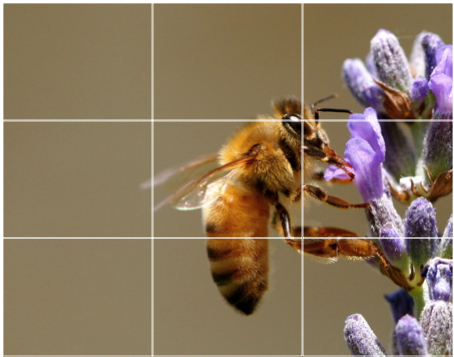
    Just because you’re using a camera phone, “Composition 101″ still applies. Try to imagine two horizontal and two vertical lines intersecting across your image, and place important elements of your image at the point where two of these lines intersect. Equally, try to place important lines (e.g. a horizon) across one of the third lines in your photo.


    grid2.png

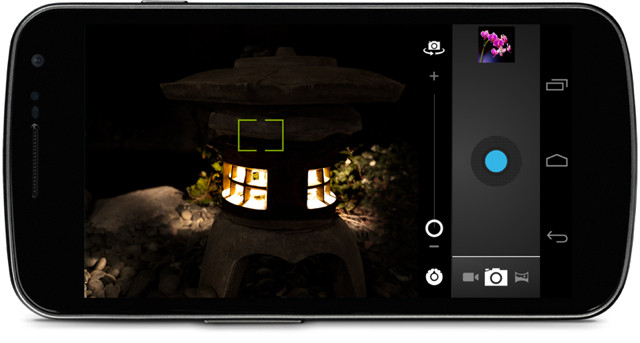
    Some camera-phones are able to super-impose these lines over the image for you, which can be incredibly helpful. Be sure to turn this feature on if you have it available.


    2. Forget the Zoom

    There’s an inherent issue with trying to make phones increasingly thinner, yet also increase the quality of a camera. Trying to include a usable zoom in a very thin piece of equipment is incredibly difficult, and leads to this function being generally atrocious on most phones. You’ll find that the camera uses a digital zoom, which is best left alone at all costs — otherwise you’ll end up with a pixellated, unattractive image.
    nexus12.jpg

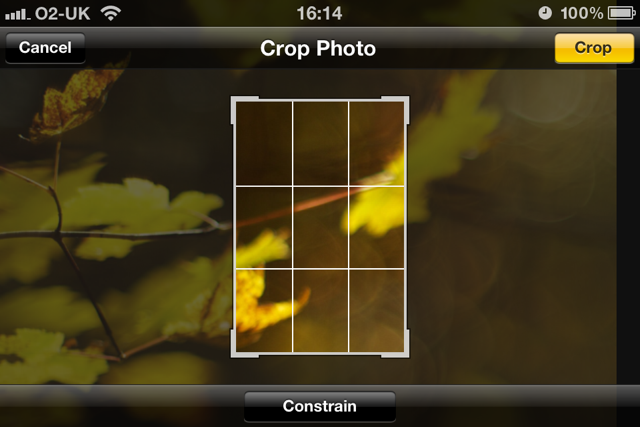
    A better thing to do is to wait until you get back to your computer, and crop the image down to focus in on the important elements. This is becoming increasingly possible with regular bumps to the resolution of images taken by camera phones. The best option in most cases is to just get closer to your subject.


    3. Shoot Now, Edit Later

    One way that phone manufacturers try to differentiate their model is by offering an array of editing functionality in your phone. This might be useful in a few limited cases, but it’s best left alone. Resist the urge to add that sepia effect to every image, and leave the post-processing to Lightroom, Photoshop or Aperture rather than your phone’s limited processor.
    The important thing to do is to keep shooting. You’ll kick yourself if you miss a beautiful composition because you’re desperately trying to figure out how to add a fake tilt-shift effect to your previous photo…


    crop2.png

    4. Lighting is Still Key

    Although camera phone sensors are coming on in leaps and bounds, they still have some way to go before they’re able to rival your SLR. One of the key areas that many phones struggle is in capturing enough light. You can help with this, by ensuring that your subject is well lit before pressing the shutter. Turn on the light, open the curtains, or wait until the sun is a little higher in the sky!
    If your camera has a flash function, give it a try. Although it probably won’t be powerful enough to make a huge improvement, it can be very useful when you just need a slight boost in the light conditions. Try using it outside as a fill-flash — it might just give that extra “punch” you were looking for.


    from : tutsplus.com
     

    san1020

    Well-known member
  • Jun 8, 2011
    3,496
    506
    113
    ලැප ඉදිරියේ
    5. Use Your Phone’s Features

    settings2.png


    We’ve already mentioned the possibility of super-imposing grid lines over your image, and it doesn’t stop there. Although many features may feel like a gimmick, others can really help with your photography and help to take better images. Try turning on the HDR mode on your iPhone — it’ll capture two images, one standard, and another that merges a few exposures together on the fly. Sometimes the result is dire, but often it can pick out way more detail that you’d expect a phone to be able to.


    nexus22.jpg


    Some phones are starting to offer pretty nifty software for capturing panoramic images as well. It often works better than you’d expect!


    6. Reserve Judgement for Later

    Although your phone camera may be pretty decent, there’s a good chance that you’ll struggle to appreciate the quality of your photographs on a small, relatively low-resolution screen. Providing space isn’t a restraining factor, hang on to your photos to review at a later date. You might find that they appear far more impressive on your desktop/laptop display!


    7. Free Up Some Space, and Backup!

    Two tips in one here… Just in the same way that packing a couple of memory cards is advisable, it’s also good sense to regularly check your phone’s memory to ensure you have plenty of space for snapping ad-hoc photos. Don’t be caught with a phone that’s so full of games, apps, and music that you don’t have any space to capture the photo of your son’s first few steps.


    space2.png


    Equally important is to ensure that you regularly download the photos from your phone, and back them up to your computer. The nature of a phone means that it’s far easier to lose, or have stolen. It’s bad enough to lose the phone, but it would be more devastating to realise that you’d never copied any of your photos back to your computer.


    8. Avoid Direct Sunlight

    Another tip that applies to mobile phone photography, just as it does everywhere else, is to avoid direct sunlight. Don’t encourage your subject to stand directly facing the sun, as you’ll have harsh shadows and a poor image. Head into the brightest area of the shade to set up your composition, and you’ll be far more pleased with the result.


    9. Fill Your Frame

    Unfortunately, you won’t yet find a f1.2 lens on your camera phone just yet, so it can be difficult to blur the background using a shallow depth of field. Instead, the best way to deal with a crowded and busy background is to fill the frame with your subject. Get close (don’t forget, you’re much less intimidating with a phone rather than your SLR), and avoid a photo with a tiny subject in the middle of a crowded background.


    10. Take It Everywhere!

    As the old adage goes, the best camera is the one you have with you. The beauty of your mobile phone is that it’s almost always in your pocket — there’s no need to carry around an extra point-and-shoot, or remember to charge a second device.
    Although it will never be a replacement for a powerful digital SLR, the humble camera-phone has come a long, long way over the past few years. I now take more photos using my iPhone than I do any other camera, and it’s an incredibly capable piece of kit .
    Take it with you everywhere, follow these simple tips, and enjoy the freedom of being able to snap a beautiful image regardless of whether or not you remember to pack your photography kit!


    from : tutsplus.com
     
    Last edited:

    san1020

    Well-known member
  • Jun 8, 2011
    3,496
    506
    113
    ලැප ඉදිරියේ
    1. Remember Your Thirds

    ඔබ පාවිච්ච් කරන camera phone එකටත් rule of third (Composition 101)apply වෙනවා , ගන්න යන ෆොටෝ එකේ තිරස් , සිරස් ඉරි දෙකක් හිතින් ඇඳගන්න ( සමහර phones වල මේක තියෙනවා ) .

    rule-of-thirds.gif


    මේ ඉරි කැපෙන තැන්වල තමා අපි ගන්න යන photo එකේ වැදගත් දේ ( subject ) නැත්නම් අපිට focus කරන්න ඕනි දේ තියෙන්න ඕනි .


    මේ තියෙන්නේ ඒ rule එකට අනුව ගත්ත photo ටිකක් .


    200605022117.jpg


    2155853350038079955S425x425Q85.jpg


    bonsai_ruleofthirds.jpg


    තේරෙන්න ඇති කියල හිතනවා :D .

     
    Last edited:
    • Like
    Reactions: prageeth119lk