මට මේවගේ නුල් දල නම් එච්චර පුරුදක් නැ 
එත් ඉතින් පට්ට software එකක් සෙට් උනාම කොහොම හරි අපේ EK එක කට්ටියත් එක්ක බෙදා ගන්න එපැයි නේ
මට මේ වැඩ ටික හොයල දුන්නෙත EK එකේ එල කොල්ලෙක්
ඔන්න එහෙනම් වැඩ පටන් ගමු
PC එකේ Audio System එක කොච්චර හොඳ උනත් අපිට එකේ උපරිම ගන්න අමාරුයි...
මෙන්න ඒක කරගන්න හොඳ වැඩ ටිකක්
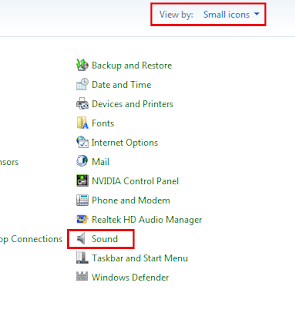
1. Control Panel එක Open කරන්න, select View by: Small/Large icons, ඊට පස්සේ click Sound link
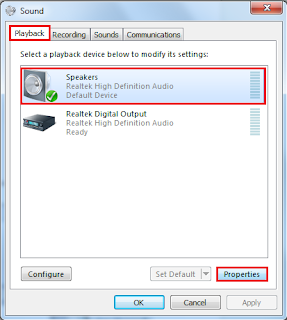
2. Playback tab එක යටතේ තියන Speakers select කරන්න, then click Properties.
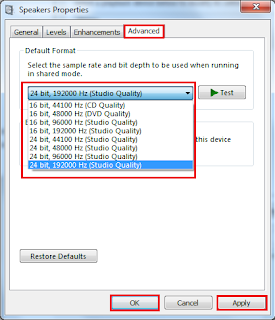
3. Advanced tab එක යටතේ , drop-down menu එක click කරලා ඔය යටම තියන එක තෝරන්න (නැත්තන් තියන හොඳම එක තෝරන්න). In our example, I will select 24 bit, 192000 Hz (Studio Quality). OK click කරන්න.
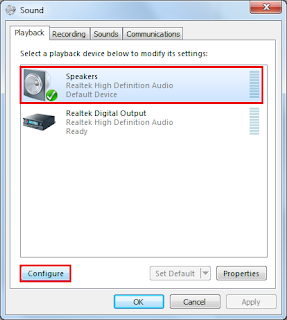
4. Sound window එකට අයෙත් යන්න , select Speakers again and click Configure button.
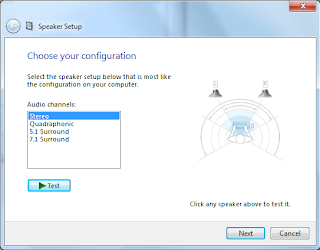
5. මෙතනින් ඔය පාවිච්චි කරන speaker setup එක තෝරන්න , then click Test button to test it. ඊට පස්සේ , click Next to finish the setup wizard.

==================================

==================================
එත් ඉතින් පට්ට software එකක් සෙට් උනාම කොහොම හරි අපේ EK එක කට්ටියත් එක්ක බෙදා ගන්න එපැයි නේ
මට මේ වැඩ ටික හොයල දුන්නෙත EK එකේ එල කොල්ලෙක්
ඔන්න එහෙනම් වැඩ පටන් ගමු
PC එකේ Audio System එක කොච්චර හොඳ උනත් අපිට එකේ උපරිම ගන්න අමාරුයි...
මෙන්න ඒක කරගන්න හොඳ වැඩ ටිකක්
1. Control Panel එක Open කරන්න, select View by: Small/Large icons, ඊට පස්සේ click Sound link

2. Playback tab එක යටතේ තියන Speakers select කරන්න, then click Properties.

3. Advanced tab එක යටතේ , drop-down menu එක click කරලා ඔය යටම තියන එක තෝරන්න (නැත්තන් තියන හොඳම එක තෝරන්න). In our example, I will select 24 bit, 192000 Hz (Studio Quality). OK click කරන්න.

4. Sound window එකට අයෙත් යන්න , select Speakers again and click Configure button.

5. මෙතනින් ඔය පාවිච්චි කරන speaker setup එක තෝරන්න , then click Test button to test it. ඊට පස්සේ , click Next to finish the setup wizard.

ඔන්න එහෙනම් එක වැඩක් ඉවරයි 
දැන් මේ software එක බාගන්න
දැන් මේ software එක බාගන්න
SRS Audio Essentials
- Natural, HD-quality audio playback
- Three dimensional surround sound
- Heart pounding bass
- Crystal clear vocals
- Steady volume eliminates spikes
- Sleek and intuitive interface
- Personalized settings and complete control
- Compatible with popular media players
- Works with music, movies, games and much more
මෙන්න මෙහෙමයි මේක Install කරන්නේ
1) Uninstall older version and install the new one. (මීට කලින් Install කරලා තියනවනම්)
2) DO NOT just Restart the PC yet.
3) Open "MS Hotfix Common Windows7 SP1 1.0.0.2" folder and;
4) Run "action services" Batch file (මේක Run වෙලා Automatically Close වෙලා යයි)
5) Install "QHotfix" Windows Update Installation File

6) මේකත් කරන්න start >> run >> msconfig And Unchecked SRS Audio Ess, AudioEssential in startup
7) Restart PC (Windows Update එකක් Install වෙයි, බය වෙන්න දෙයක් නැ)
8) Stop the 'SRSHDAudioService' service (Start >> Run >> services.msc)
9) "SRSDSPProxy.dll" කියන ෆිලේ එක copy කරන්න (x86 or x64,depending on the bit of your Windows (32 bits x86 / 64 bits x64) ඊට පස්සේ C: \ Program Files \ Common Files \ SRS Labs \ DSP Proxy කියන Folder එකේ Copy and Replace කරන්න.
10) Restart the 'SRSHDAudioService' service (Start | Run | services.msc)


Interface


දැන් බලන්නකෝ පට්ට කොලිටිය
 අවුලක් තියනවනම් කියන්න
Here are some key features of "SRS Audio Essentials":
- Natural, HD-quality audio playback
- Three dimensional surround sound
- Heart pounding bass
- Crystal clear vocals
- Steady volume eliminates spikes
- Sleek and intuitive interface
- Personalized settings and complete control
- Compatible with popular media players
- Works with music, movies, games and much more
මෙන්න මෙහෙමයි මේක Install කරන්නේ
1) Uninstall older version and install the new one. (මීට කලින් Install කරලා තියනවනම්)
2) DO NOT just Restart the PC yet.
3) Open "MS Hotfix Common Windows7 SP1 1.0.0.2" folder and;
4) Run "action services" Batch file (මේක Run වෙලා Automatically Close වෙලා යයි)
5) Install "QHotfix" Windows Update Installation File

6) මේකත් කරන්න start >> run >> msconfig And Unchecked SRS Audio Ess, AudioEssential in startup
7) Restart PC (Windows Update එකක් Install වෙයි, බය වෙන්න දෙයක් නැ)
8) Stop the 'SRSHDAudioService' service (Start >> Run >> services.msc)
9) "SRSDSPProxy.dll" කියන ෆිලේ එක copy කරන්න (x86 or x64,depending on the bit of your Windows (32 bits x86 / 64 bits x64) ඊට පස්සේ C: \ Program Files \ Common Files \ SRS Labs \ DSP Proxy කියන Folder එකේ Copy and Replace කරන්න.
10) Restart the 'SRSHDAudioService' service (Start | Run | services.msc)


Interface


(1) Modes - Music, Games, Movies, Vocal
(2) Speaker Modes - Speakers, Built-In, Headset
(3) Advanced - Custom Equalizes ටික පෙන්නනවා
(4) Power - On/Off
(5) Options - Brings Up The Equalizes
(2) Speaker Modes - Speakers, Built-In, Headset
(3) Advanced - Custom Equalizes ටික පෙන්නනවා
(4) Power - On/Off
(5) Options - Brings Up The Equalizes
- Bass එක අඩු වැඩි කරන්න 3D TRUBASS LEVEL එකයි TRUBASS SPEAKER SIZE එක අඩු වැඩි කරන්න
- 3D Surround Sound Effect එක ගන්නේ අනිත් Equalizes තුනෙන්

දැන් බලන්නකෝ පට්ට කොලිටිය අවුලක් තියනවනම් කියන්න ==================================

==================================
==================================
Last edited: