


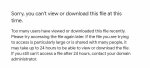
Google drive එකේ file එකක් share කරාම එක ගොඩ දෙනෙක් ඒක දිගට access කරන්න try කරණකොට Google එක එ file එක limit කරනවා 24hrs වලට download කරන්න නොදී.
මෙක bypass කරන්නේ මේ විඳියට.
මුලින්ම තමන්ගේ Google drive එකට login වෙන්න. (download කරන්න ඕනේ file එකේ size එක ට වඩා drive එකේ space එක තියෙන්න ඕනේ)
දැන් ඕනේ Google drive link එකට යන්න ගියාම උඩ දාලා තියෙනවා වගේ message එකක් එයි file එක access කරන්න බැ කියලා.
දැන් browser එකේ Google drive file එකේ url එකේ uc කියන එක වෙනුවට open කියලා type කරලා enter ඔබන්න.
https://drive.google.com/uc?id=1HYoWqjJgLe6MckVrESedsjGS9RfENMyY
https://drive.google.com/open?id=1HYoWqjJgLe6MckVrESedsjGS9RfENMyY
දැන් අර error එක පෙන්නපු file එක open වෙනවා හැබැයි තාමත් ඒක download කරන්න දෙන්නේ නැ.
දැන් තමන්ගේ drive එකට යන්න. එතකොට අන්තිමට open කරපු file එක විඳිය ට දැන් බලපු file එක පෙන්නනවා. එ file එක උඩ right click කරලා make copy කියන command එක දෙන්න. එතකොට එ file එකේ copy යක් අපේ drive එකේ හැදෙනව. දැන් කිසි ප්රශ්නයක් නැතුව එ file එක download කරගන්න පුළුවන්.
මෙක bypass කරන්නේ මේ විඳියට.
මුලින්ම තමන්ගේ Google drive එකට login වෙන්න. (download කරන්න ඕනේ file එකේ size එක ට වඩා drive එකේ space එක තියෙන්න ඕනේ)
දැන් ඕනේ Google drive link එකට යන්න ගියාම උඩ දාලා තියෙනවා වගේ message එකක් එයි file එක access කරන්න බැ කියලා.
දැන් browser එකේ Google drive file එකේ url එකේ uc කියන එක වෙනුවට open කියලා type කරලා enter ඔබන්න.
https://drive.google.com/uc?id=1HYoWqjJgLe6MckVrESedsjGS9RfENMyY
https://drive.google.com/open?id=1HYoWqjJgLe6MckVrESedsjGS9RfENMyY
දැන් අර error එක පෙන්නපු file එක open වෙනවා හැබැයි තාමත් ඒක download කරන්න දෙන්නේ නැ.
දැන් තමන්ගේ drive එකට යන්න. එතකොට අන්තිමට open කරපු file එක විඳිය ට දැන් බලපු file එක පෙන්නනවා. එ file එක උඩ right click කරලා make copy කියන command එක දෙන්න. එතකොට එ file එකේ copy යක් අපේ drive එකේ හැදෙනව. දැන් කිසි ප්රශ්නයක් නැතුව එ file එක download කරගන්න පුළුවන්.
Last edited:


