Tips & Tricks Collection of DC

Oct 26, 2008
6,219
8
0
Cyberspace
Increasing Options in add/remove programs

add_remove_programs.gif


Not a fan of MSN Messenger? don't want Windows Media Player on your system? Fair enough, but if you go to Add/Remove Programs in the Control Panel, by default none of Windows XP's 'built in' programs are visible. it's fairly easy to change, though... just open the file X:\Windows\inf\sysoc.inf (where X: is the drive letter where Windows XP is installed) in Notepad. You should see a section of the file something like this:


[Components]
NtComponents=ntoc.dll,NtOcSetupProc,,4
WBEM=ocgen.dll,OcEntry,wbemoc.inf,hide,7
Display=desk.cpl,DisplayOcSetupProc,,7
Fax=fxsocm.dll,FaxOcmSetupProc,fxsocm.inf,,7
NetOC=netoc.dll,NetOcSetupProc,netoc.inf,,7
iis=iis.dll,OcEntry,iis.inf,,7
com=comsetup.dll,OcEntry,comnt5.inf,hide,7
dtc=msdtcstp.dll,OcEntry,dtcnt5.inf,hide,7
IndexSrv_System = setupqry.dll,IndexSrv,setupqry.inf,,7
TerminalServer=TsOc.dll, HydraOc, TsOc.inf,hide,2
msmq=msmqocm.dll,MsmqOcm,msmqocm.inf,,6
ims=imsinsnt.dll,OcEntry,ims.inf,,7
fp_extensions=fp40ext.dll,FrontPage4Extensions,fp40ext.inf,,7
AutoUpdate=ocgen.dll,OcEntry,au.inf,hide,7
msmsgs=msgrocm.dll,OcEntry,msmsgs.inf,hide,7
RootAutoUpdate=ocgen.dll,OcEntry,rootau.inf,,7
IEAccess=ocgen.dll,OcEntry,ieaccess.inf,,7

This is a list of all components installed at the moment. I've taken the example of MSN Messenger - the program entry called 'msmsgs', third-last line. You can see the word 'hide' highlighted - this is the string which tells Windows not to display the component in the Add/Remove Programs list. Fix this up by simply deleting the word 'hide' like so:

To this:


msmsgs=msgrocm.dll,OcEntry,msmsgs.inf,,7


Now, after restarting, you should be able to see MSN Messenger in the Add/Remove Programs list. If you want to be able to quickly view and remove all components, simply open the sysoc.inf file and do a global find and replace for the word ",hide" and replace it with a single comma ",".
 
Oct 26, 2008
6,219
8
0
Cyberspace
GPEDIT.MSC And Autoplay

group_policy_user_rights_assignment.png


A great tweaking file that comes with XP is gpedit.msc. Go to Start -> Run... and then type in 'gpedit.msc' and press enter.

This is effectively the Policies Editor, and it comes in handy often. For example, if you hate CD autoplay like I do and want to permanently disable it, you can use this tool to do so. Just run gpedit.msc, then go to Computer Configuration -> Administrative Templates -> System. In here you can see the value 'Turn Off Autoplay'. Right-click on it and then click 'Properties'.
 
Oct 26, 2008
6,219
8
0
Cyberspace
Menu Delays

waiting_1.jpg


Another minor and easy tweak to remove any delay from menus sliding out. For this you will need to use regedit (open regedit by going to Start -> Run..., then typing 'regedit' and pressing enter). The key you need to change is located in HKEY_CURRENT_USERControl PanelDesktop. The actual key is called MenuShowDelay - all you have to do is change the value to 0. Remember, you will have to re-boot your computer for this tweak to take effect.
 
Oct 26, 2008
6,219
8
0
Cyberspace
No Shutdown

shutdownjm2.jpg


Wanna play with your friends by removing the shutdown option from start menu in their computer.

Just hack it down !!!

Regedit
HKEY_CURRENT_USER\Software\Microsoft\Windows\CurrentVersion\Explorer
"NoClose"="DWORD:1"
 
Oct 26, 2008
6,219
8
0
Cyberspace
Automatic Administrator Login

admin.jpg


Well here's the trick which you can use to prove that Windows XP is not at all secure as multi-user operating system. Hacking the system registry from any account having access to system registry puts you in to the administrator account.
REGEDIT 4
[HKEY_LOCAL_MACHINE\SOFTWARE\Microsoft\Windows NT\CurrentVersion\Winlogon]
"AutoAdminLogon"="1"
 
Oct 26, 2008
6,219
8
0
Cyberspace
Display legal notice on startup

legal.jpg


Wanna tell your friends about the do's and dont's in your computer when they login in your absence. Well you can do it pretty easily by displaying a legal notice at system start up.
REGEDIT
[HKEY_LOCAL_MACHINE\SOFTWARE\Microsoft\Windows\CurrentVersion\policies\system]
"legalnoticecaption"="enter your notice caption"
"legalnoticetext"="enter your legal notice text"
 
Oct 26, 2008
6,219
8
0
Cyberspace
What is a .bin / .cue file???

NL7-8.png


What is a .bin / .cue file???

- .bin / .cue's are CD-R images. They're formated to be burned onto standard

700MB CD-R's or CD-RW's NOT DVD's.

What is a KVCD???

- First let me explain "VCD" this means Video-CD, a movie encoded to be burned to a CD instead of a DVD. KVCD's are a "hybrid" format, they work at variable bit rates (unlike standard VCD's which are a constant bit rate). This allows an entire movie to be fit on only 1 CD, whereas many VCD's require 2 CD's. The advantage of KVCD's are that they are 1 tenth the size of standard DVD's
which mean quicker downloads (and are nice for those that don't have DVD burners). Most DVD Players (almost all the newer ones) will support VCD playback.

What Do I Do with this KVCD .bin / .cue???

- Ok, let me make this straight, KVCD .bin / .cue's are meant to be burned to a standard CD-R, NOT for watching on your PC! If you watch the film on your PC the quality wont be near as good as it would be in your standard DVD Player!!! If you want to watch the film on your PC then download the original AVI version!!!

You can download "VLC Player" (google it, it's free), this will allow you to play the .bin / .cue on your PC (be sure to load the .cue). I don't wanna here any piss about the quality if you're watching it on your PC!!!

Ok, How Do I Burn the .bin / .cue???

- You will need a program like Nero (I recommend the latest version of 6, 7 sometimes causes errors) or Alcohol (my favorite).

With Nero:

Right click on the ".cue" and go to open with.

Browse for Nero, if it's not on the list (locate it in its install directory)
x:/Program Files/Ahead/Nero/Nero.exe

Set the burn speed to around 4x - 8x for BEST and SURE results!

(If prompted to overburn, select YES!)


With Alcohol:

Open Alcohol

Select "image burning wizard"

Browse for the .cue wherever the folder is located.

Burn around 4x - 8x

How to set overburn in Alcohol 120%:

Open Alcohol

Go To "File - Options"

Locate "Recording" on the Options list to the left

Check "Overburn Discs"

(I highly recommend you do the burning with Alcohol, it's the best
icon_biggrin.gif
)
 
Oct 26, 2008
6,219
8
0
Cyberspace
Changing your MTU Size for Optimal Internet Access

Change the Maximum Transmission Unit (MTU) Size (Windows NT/2000/XP) Popular


Fig1_DIASLA_boundaries%5B.gif


This parameter specifies the Maximum Transmission Unit (MTU) for a network interface. By optimizing the MTU setting you can gain substantial network performance increases, especially when using dial-up modem connections.

MTU stands for Maximum Transmission Unit and in basic terms, it defines the maximum size of a packet that can be transferred in one frame over a network.

Open your registry and find the key below.

[HKEY_LOCAL_MACHINE\System\CurrentControlSet\Servic es\Tcpip\Parameters\
Interfaces\[Adapter ID]]
( You will have a few of these in there is you have got multiple adapters)

Create a new DWORD value, or modify the existing value, called "MTU" and set it to equal the required MTU size in decimal.

Recommended Values
# 576 - Dial-up Connections
# 1492 - PPPoE Broadband Connections
# 1458-1500 - Ethernet, DSL and Cable Broadband Connections ( recommend 1458 or 1480)

Restart Windows for the change to take effect.

Note: For Windows NT 4 the key is [HKEY_LOCAL_MACHINE\System\CurrentControlSet\Servic es\ Tcpip\Parameters]

Note: IP datagrams may span multiple packets. Values larger than the default for the underlying network will result in the transport using the network default MTU. Values smaller than 68 will result in the tranport using an MTU of 68.

YOU ALTER THE REGISTRY AT YOUR OWN RISK

Registry Settings
System Key: [HKEY_LOCAL_MACHINE\System\CurrentControlSet\Servic es\Tcpip\Parameters\
Interfaces\[Adapter ID]]
Value Name: MTU
Data Type: REG_DWORD (DWORD Value)
Value Data: Default = 0xffffffff


I would recommend using a program called DrTCP

************************************************** **********************

How to Use DrTCP


Q: DRTCP: How do I use it, & what are all these settings?

A: DRTCP works with Win95/98/98se/ME/2K/XP.

This is not meant to be a Tylenol inspiring, technical documentation, but merely a basic guide to understanding how you can best use this great tool (surprise at end).

DRTCP is not a patch, but a shortcut (GUI interface) into your registry. It does not enter anything by itself.

66bl3iq.gif


TCP Receive Window: This is where you set RWIN (RcvWindow). RWIN is the single most important tweak. Raising Rwin from default (8760 for Win95/98/98SE/NT and 17520 for WinME/2K/XP), can greatly improve download speeds. Why? Here is my kindergarten analogy: Default RWIN for broadband, is like having a tiny straw in a thick milk shake, only so much can get through the straw (line), so fast. By putting a larger straw (higher RWIN) in that same thick shake, you allow more shake (data) to come through faster, to a point that is. After which, there is no more improvement, and shake (data) can start spilling all over (packet loss). So the key is, to find an RWIN that fits your line just right. This is blank before changing from default.

The formula for finding your "ideal" RWIN, is to take your latency (average ping time in ms x 1.5), multiply that by your advertised (download) speed, and divide that by 8.

Note: If setting RWIN below 8192, try using even multiples of MSS.

Windows Scaling: 65535 is the highest RWIN you can use without Windows Scaling being turned on. So simply put, Scaling is needed to enter any number higher than 65535. However, you must also have the updated vtcp.386 patch (WinME/2K/XP does not need a patch). Relax though, most users do not need to go higher than 65535. Windows Scaling "Defaults" to off (same as No).

Time Stamping: The need for this seems to be in question, at least with RWIN under 65535. If you have a line where latency varies a lot, or a "long fat pipe" (for example, pure satellite connection), then Time stamping should be beneficial, so experiment with it. Time Stamping "Defaults" to off (same as No).

Selective Acks: This improves throughput (speed) on lines that tend to lose packets, by re-transmitting only packets that were lost, if any. "Defaults" to on (same as Yes) in Win98/98SE/ME/2K/XP and is N/A in Win95/NT.

Path MTU Discovery: This automatically sets your MTU (maximum transmission unit) to what type of line you have (dial-up (576), broadband 1492-1500). This is the size of packets that you can receive. The highest MTU that one can have is 1500. For users with PPPoE connection software, 1492 and lower. Without PPPoE, it should default to 1500. "Defaults" to on (same as Yes) in Win98/98SE/ME/2K/XP/NT, and is N/A in Win95.

Black Hole Detection: This discovers routers on the WEB that cause MTU Discovery to work sub-optimally. "Defaults" to off (same as No) in Win95/98/98SE/ME/2K/XP.

Max. Duplicate ACKs: This allows for faster re-transmission of packets (information), when packet loss is encountered. "Defaults" to blank, where blank stands for 3 in Win98/98SE/ME, 2 in WinNT/2K/XP, and is N/A in Win95.

TTL: Time To Live is the amount of hops (servers) that a transmission of packets will take before all packets are lost. If you were receiving packets from 20 hops away, and TTL was set to 19 or less, all packets would be lost before they reach you. Not a speed tweak. "Defaults" to blank, where blank stands for 32 in Win95, 128 in Win98/98SE/ME/2K/XP.

Adapter settings: This is where you set your MTU. Use the drop-down menu to find your NIC (Ethernet card). If you do not know which adapter you should set, please ask. Do not set them all the same. (Note: If your MTU is 1500 by default, it will be blank in DRTCP. Also: Only physical NIC's supported for XP, no dial-up adapters.

Note: DRTCP defaults to showing the dial-up adapter. This has nothing to do with the other settings. It does not matter which adapter is visible when setting anything except MTU. Also: Upon reboot the dialup adapter will be showing, regardless of which adapters MTU was set.

ICS Settings: Internet MTU is set when Internet Connection Sharing (a ********* program) is enabled and being used on your PC. This is where 2 or more PCs share the same Internet connection, though only one can “surf” at a time. ICS MTU should match that of the PC. This is grayed out if ICS is not being used (not ready for Win2K/XP).

Also: By right clicking on the logo and choosing "About", you will find information about the version of Windows you use.

Great, so what should you set all of these to? Most users can leave all of them at Default (surprise!) except for RWIN, as this has been determined to be best, most of the time, thus being "Default". After making any changes, click Save, then Exit, then reboot (restart) your PC. Use the Tab button on your keyboard to move about DRTCP. If you do not reboot, the settings will not "take".

DRTCP Recommended
~~~~~~~~~~~~~~~~~~~~~~

Uninstall: Since DRTCP is a GUI interface (never mind), it is not installed. Therefore there is no uninstall. Right click on DRTCP and choose Delete, if you wish to.

To simply set your registry back to it's default settings, set everything to "Default" or blank (cleared of value), click Save, and reboot. Done.
 
Oct 26, 2008
6,219
8
0
Cyberspace
Shortcut to switching between Tabbed Window


Frequent browsers might have experienced in tabbed window browsing. These tabbed window was supported in Mozilla and in Internet Explorer version 7.0. Meanwhile it is not supported in the version 6 of Internet Explorer. Hope the tabbed window can be added to it by some add-ons. Switching between the tabbed window can be done through ‘CTRL+TAB’ key combination to proceed in clockwise direction and to proceed on the anti clockwise direction make use of ‘CTRL+SHIFT+TAB’ key. What you do when need to switch over to the third tabbed window from the first window?. I just stumbled over the Internet for such shortcut key and find atlast. You could achieve by using the combination of ‘CTRL+’ key. For example if you need to look of the sixth tabbed window, just press the key ‘CTRL+6′. Hope many of you might be aware of this. This is just to add upon for those who unaware of it.
 
Oct 26, 2008
6,219
8
0
Cyberspace
Multi Yahoo! Messenger


  1. click ''run'' type ''regedit''​
  2. click .....''HKEY_CURRENT_USER""​
  3. Expand = ''Software''​
  4. Expand = ''Yahoo''​
  5. Click = ''Pager''​
  6. Click = ''Test''​
  7. right click = ''Below default''​
  8. click = ''Sting Value''​
  9. change = ''New Value to Plural''​
  10. Double click = plural put ''0'' Value​
  11. Close = ''Regedit''​
  12. Restart your computer for better result then open Multiple Messengers​
 
Oct 26, 2008
6,219
8
0
Cyberspace
How to Remove Windows XP's Messenger


Theoretically, you can get rid of it (as well as a few other things). Windows 2000 power users should already be familiar with this tweak.

Fire up the Windows Explorer and navigate your way to the %SYSTEMROOT% \ INF folder. What the heck is that thingy with the percentage signs? It's a variable. For most people, %SYSTEMROOT% is C:\Windows. For others, it may be E:\WinXP. Get it? Okay, on with the hack! In the INF folder, open sysoc.inf (but not before making a BACKUP copy first). Before your eyes glaze over, look for the line containing "msmsgs" in it. Near the end of that particular line, you'll notice that the word "hide" is not so hidden. Go ahead and delete "hide" (so that the flanking commas are left sitting next to one another). Save the file and close it. Now, open the Add and Remove Programs applet in the Control Panel. Click the Add / Remove Windows Components icon. You should see "Windows Messenger" in that list. Remove the checkmark from its box, and you should be set. NOTE: there are other hidden system components in that sysoc.inf file, too. Remove "hide" and the subsequent programs at your own risk.
 
Oct 26, 2008
6,219
8
0
Cyberspace
Configure Windows XP to Automatically Login


After downloading fixes from Windows Updates page or via Automatic Updates, you may notice that Windows XP no longer logs into your account automatically. This is usually caused after the installation of .NET Framework from Microsoft. It creates an additional user account called ASP.NET, which you can see in the Control Panel User Accounts applet. But, you neither need to remove this update nor delete this account. You can still configure Windows XP to automatically login using this method:


Click Start, Run and type "Control UserPasswords2", and click OK. Select the user account from the list (the account to which you want to automatically logon). Uncheck Users must enter a user name and password to use this computer option, and click OK. Type the user account password and complete the process.


Configure+Windows+XP+to+Automatically+Login+-+2.JPG


For Windows XP Home, don't try to auto-login as the built-in Administrator, as you'll receive an error message.
 
Oct 26, 2008
6,219
8
0
Cyberspace
Removing invalid entries from Add or Remove Programs


Sometimes when you uninstall a program, corresponding entry in the Add or Remove ProgramsAdd or Remove Programs applet, follow these steps: listing may not be removed. This may be due to incomplete uninstall or poorly designed uninstaller itself. To manually remove the orphaned entries from the Click Start, Run and type "regedit.exe"

Navigate to the following key:

  • HKEY_LOCAL_MACHINE \ SOFTWARE \ Microsoft \ Windows \ CurrentVersion \ Uninstall
  • Backup the branch to a file
Note: Each subkey represents a program that you've installed. To determine which program that each key represents, click the key, and then view the DisplayName value data in the right pane.
  • Select the subkey that you want to delete
  • Right-click on the subkey and choose
  • Delete Close Registry Editor
 
Oct 26, 2008
6,219
8
0
Cyberspace
How can I change the physical location of "My Documents" folder?


By default, the My Documents folder for your user account resides in the %Userprofile% folder:

Example: C:\Documents and Settings\Robert\My Documents (Assuming your user account name is Robert)

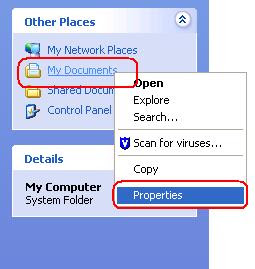
If the system drive is running out of space and you want to redirect the My Documents folder to a different partition, follow this method:

  • Create a folder in a different drive.
  • Assign appropriate folder permissions.
  • Open My Computer window.
  • From Common Tasks pane, right-click My Documents and choose Properties.
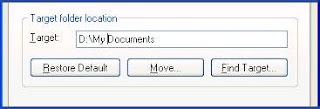
  • Type the target folder path and click Apply.
My+Documents+folder+-+2.jpg


My+Documents+folder+-+3.jpg
 
Oct 26, 2008
6,219
8
0
Cyberspace
How do I round-off numbers using JavaScript?

400px-WikiBookTitel_JavaScript.jpg


It is easy, you can even round numbers off to a certain number of decimal places.

JavaScript offers the following method: Math.round(x)

Math.round(295.9); // returns 296
Math.round(245.2); // returns 245
Math.round(-102.58); // returns -103


Here is how you round to specific decimal numbers:

Use the
Math.round() function along with the basic multiply and divide operators and you can easily round numbers to a specific decimal.

For example:

var pi = "3.1415926535";

// Round to tenths
pi = Math.round(pi*10)/10; // returns 3.14

// Round to hundredths
pi = Math.round(pi*100)/100; // returns 3.142

// Round to Bazillionths
pi = Math.round(pi*infinity)/infinity; // Just Kidding


This function is very useful when rounding dollar amounts:

var totalDue = "1003.1415926535";

// Round to tenths:
totalDue = Math.round(totalDue*100)/100; // returns $1003.14
 
Oct 26, 2008
6,219
8
0
Cyberspace
How do I get a popup window to work in my site?

popup.gif


You have been looking around at other sites and you see how they use popup windows and you decided you would like to add one to your site for one reason or another. Well you are in luck, it is easier than you think.

There are only a few simple steps you need to take in order to get this to work.

1) Identify HTML page you would like to trigger the popup window from. This means the page that will contain the link that prompts the window to open. We will call this the primary page.

2) Identify the page you would like to open in the popup window. Let's assume it is a welcome HTML page (welcome.htm).

3) Let's make this real easy, place both HTML files in the same directory. Then you don't have to specify the path to the file, you can call it directly.

4) Open up the primary page with your favorite text editor and locate the opening <head> tag, then locate the closing </head> tag. between these two tags is where you will add the JavaScript code (one portion of it).

Figure 1
Basic Web Page Example:
<html>

<head> <- Opening HEAD tag.
<title>Test Popup</title>

<- JavaScript code will go here.

</head> <- Closing HEAD tag.

<body>

<p>Basic website stuff : )</p>

</body>
</html>

5) Go to the Ace Popup Creator web page and follow the instructions on that page to create the desired results. After you grab the code from "Step 1" go to the next step in this article.

6) Paste the code from the Ace Popup Creator in the location shown in Figure 1 above.

Figure 2
It should look like this now:
<html>

<head>
<title>Test Popup</title>

<SCRIPT LANGUAGE="JAVASCRIPT" TYPE="TEXT/JAVASCRIPT">
<!--

var win=null;
---CODE ABBREVIATED---
// -->
</script>


</head>

<body>

<p>Basic website stuff : )</p>

<- Add the "Step 2" code from the Ace Popup Creator here.

</body>
</html>

7) Believe it or not you are almost done! Go back to the Ace Popup Creator web page and get the data "Step 2". Paste the code from the Ace Popup Creator in the location shown in Figure 2 above.


Figure 3
The completed web page should look like this:
<html>

<head>
<title>Test Popup</title>

<SCRIPT LANGUAGE="JAVASCRIPT" TYPE="TEXT/JAVASCRIPT">
<!--

var win=null;
---CODE ABBREVIATED---
// -->
</script>

</head>

<body>

<p>Basic website stuff : )</p>

<a href="welcome.htm" onclick="NewWindow(this.href,'welcome','500','300','yes','center');return false" onfocus="this.blur()">LinkText</a>

</body>
</html>

8) Save the file and you are done. Open the primary html file in a browser and click the "LinkText" link.

You can now upload the HTML pages to your server. Make sure both files are stored in the same directory.

Practice this a few times and you will be ready to start adding advanced features to the popup windows.