Tips & Tricks Collection of DC

Oct 26, 2008
6,219
8
0
Cyberspace
Super Mailto Link Tutorial
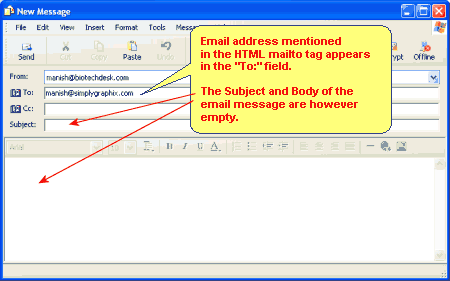
html_mailto_basic_form.gif


Description:

Create comprehensive mailto links using the instructions and code shown below. Configure To, CC, Bcc, Subject, and Body information!


Directions:

Below you will find the code required to create a complete mailto link. read a little about the configurations that are possible so you will know how to edit the code. Use the 'Grab Text' buttons to select the code within the adjacent textarea. Then use Control-C or Edit -> Copy to buffer the text for pasting into your document.


Test the code shown below:
Test Mailto Link

mailto:
can do more than provide a way to send email to you from your site. When used as an <A HREF> tag, one email can be sent to multiple addresses. Not only that, but any combination of those addresses can be tagged as To: (regular), Cc: (carbon copy), or Bcc: (blind carbon copy) addresses. You can also set default text for the Subject: line and the email body!
Mailto links can send email to multiple recipients. Add additional email addresses after the first, separated by a comma:You can select additional email commands as well:
Sender is the person who selects the mailto: link
Recipient is the person who will receive the mailto: email
  • TO ( same as using comma in the mailto: line)
    Recipient's name will appear in the To: line, along with all the other To: addresses. Sender will see all addresses in the To: line. Recipient will see all addresses in the To: line. Can be changed by Sender.
  • CC ( carbon copy)
    Recipient's name will be in the Cc: line, along with all the other Cc: addressees. Sender will see all addresses in the Cc: line. Recipient will see all addresses in the Cc: line. Can be changed by Sender.
  • BCC ( blind carbon copy)
    Recipient's name will appear in the Bcc: line, along with all the other Bcc: addresses. Sender will see all addresses in the Bcc: line. Recipient will see no addresses in the Bcc: line. Can be changed by Sender.
  • SUBJECT ( default text for subject line)
    Text following this command will appear in the Subject: line. Can be changed by Sender.
  • BODY ( default text for email body)
    Text following this command will appear in the Body of the email. Can be changed by Sender.
Here is an Example:
Then use Control-C
to copy the text into your web page.
HTML:
<a href="mailto:[email protected], [email protected]?subject=Mailto Test Subject text&[email protected]&[email protected]&body=Test mailto body message">Test Mailto Link</a>
 
Oct 26, 2008
6,219
8
0
Cyberspace
"Grab" Form Field Text

SlidingText_FR.jpg


Description:

Use these instructions to add the date to your web site.
Directions:
Below you will see example code and where to place it in your HTML file. You can add HTML tags to format the text and position it wherever you want.
Paste the code between the open and close BODY tags within your document, like this:
<HTML>
<HEAD>
<TITLE>Title of page here.</TITLE>
</HEAD>

<BODY>
Add code anywhere here to display time.
</BODY>
</HTML>


Then use Control-C to copy the text into your web page.

Code:
[LEFT]<SCRIPT LANGUAGE="Javascript"><!--

// Get today's current date.
var now = new Date();

// Array list of days.
var days = new Array('Sunday','Monday','Tuesday','Wednesday','Thursday','Friday','Saturday');

// Array list of months.
var months = new Array('January','February','March','April','May','June','July','August','September','October','November','December');

// Calculate the number of the current day in the week.
var date = ((now.getDate()<10) ? "0" : "")+ now.getDate();

// Calculate four digit year.
function fourdigits(number)    {
    return (number < 1000) ? number + 1900 : number;
                                }
// Join it all together
today =  days[now.getDay()] + ", " +
              months[now.getMonth()] + " " +
               date + ", " +
                (fourdigits(now.getYear())) ;

// Print out the data.
document.write("Today\'s date is " +today+ ".");
  
//--></SCRIPT>


[/LEFT]
 
Oct 26, 2008
6,219
8
0
Cyberspace
"Grab" Form Field Text 2

Description:
Use these instructions to create a 'grab text' option adjacent to your textarea within your forms. You can use any of the 3 options, link, button, or image. See the example in the form below.


Directions:

Use these instructions to create a 'grab text' option adjacent to your textarea within your forms. You can use any of the 3 options, link, button, or image. See the example in the form below.

Step 1:

The first thing you need to do is setup some JavaScript in the HEAD of your HTML document that will do the 'grabbing'. The function will take whatever form field is passed and set the focus to it then select the text within it.

<SCRIPT LANGUAGE='JavaScript'>
<!--
function aceGrabText(fieldName){
fieldName.focus();
fieldName.select();
}
-->
</SCRIPT>


Step 2:
The second thing you need to do is setup the link that will pass the form field data to the JavaScript. It is important to follow this step carefully. You can see in the example link below the JavaScript call javascript:aceGrabText(document.form1.field1).The important part of this call is the "form1" and the "field1" values. These actually tell the JavaScript what form and field will be "grabbed". The textarea resides in a form, type the form name in place of the "form1" name below. Then the textarea itself has a name, type that in place of the "field1" name.

Note: You can add as many links as you want, as many forms and textarea fields you have. Simply change the form name and field name accordingly. They all share the same JavaScript function.

<a href="javascript:aceGrabText(document.form1.field1)">Click to Select</a>
EXAMPLE FORM:
<form name="
form1">
<textarea rows="12" cols="62" name="
field1
">Text goes here.</textarea>
</form>

Paste the code between the open and close HEAD tags within your document:

Step 1 - Action:

Code:
<SCRIPT LANGUAGE='JavaScript'>
<!--
function aceGrabText(fieldName){
fieldName.focus();
fieldName.select();
}

-->
</SCRIPT>

Step 2 - Action

Choose from any of the 3 options, link text, button, or image link. Paste the code between the open and close BODY tags within your document where you want the "grab text" link to appear:

Then use Control-C to copy the text into your web page.

Link Text Option

Code:
<a href="javascript:aceGrabText(document.form1.field1)">Click to Select</a>

Button Option

Code:
<input type="submit" value="Grab Text" onClick='aceGrabText(document.form1.field1);'>

Image Option
Code:
<input type="image" src="image.gif" onClick='aceGrabText(document.form1.field1);'>
 
Last edited:
Oct 26, 2008
6,219
8
0
Cyberspace
Deploying LAMPS for your web development

tux.jpg


Introduction


This document will teach you to set up and configure a LAMP system for web development.


Why LAMP?

LAMP [Linux, Apache, MySQL, PHP] refers to a set of software tools that allow for rapid development and deployment of sophisticated, robust web applications of all sorts.

All components of LAMP can be downloaded and used for free. This helps a lots in cost savings, which is why so many large organizations are moving to Linux and other open source solutions for a variety of projects.

Although LAMP components are provided with non-profit making, there’s still a surprisingly extensive support network for all LAMP components. There are literally millions of LAMP users who congregate in online communities like onlamp.com/ to help each other get the most out of LAMP. Training is available from a wide array of providers, and many consulting firms offer advanced capabilities for those businesses that require sophisticated LAMP development.

Perhaps most importantly, LAMP works well. Its component technologies offer tremendous flexibility, rapid development, high performance, and fewer security and stability problems than many far-costlier proprietary solutions.


The Components of LAMP

Linux
An operating system most often used to run servers, Linux is a lean performer that can run quite well even on older hardware (such as an old Pentium II).

Apache
The most widely used web server software in the world , Apache can be run on a variety of operating systems, including AIX, Digital UNIX, FreeBSD, Irix, Mac OS X, Netware, OpenBSD, Solaris, SunOS, Windows, and of course, Linux. Apache's security record is far better than that of Microsoft IIS.

MySQL
This databasee was built with the attitude that a web database should be lean and fast. It doesn't incorporate the diverse array of application server features that Oracle and Microsoft database tools do, instead focusing on core performance and leaving enhanced functions to scripting languages. MySQL runs on a variety of operating systems, including AIX, FreeBSD, Mac OS X, Solaris, Windows, and Linux. It is well known for its reliability.

PHP
Developed from the ground up as a web developer's language, PHP is easy to use and executes very quickly. Skilled developers can use PHP to build everything from online forms to complex database-driven web applications. PHP is extremely popular, runs on a variety of operating systems, and is most often used in conjunction with MySQL.


Before Installation

Assumed that you have the Linux installed.

Make sure you have downloaded all the relevant software:

(1) The latest binary version of MySQL (currently MySQL 4.1.3-beta), available from MySQL.com
(2) The latest version of PHP (currently PHP 5.0.0), from Php.net
(3) The latest version of Apache 2 (currently Apache 2.0.50), from Apache.org

Copy all of these to your /tmp directory and decompress them as follows:

$ cd /tmp
$ tar -xzvf mysql-standard-4.1.3-beta-pc-linux-i686.tar.gz
$ tar -xzvf php-5.0.0.tar.gz
$ tar -xzvf httpd-2.0.50.tar.gz


MySQL server installation

Detailed installation instructions for MySQL are provided in the download archive, but here's a fast recap:

Move the decompressed MySQL archive to /usr/local/mysql:

$ mv /tmp/mysql-standard-4.1.3-beta-pc-linux-i686 /usr/local/mysql

Create a user and group for MySQL:

$ groupadd mysql
$ useradd -g mysql mysql


Initialize the MySQL grant tables with the provided mysql_install_db script:

$ /usr/local/mysql/scripts/mysql_install_db --user=mysql [/output]

Give the MySQL user rights to the MySQL directory:

$ chown -R root?/usr/local/mysqll
$ chgrp -R mysql /usr/local/mysql
$ chown -R mysql /usr/local/mysql/data


Start the MySQL server:

$ /usr/local/mysql/support-files/ mysql.server start [/output]

At this point, also check to make sure that the MySQL server socket has been created in /tmp it usually has a name like mysql.sock.


Administering your MySQL Database

Once the MySQL server is installed successfully, most of the users would not like to administer their database with the command line. I definitely understand this and for those users who do not like to use command line, I suggest you to get a MySQL administration GUI, one of the available GUI in the markets with relatively lower cost is Navicat. If you would like to adopt a free tool, MySQL administrator provided by MySQL Ab is also a good alternative. I personally use Navicat for its simplicity and also for its speed. Navicat allows you to edit your data directly and one of the feature I like so much is that it allows me to test running for queries before actually putting it into the php scripts! J Navicat also has other features like backups, schedulers which is necessary for good database maintenance. Some features which I haven’t tested it out is its Reporting functions. I believe it will be useful for those need to generate reports for their data. For more information, please visit http://www.navicat.com/.


Apache server + PHP installation

There are two ways of using PHP with Apache: as a dynamic module that can be loaded into the Web server at run-time, or as a static module that is directly compiled into the Web server code. For this tutorial, I'm going with the first option.

To enable dynamic loading of PHP as an Apache 2.0 module, the Apache server must be compiled with Dynamic Shared Object (DSO) support. This feature can be enabled by passing the --enable-so option to the Apache 2.0 configure script:

$ cd /tmp/httpd-2.0.50
$ ./configure --prefix=/usr/local/apache2 --enable-so
$ make && make install


This should configure, compile, and install the server to /usr/local/apache2.


Installing PHP

With both MySQL and Apache installed, the final step is to compile and install PHP. The most important step in this process involves providing the PHP configure script with a list of extensions to activate, as well as the correct file paths for the external libraries needed.

This might look complicated, but it's really not:
  • The --prefix argument sets the installation path for the PHP 5.0 binaries.
  • The --with-apxs2 argument tells PHP where to find Apache 2.0 and its apxs script (used to handle extensions).
  • The --with-libxml-dir and --with-zlib-dir arguments tell PHP where to locate the libxml2 and zlib libraries. Note that you need to use these options only if you compiled and installed the libraries yourself; if you're using your distribution's default libraries, PHP should be able to find them automatically.
  • The --with-mysql argument activates the regular MySQL extension. Note that in PHP 5.0, this is not active by default (as it was in PHP 4.0) and must be explicitly named in configure to be activated.
  • The --with-mysqli argument activates the new MySQL Improved extension (for MySQL 4.1.2+ only), and must point to the mysql_config script that comes with MySQL 4.x.
  • The --with-gd argument activates the GD extension for dynamic image creation.
  • The --with-zlib argument activates the ZLIB compression library for on-the-fly data compression.
  • The --enable-sockets argument activates socket communication features.
  • The --enable-soap argument activates support for SOAP and Web services.
A number of other options and extensions are also possible

$ ./configure –help for a complete list.

Once the configure script finishes processing, you can compile and install PHP.

$ make
$ make install


Note that the installation process is intelligent enough to place the PHP module in the correct directory for Apache 2.0 to find it.


Configuring and testing Apache with PHP

The final step consists of configuring Apache to recognize PHP scripts and then hand them over to the PHP interpreter for processing. To do this, edit the Apache configuration file, /usr/local/apache2/conf/httpd.conf, and add the following line to it:

AddType application/x-httpd-php .php

Save the file and then start the server:

$ /usr/local/apache2/bin/apachectl start [/output]

You can now test whether all is working as it should by creating a simple test script in the server's document root: /usr/local/apache2/htdocs/.

Name the script test.php, and populate it with these lines:

<?php
phpinfo();
?>


Save the file and then point your browser to http://localhost/test.php.

You should be able to see a page with the details on your Server environments.


Conclusion

With LAMP properly set up, you should be able to build your web site in a stable, reliable and efficient environment. Deploying LAMP system has substantial advantages, and these will be recognized by more and more people with time.
 
Oct 26, 2008
6,219
8
0
Cyberspace
Codecs Supported by Windows Media Player for Windows XP

Microsoft-Windows-Media-Player-1186081.jpg


The following codecs are supported in Windows Media Player for Windows XP:

- Cinepak codec
- ClearVideo Decoder Driver
- Fraunhofer IIS MPEG Layer-3 Codec
- Fraunhofer IIS MPEG Layer-3 Codec for MSACM
- Intel Audio Codec
- Intel I.263 Video Driver
- Intel Indeo 3.0 Video Codec
- Intel Indeo 5.0 Video Codec
- Intel Indeo(R) Video Interactive 32-bit Driver
- Intel RAW YVU9 Video Driver
- Lernout And Hauspie Codecs
- Microsoft MPEG-4 Standard Video Codec
- Microsoft MPEG-4 Video Codec v1
- Microsoft MPEG-4 Video Codec v2
- Microsoft MPEG-4 Video Codec v3
- Microsoft Network Audio CODEC
- Microsoft Screen Video Decompressor
- Microsoft Windows Media Video v7
- Microsoft Windows Media Video v8
- Sharp G.726 Audio Codec
- Sipro Lab Audio Telecom CODEC (Acelp)
- Streaming Animation Support
- Vivo H.263 Video CODEC
- Vivo Siren Audio CODEC
- VivoActive Audio CODEC
- Voxware MetaSound
- Voxware MetaVoice
- Windows Media Audio Codec

Note: Not all of the supported codecs are installed by default.
 
Oct 26, 2008
6,219
8
0
Cyberspace
How to (re)install Default Codecs in Windows XP/2000

code-breakers-1.jpg


1. Choose Start > Control Panel and double click Add hardware, then click Next.
Click "Yes, I have already connected the hardware" and click Next.

2. Choose Add a new hardware device at the bottom of the list and click Next.
Select "Install the hardware that I manually select from a list (Advanced)", and click Next.

3. Select "Sound, video and game controllers" from "Common hardware types" list and click Next.
Select "(Standard system devices)" from "Manufacturer" and click Have Disk.

4. Click Browse in the "Install From Disk" dialog box and open the folder C:\Windows\System32
Find mmdriver.inf file, select it and click Open then click OK in the "Install From Disk" dialog box. If you see a warning about logo compatibility, just click "Continue Anyway".

5. Now you should finally see a list of audio codecs. Amongst the other items, you should find Microsoft ADPCM Audio Codec and IMA ADPCM Audio Codec. You need to install them one by one so select either of these and click Next. This should re-install the codec (take care, you may need your Windows XP CD).

6. Reboot


- All default audio codecs are in the same list with Microsoft ADPCM Audio Codec and IMA ADPCM Audio Codec; just go to step 5 and select them.
- If you want to (re)install video codecs go to step 3 Select "(Standard system devices)" from "Manufacturer" and "Video Codecs" from "Model" then follow the instructions.


The following table lists the codecs included with Windows:

Manufacturer Model
DSP Group TrueSpeech Software Audio Codec
Intel Indeo R3.1 Video Codec
Indeo R3.2 Video Codec
Microsoft Audio codecs ADPCM Audio Codec
CCITT G.711 A-Law and u-Law Audio Codec
GSM 6.10 Audio Codec
IMA ADPCM Audio Codec
Microsoft Video codecs RLE Video Codec
Video 1 Video Codec
SuperMatch Cinepak Video Codec
 
Oct 26, 2008
6,219
8
0
Cyberspace
What´s the difference between "decoding", "encoding", "recoding" and "transcoding"?

audio-edit-vocal-wave-sm.gif


• Transcoding
Conversion of a video file which is present in a special format into another video format (e.g. DivX in DVD or MPEG-2 in DivX,…).

• Recoding
Conversion of a video file which is present in a special format with special attributes in the same format with different attributes (e.g. 2 h movie with 3000 Kbit/s into 2 h movie with 2000 Kbit/s).

• Encoding
Creating a video file in a special format (e.g. DivX, MPEG-2, MPEG-4, ...) - You´ll need a DivX Encoder in order to be able to create DivX files and a MPEG-2 Encoder in order to be able to create MPEG-2 videos. You´ll need these encoders for transcoding and recoding video files as well.

• Decoding
Simply opening and watching video files with a video player (e.g. a DivX decoder for opening DivX files or a MPEG-1 Decoder for opening a MPEG-1 video file).
 
Oct 26, 2008
6,219
8
0
Cyberspace
How to fix "divide error in module IVIAUDIO.AX at..."

image001.jpg


Only exists in systems that have various "Sound Blaster Live" (Creative Labs) sound cards and WinDVD (InterVideo, Inc.) installed. This is a documented compatibility problem between some "Sound Blaster Live" cards and the WinDVD product. The problem is realized when MP3 oriented applications call upon certain sound card services making it look as though the error was raised from within the application in question.

1. Search your computer for the location of the files IVIAUDIO.AX and IVIVIDEO.AX [START > Search, or just push F3 button]

2. Then launch command prompt [START > Run], then type in the following string - regsvr32 /u "<path to the offending file>\IVIAUDIO.AX"

3. Press the OK button.

4. When presented with the successful pop-up press the OK button.

5. Type in the following string - regsvr32 /u "<path to the offending file>\IVIVIDEO.AX"

6. Press the OK button

7. When presented with the successful pop-up press the OK button.

8. Close all windows and applications and re-boot your system.

Note: Where <path to offending file> is the fully qualified path name to the 2 files (IVIAUDIO.AX and IVIVIDEO.AX) (i.e. c:\program files\intervideo\common\bin\ivi...).
 
Oct 26, 2008
6,219
8
0
Cyberspace
What Codecs Should I Use?

video-formats_id371298_size480.jpg


You have downloaded a video or audio file and you are unable to open it or it does not play properly. This can be due to a simple reason: a missing codec. But what codec(s) should i download?

• The easiest way to find out is to check the file extension. One thing to be noted is that some files can be named wrongly and some file formats such as AVI require different codecs depending on the file even if the file extension is the same.

• Other method - also very simple - to find out the proper codec for video/audio files is GSpot or AVIcodec. These small tools can help you to check what codecs you need and whether your computer is able to play the file(s).

Sometimes it would be simpler to just install most of the commonly used codecs so as to avoid having to search for one each time you download a file using a new codec. Such codec packs are available here at Free-Codecs.com, however, you must take precautions to ensure that there are no software conflicts.


Many users reported troubles with codec packs. Our advice is: Always use tools like GSpot and AVIcodec and try to install only the codecs you need. Almost all packs give you the option to select the codec before installation.


Codecs related tools:

• GSpot: is a video codec identification utility - identifies which video codec and audio compression method is used on .avi files, whether the matching codec is installed, and more.
• AVIcodec: gives detailled information, especially the codecs needed to play the file...
• Sherlock - The Codec Detective!: The Codec Detective helps to determine the codecs installed on computer and check to see if any of the codecs are broken.
• Windows XP Video Decoder Checkup Utility: this utility helps you determine if an MPEG-2 video decoder is installed on your Windows XP computer...
• CodecInstaller: CodecInstaller detects which Audio and Video codecs are installed on your system and suggest you to install the ones necessary to correctly view the movie.
• MMCompView: displays the details of all installed multimedia components (codecs, ActiveX filters) and allows you disable/enable specific components.
• CodecViewer: is a little tool, which tells you which audio and video codecs you need for an avi file.
• DirectShow Filter Manager: helps to list, sort, find, add or remove DirectShow filters.
• DXMan: allows you to add or remove video and audio codecs and plugins.
• VideoInspector: is a Freeware which aim is to detect codec required by AVI, MKV, QT, etc etc files.
• RadLight Filter Manager: this little tool allows you to change merit of DirectShow filters and it can also be used to list all registered codecs and to register or unregister codecs.
 
Oct 26, 2008
6,219
8
0
Cyberspace
VBR encoded MP3 files, advantages (and disadvantages?)

Music_Image.jpg


VBR stands for Variable Bit Rate. The bit rate of a coded audio file is the number of bits (binary digits - 0s or 1s - bits of digital information) that are required to store 1 second of audio. An mp3 at 128kbps requires 128,000 (ish!) bits to store 1 second of audio.

The point of psychoacoustic coding is that you only store the audible part, but just how much information is needed to represent the audible part varies from 1 moment to the next. Silence doesn't contain very much information at all - rather than storing thousands of zeros, you could just store a code meaning "so many seconds of silence".

A Variable BitRate Coder will vary the bit rate, depending on how much information is needed to store the audible part of a signal from moment to moment. If a decoder expects the same number of bits every second, this can really confuse it!

MPEG 1/2/2.5 layer 3 files (.mp3 files) are encoded with a specified bit rate, usually 128 kbps (thousand bits per second) or, sometimes 160 or 192 kbps.

Greater bit rates generally mean better sound quality and a closer representation of the original sound. With variable bit rate MP3s, the encoder automatically detects which bit rate is most apropriate for the sound being encoded, live.

This means that when there is little sound to be heard, the encoder encodes the MP3 with a low bit rate (as low as 16 kbps or less), but when there is very complex sound to be heard, the encoder uses a much higher bit rate (up to 320 kbps) to attain better sound reproduction.


• What are the major advantages of VBR encoded MP3 files?
- VBR encoded MP3s are generally smaller than standard MP3s of the same sound quality and generrally sound better, especially in the high frequencies.
Also, it's great for spoken word audio as there are often pauses and silence between sentences.


• What are the major disadvantages of VBR encoded MP3 files?
- Some older MP3 players cannot play them.
- Must be re-encoded in order to be streamed. Although variable speed compressed files are difficult to stream continuously over most Internet connections, those that download the entire file before viewing are unaffected.
 
Oct 26, 2008
6,219
8
0
Cyberspace
How to Get the Codecs Downloaded Automatically to Windows Media Player

Downloaded-5thWave.jpg


Windows Media Player may not be able to play a portion of content that you select because that content requires a codec that either could not be downloaded to your computer, or is not supported by Windows Media Player. By default, Windows Media Player downloads codecs automatically when you need them to play a file.

When you are trying to play back content, temporarily set the Internet Explorer Download unsigned ActiveX controls security setting to Enable or Prompt. This setting will let you install the codec.

1. In Internet Explorer 4.x, click Internet Options on the View menu. In Internet Explorer 5 and 6, click Internet Options on the Tools menu. (Or go to Start > Control Panel > Internet Options).

2. On the Security tab, click on the Custom Level... button.

3. Scroll down to Download unsigned ActiveX controls and click Enable.

4. After codecs were downloaded, follow again steps 1-3. On step 3 change your settings back to Download unsigned ActiveX controls, Disable.

Note: If you want to avoid step 4, select Prompt instead of Enable. In this way, you'll always be notified of new "unsigned downloads".


Signed and Unsigned codecs

The following codecs are no longer signed. These codecs are available on the Microsoft codec server.

• Sharp G.726 Audio Codec
• Voxware MetaSound
• Voxware MetaVoice
• Sipro Lab Audio Telecom CODEC (ACELP.net)

As of the time that this article was published, the following decoders were signed and were available on the codec server:

• Microsoft MPEG-4 Video Codec v1
• Microsoft MPEG-4 Video Codec v2
• Microsoft MPEG-4 Video Codec v3
• Microsoft ISO MPEG4 v1.0
• Microsoft ISO MPEG4 v1.1
• Microsoft Windows Media Video v7
• Microsoft Windows Media Video v8
• Microsoft Windows Media Video 9 (DMO)
• Microsoft Windows Media Video 9 (VCM)
• Windows Media Video 9 Advanced Profile
• Microsoft Windows Media Audio 9 Professional
• Microsoft Windows Media Audio 9 Lossless
• Microsoft Windows Media Voice 9
• Microsoft Windows Media Voice 9 (DSHOW)
• Microsoft Windows Media Video Image 9
• Microsoft Windows Media Screen 9
 
Oct 26, 2008
6,219
8
0
Cyberspace
Commands in SoftICE

Screen_01.gif


SoftICE is a kernel mode debugger for Microsoft Windows. Crucially, it is designed to run underneath Windows such that the operating system is unaware of its presence. Unlike an application debugger, SoftICE is capable of suspending all operations in Windows when instructed. For driver debugging this is critical due to how hardware is accessed and the kernel of the operating system functions. Since its low-level capabilities, SoftICE is also popular as a software cracking tool. Microsoft offers two kernel-mode debuggers, WinDbg and KD, for no charge. However, the full capabilities of WinDbg and KD are available only when two interlinked computers are used. SoftICE therefore is an exceptionally useful tool for difficult driver related development and continues to function well even with Microsoft's latest operating system versions.
Older versions exist for DOS and compatible operating systems. SoftICE was originally produced by a company called NuMega, and was subsequently acquired by Compuware.


Following is a list of commands for SoftICE. SoftICE is worth being studied ... the more about SoftICE you know the faster you can crack (Assembly Knowledge Needed Of Course).


Code:
Basic Stuff  
-------------------------------------------------------------------------------- 
?                             Evulate Expression 
A                             Assemble code 
ADDR                          Display/Change address contents 
BC                            Clear Breakpoint 
BD                            Disable Breakpoint 
BE                            Enable Breakpoint 
BL                            List current Breakpoints 
BPE                           Edit Breakpoint 
BPT                           Use Breakpoint as a template 
BPM, BPMB, BPMW, BPMD         Breakpoint on memory access 
BPR                           Breakpoint on memory range 
BPIO                          Breakpoint on I/O port access 
BPINT                         Breakpoint on Interrupt 
BPX                           Breakpoint on execution 
BPMSG                         Breakpoint on windows message 
C                             Compare two data blocks 
CLASS                         Display window class information 
D, DB, DW, DD, DS, DL, DT     Display memory 
DATA                          Change data window 
E, EB, EW, ED, EL, ET         Edit memory 
EXIT                          EXIT 
F                             Fill memory with data 
FORMAT                        Change format of data window 
G                             Go to address 
H                             Help on specific function 
HBOOT                         System boot (total reset) 
HERE                          Go to current cursor line 
HWND                          Display window handle information 
M                             Move Data 
MOD                           Display windows module list 
P                             Step skipping calls, Int, etc 
R                             Display/Change Register contents 
S                             Search for data 
T                             Single Step one instruction 
TASK                          Display windows task list 
THREAD                        Display thread information 
U                             Un-Assemblers instructions 
VER                           SoftICE Version 
WATCH                         Add watch 
WHAT                          Identify the type of expression 
WMSG                          Display windows messages 
X                             Return to host debugger or program 

-------------------------------------------------------------------------------- 


Advanced Stuff  
-------------------------------------------------------------------------------- 
CPU                           Display CPU register information 
GDT                           Display global descriptor table 
GENINT                        Generate an interrupt 
HEAP                          Display windows global heap 
LHEAP                         Display windows local heap 
IDT                           Display interrupt descriptor table 
I, IB, IW, ID                 Input data from I/O Port 
O. OB, OW, OD                 Output data form I/O Port 
LDT                           Display local descriptor table 
MAP32                         Display 32Bit section map 
MAPV86                        Display v86 memory map 
PAGE                          Display page table information 
PCI                           Display PCI device information 
PEEK                          Read from physical address 
PHYS                          Display all virtual addresses for physical address 
POKE                          Write to physical address 
PROC                          Display process information 
QUERY                         Display process virtual address space map 
TSS                           Display task state segment 
STACK                         Display call stack 
VCALL                         Display VxD calls 
VM                            Display virtual machine information 
VXD                           Display windows VxD map 
XFRAME                        Display active exeption frames 

-------------------------------------------------------------------------------- 


Mode Control  
-------------------------------------------------------------------------------- 
FAULTS                        Enable/Disable SoftIce fault trapping 
I1HERE                        Direct INT1 to SoftICE 
I3HERE                        Direct INT3 to SoftICE 
SET                           Change an internal variable 
ZAP                           Zap embedded INT1 or INT3 

-------------------------------------------------------------------------------- 


Customization Commands  
-------------------------------------------------------------------------------- 
ALTKEY                        Set key sequence to invoke window 
ANSWER                        Auto-answer and redirect console to modem 
CODE                          Display insctruction bytes in code window 
COLOR                         Display/Set screen colors 
DEX                           Display/Assign window data expression 
DIAL                          Redirect console to modem 
FKEY                          Display/Set function keys 
LINES                         Set/Display number of lines on screen 
MACRO                         Define a named macro command 
PAUSE                         Control display scroll mode 
PRN                           Set printer output port 
SERIAL                        Redirect console 
TABS                          Set/Display tab setting 

-------------------------------------------------------------------------------- 


Window Commands  
-------------------------------------------------------------------------------- 
.                             Locate current instruction 
EC                            Enable/Disable code window 
WC                            Toggle code window 
WD                            Toggle data window 
WF                            Toggle float point stack window 
WL                            Toggle locals window 
WR                            Toggle register window 
WW                            Toggle watch window 

-------------------------------------------------------------------------------- 


Window Control  
-------------------------------------------------------------------------------- 
ALTSCR                        Change to alternate display 
CLS                           Clear window 
FLASH                         Restore screen during P and T 
RS                            Restore program screen 

-------------------------------------------------------------------------------- 


Symbole/Source Commands  
-------------------------------------------------------------------------------- 
EXP                           Display export symbols 
FILE                          Change/Display current source file 
LOCALS                        Display locals currently in scope 
SRC                           Toggle between source, mixed & code 
SS                            Search source module for string 
SYMLOC                        Relocate symbol base 
TAB                           Select/Remove symbol table 
TYPES                         List all types, or display type defination 

-------------------------------------------------------------------------------- 


Back Trace Commands  
-------------------------------------------------------------------------------- 
SHOW                          Display from backtrace buffer 
TRACE                         Enter backtrace simulation mode 
XT                            Step in trace simulation mode 
XP                            Program step in trace simulation mode 
XG                            Go to address in trace simulation mode 
XRSET                         Reset backtrace history buffer 

-------------------------------------------------------------------------------- 


Special Operators  
-------------------------------------------------------------------------------- 
.                             Preceding a decimal number specifies a line number 
$                             Preceding an address specifies SEGMENT addressing 
#                             Preceding an address specifies SELECTOR 
@                             Preceding an address 

--------------------------------------------------------------------------------
 
Oct 26, 2008
6,219
8
0
Cyberspace
Missing Files

You downloaded a software and when you try to run it, you receive a "missing file" error like this...

missingfiles.gif


What's up with that ?
A particular file (e.g MFC42.DLL or COMDLG32.OCX or any other) is missing


Code:
http://www.google.com/search?q=MFC42.DLL 
http://www.google.com/search?q=comdlg32.dll
Developers sometimes assume that most people have those files, however if you don't download very often and don't use a lot of software other than what came with your computer - you may need an additional support file here and there. Microsoft releases new "Run-time" files every now and then, they allow software developers to make use of the latest technology when creating new software. In order for YOU to use these programs, you need to update your Windows system with these files. Many software products requires the VB6 Runtimes or the earlier version, the VB5 Runtimes.

Code:
http://support.microsoft.com/support/kb/articles/Q192/4/61.ASP
http://support.microsoft.com/support/kb/articles/Q180/0/71.ASP
Download VB runtime files
VBRun60.exe Installs Visual Basic 6.0 Run-Time Files

Code:
http://support.microsoft.com/support/kb/articles/Q192/4/61.ASP
This package includes: ASycFilt.dll, ComCat.dll, MSVBVM60.dll, OLEAut32.dll, OLEPro32.dll, STDOLE2.tlb, ADVPack.dll, W95Inf16.dll, W95Inf32.dll, VBRun60.inf,

Msvbvm50.exe Installs Visual Basic 5.0 Run-Time Files
Code:
http://support.microsoft.com/support/kb/articles/Q180/0/71.ASP
This package includes: Msvbvm50.dll, Oleaut32.dll, Olepro32.dll, Stdole2.tlb, Asycfilt.dll, Comcat.dll

VBrun4.exe installs Visual Basic 4.0 Run-Time
Code:
http://download.microsoft.com/download/vb40ent/Sample27/1/W9XNT4/EN-US/Vb4Run.exe
VB4 Runtimes may still be required by some older products. If you receive an error that VB40032.DLL is missing, you need to download and install these.
Code:
http://download.microsoft.com/download/vb40ent/Sample27/1/W9XNT4/EN-US/Vb4Run.exe
The package includes Vb40016.dll and Vb40032.dll More info.
Code:
http://support.microsoft.com/support/kb/articles/Q196/2/86.ASP?LN=EN-US&SD=gn&FR=0&qry=VB40032.DLL%20&rnk=16&src=DHCS_MSPSS_gn_SRCH&SPR=MSALL
Need mfc42.dll? Click here to download.
Code:
http://alltheweb.com/search?cat=ftp&ftype=4&query=MFC42.DLL&Search=Find+file

javalarge.gif
Java Runtime Environment

Java is a programming language just like Visual basic, C etc. However, in order to run programs written in Java on a Windows computer, you need to install the latest support files, the Java 2 Runtime Environment from Sun. You only need to install the JRE once, then you are ready to use any software that requires the JRE1.3 or Java2 (same thing).

Download Java from SUN
Code:
http://java.sun.com/j2se/1.4.1/download.html
dotnetlarge.gif
.
NET Runtimes

Some program take advantage of Microsoft's new .NET framework. You will need the .NET Runtimes in order to run those programs.

Download .NET Runtime files from Microsoft
Code:
http://www.microsoft.com/downloads/details.aspx?FamilyId=262D25E3-F589-4842-8157-034D1E7CF3A3&displaylang=en

Other errors & solutions
Runtime Library Microsoft Visual C++, Runtime Error Program C:\Windows\Explorer.exe or Iexplore.exe, abnormal program termination.

Could be related to the browser add-on Common Name.
Code:
http://www.commonname.com/
Click here for details and possible fixes (or just use Add/Remove to uninstalle Common Name)
Code:
http://www.doxdesk.com/parasite/CommonName.html

Need WS_32.DLL?
Visit Microsoft and download the Winsock 2 update
Code:
http://www.microsoft.com/windows95/downloads/contents/wuadmintools/s
_wunetworkingtools/w95sockets2/?RLD=357

WNASPI.DLL
Often needed for CD burning related applications. Get it from Ahead Software AG here.
Code:
http://www.nero.com/en/631940733573829.html

DLL Help Database
Microsoft DLL Database Search
Use Microsoft DLL Help to identify which software installed a specific version of a DLL. Just enter the name of the files (e.g WS_32.DLL, COMDLG32.OCX) and click the search button. If it is a Mic rosoft file, the datbase will tell you which software installed it.
Code:
http://support.microsoft.com/dllhelp/
For all other missing files, check the
Code:
http://support.microsoft.com/
web site or find that file by doing a public FTP search (below) and then downloading and placing it in you C:\\Windows\System directory.
Example: If you received an error that a software requires COMDLG32.OCX, you would enter the exact name into the search box below and press"search". You would then find a list of available downloads found on FTP servers. There may be multiple locations available, select the one that is dated most recently and download the file. Save it in your C:\\Windows\System directory.

List of some of them:

Code:
advapi32.dll 
awcapi32.dll 
awfxrn32.dll 
awlft332.dll 
awlhut32.dll 
awlzrd32.dll 
awutil32.dll 
bwcc.dll 
bwcc32.dll 
cmc.dll 
cncs232.dll 
commctrl.dll 
ctl3d.dll 
d3d8.dll 
ddraw.dll 
deskcp16.dll 
dinput.dll 
dinput8.dll 
directx2d.dll 
disktool.dll 
dplay.dll 
dsound.dll 
gdi32.dll 
glide2x.dll 
glu32.dll 
icm32.dll 
iconlib.dll 
imagehlp.dll 
kernel.dll 
kernel32.dll 
mapi32.dll 
mfc30.dll 
mfc40.dll 
mfc42.dll 
mros432.dll 
msajt200.dll 
msnp32.dll 
mso9.dll 
mso97.dll 
msoe.dll 
mspdb60.dll 
mss32.dll 
msvbvm50.dll 
msvbvm60.dll 
msvcp50.dll 
msvcp60.dll 
msvcirt.dll 
msvcrt.dll 
msvcrt10.dll 
wnaspi32.dll 
msvcrt20.dll 
msvcrt40.dll 
netapi.dll 
nshlp32.dll 
npccs32.dll 
nwnp32.dll 
oleaut32.dll 
olepro32.dll 
opengl32.dll 
pndx5016.dll 
pndx5032.dll 
pngu3263.dll 
ra32.dll 
ragui32.dll 
rasapi16.dll 
rasapi32.dll 
regsvr32.dll 
riched20.dll 
rnaui.dll 
secur32.dll 
setup.dll 
shdocvw.dll 
shell.dll 
shell32.dll 
shlwapi.dll 
urlmon.dll 
user32.dll 
vba332.dll 
vb40016.dll 
vb40032.dll 
vbrun100.dll 
vbrun200.dll 
vbrun300.dll 
winaspi32.dll 
wing32.dll 
wmmutil.dll 
wmvcore.dll 
winmm.dll 
wnaspi32.dll 
ws2_32.dll 
ws2help.dll 
wsock32.dll 
wz32.dll 
xmlparse.dll

 
Oct 26, 2008
6,219
8
0
Cyberspace
Firefox & Deer Park Alpha2 Speed Tweaks

firefox-spotlight.png


Firefox Performance Settings (from the MozillaZine Forum)

How to: just cut and paste then save to your user.js file (use chrome edit so you don't need to dig into your Documents and Settings/"username"/Application Data/Mozilla/Firefox/Profiles/"default"/user.js)

I tested it and it works! (56K, DSL & Wi-fi Connections tested, but it should speed things up regardless of your connection.)

One of the limitations of pretty much all computer applications is the need to target for a general audience because of the wide array of computer components and varied network infrastructure. This is where tweaking comes in. Firefox by default is aimed at a general audience too and hopefully we can tune it more to the needs of theindividual. The majority of the information comes from this excellent thread over at the MozillaZine Forum.

The first post in particular goes through in great detail what each of the settings do. The thread however gets fairly long and convoluted and we attempt to summarize the contents of this thread along with a couple other sources into something that is easier to digest. As with the settings on the previous page, the contents are copied into the user.js file. We do not go into major detail about the setting as the thread goes into detailed explanations of what the settings mean in the first post. Instead, the configurations are culled from the thread of what people have reported to have worked for them along with some modifications on our end.

Quick and Dirty Settings (part of the tweaks further below)

user_pref("network.http.pipelining", true);
user_pref("network.http.pipelining.firstrequest", true);
user_pref("network.http.pipelining.maxrequests", 8);
user_pref("nglayout.initialpaint.delay", 0);


Pipelining does multiple data requests at once and should speed things up. I believe IE did this before and this was partially attributable to the speed advantage that IE had over older versions of Mozilla/Netscape. Initial Paint Delay actually slows down the rendering of the ENTIRE page but since users tend to start reading before the entire page is rendered, setting this to a low value gives the impression that the page loads faster.

The following configurations are based off of recommendations off of the Mozillazine thread with some editing.

These are the settings that seem to be common to all configuration files regardless of connection speed or computer speed with a couple of additions - plugin paths can be found with about:plugins and the bookmark menu delay is turned off.

user_pref("network.http.pipelining", true);
user_pref("network.http.proxy.pipelining", true);
user_pref("network.http.pipelining.maxrequests", 8);
user_pref("network.http.request.max-start-delay", 0);
user_pref("content.notify.backoffcount", 5);
user_pref("plugin.expose_full_path", true);
user_pref("ui.submenuDelay", 0);
user_pref("nglayout.initialpaint.delay", 0);


Fast Computer, Fast Connection:

Definitions:

Fast Computer: is a machine with a CPU greater than 1.5Ghz and with memory installed of at least 512MB RAM

Fast Connection: is a DSL, cable or a better connection

According to the above, 'Slower' connections means slower DSL or cable connections as well as double line ISDN connections, and 'Slow' means all other analog modem connections.


A 'Slow' computer is a computer with a CPU slower than 1.5Ghz, and with less memory than 512MB RAM.

user_pref("content.interrupt.parsing", true);
user_pref("content.max.tokenizing.time", 2250000);
user_pref("content.notify.interval", 750000);
user_pref("content.notify.ontimer", true);
user_pref("content.switch.threshold", 750000);
user_pref("nglayout.initialpaint.delay", 0);
user_pref("network.http.max-connections", 48);
user_pref("network.http.max-connections-per-server", 16);
user_pref("network.http.max-persistent-connections-per-proxy", 16);
user_pref("network.http.max-persistent-connections-per-server", 8);
user_pref("browser.cache.memory.capacity", 65536)
;

A couple settings of note - Firefox is allocated 4096 KB of memory by default and in this configuration we give it roughly 65MB as denoted by the last line. This can be changed according to what is used.

Fast Computer, Slower Connection:

This configuration is more suited to people without ultra fast connections. We are talking about slower DSL / Cable connections as well as double line ISDN connections.

user_pref("content.max.tokenizing.time", 2250000);
user_pref("content.notify.interval", 750000);
user_pref("content.notify.ontimer", true);
user_pref("content.switch.threshold", 750000);
user_pref("network.http.max-connections", 48);
user_pref("network.http.max-connections-per-server", 16);
user_pref("network.http.max-persistent-connections-per-proxy", 16);
user_pref("network.http.max-persistent-connections-per-server", 8);
user_pref("nglayout.initialpaint.delay", 0);
user_pref("browser.cache.memory.capacity", 65536);


Fast Computer, Slow Connection:

Slow connection means connections through an analog 57k modem or slower.

user_pref("browser.xul.error_pages.enabled", true);
user_pref("content.interrupt.parsing", true);
user_pref("content.max.tokenizing.time", 3000000);
user_pref("content.maxtextrun", 8191);
user_pref("content.notify.interval", 750000);
user_pref("content.notify.ontimer", true);
user_pref("content.switch.threshold", 750000);
user_pref("network.http.max-connections", 32);
user_pref("network.http.max-connections-per-server", 8);
user_pref("network.http.max-persistent-connections-per-proxy", 8);
user_pref("network.http.max-persistent-connections-per-server", 4);
user_pref("nglayout.initialpaint.delay", 0);
user_pref("browser.cache.memory.capacity", 65536);

Slow Computer, Fast Connection:

user_pref("content.max.tokenizing.time", 3000000);
user_pref("content.notify.backoffcount", 5);
user_pref("content.notify.interval", 1000000);
user_pref("content.notify.ontimer", true);
user_pref("content.switch.threshold", 1000000);
user_pref("content.maxtextrun", 4095);
user_pref("nglayout.initialpaint.delay", 1000);
user_pref("network.http.max-connections", 48);
user_pref("network.http.max-connections-per-server", 16);
user_pref("network.http.max-persistent-connections-per-proxy", 16);
user_pref("network.http.max-persistent-connections-per-server", 8);
user_pref("dom.disable_window_status_change", true);


One of the changes made for this particular configuration is the final line where the status bar is disabled for changing web pages to save processor time.

Slow Computer, Slow Connection:

We have entered the doldrums of the dial-up user

user_pref("content.max.tokenizing.time", 2250000);
user_pref("content.notify.interval", 750000);
user_pref("content.notify.ontimer", true);
user_pref("content.switch.threshold", 750000);
user_pref("nglayout.initialpaint.delay", 750);
user_pref("network.http.max-connections", 32);
user_pref("network.http.max-connections-per-server", 8);
user_pref("network.http.max-persistent-connections-per-proxy", 8);
user_pref("network.http.max-persistent-connections-per-server", 4);
user_pref("dom.disable_window_status_change", true);