Windows 7 drivers help

S.Akalanka

Well-known member
  • May 10, 2017
    2,729
    192
    63
    sleep eken tyla wakeup kalama keyboard , mouse wadakaranne nathi wenawa samahara welawata

    driver booster eken detect kala usb drivers outdated kiyala
    update eka athara magadi , mage athin waradila eka cancel una

    dn driver booster , drivers old kiyala detect karanne na

    mokada karanne :baffled:

    desktop ekak
     

    noone

    Well-known member
  • Jul 9, 2007
    4,417
    1,475
    113
    Nowhere
    sleep eken tyla wakeup kalama keyboard , mouse wadakaranne nathi wenawa samahara welawata

    driver booster eken detect kala usb drivers outdated kiyala
    update eka athara magadi , mage athin waradila eka cancel una

    dn driver booster , drivers old kiyala detect karanne na

    mokada karanne :baffled:

    desktop ekak


    USB drivers outdated උනාට කී බෝඩ් මවුස් වලට එහෙම අවුලක් වෙන්නෙ නෑ
    මදර්බෝඩ් එකේ ප්‍රශ්නයක්1 ඇත්තෙ
     

    S.Akalanka

    Well-known member
  • May 10, 2017
    2,729
    192
    63
    USB drivers outdated උනාට කී බෝඩ් මවුස් වලට එහෙම අවුලක් වෙන්නෙ නෑ
    මදර්බෝඩ් එකේ ප්‍රශ්නයක්1 ඇත්තෙ

    ඉතින් බන් හැමවෙලාවෙම නෑනෙ
     

    mtmadushanka

    Well-known member
  • Apr 28, 2018
    3,699
    592
    113
    Hogwarts 🏰
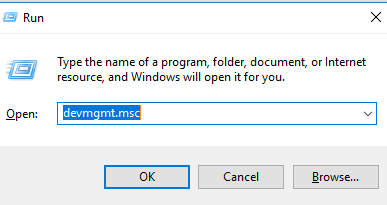
    1) On your keyboard, press the Windows logo key and R at the same time. Type devmgmt.msc and press Enter.

    img_59bf3b03a6678.png


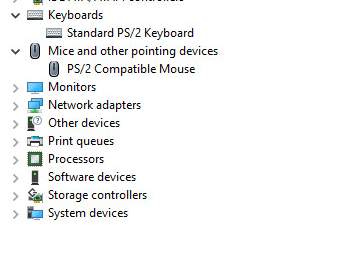
    2) Expand Mice and other pointing devices. For keyboard driver, expand Keyboards.

    mice-and-other-pointing-devices-keyboard.jpg


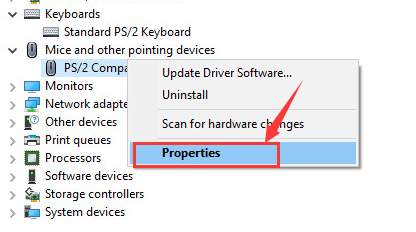
    3) Right-click the device name of your mouse or keyboard driver and click Properties.

    properties.jpg


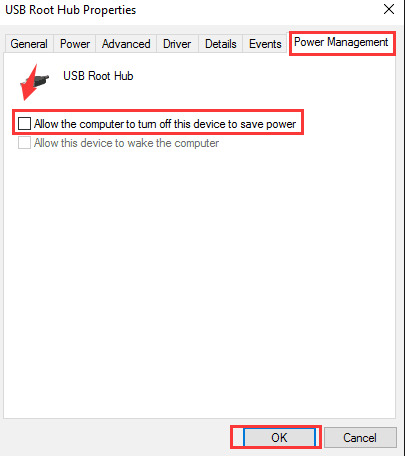
    4) Click Power Management, make sure the box for Allow the computer to turn off his device to save power option is un-checked and click OK.

    allow-the-computer-to-turn-off-his-device-to-save-power.png


    5) Reboot your computer. See if this problem occurs again.


    S.Akalanka

    Well-known member
  • May 10, 2017
    2,729
    192
    63
    1) On your keyboard, press the Windows logo key and R at the same time. Type devmgmt.msc and press Enter.

    img_59bf3b03a6678.png


    2) Expand Mice and other pointing devices. For keyboard driver, expand Keyboards.

    mice-and-other-pointing-devices-keyboard.jpg


    3) Right-click the device name of your mouse or keyboard driver and click Properties.

    properties.jpg


    4) Click Power Management, make sure the box for Allow the computer to turn off his device to save power option is un-checked and click OK.

    allow-the-computer-to-turn-off-his-device-to-save-power.png


    5) Reboot your computer. See if this problem occurs again.


    already done. didn't help :dull:
     

    imhotep

    Well-known member
  • Mar 29, 2017
    14,823
    8
    35,324
    113
    When this happens - does it work if you remove and reattach the mouse/keyboard?

    Suggest to do the following...might help you to narrow down the problem.

    Log into another account (other than your normal login) - so that it uses a different profile - check whether the same problem occurs.

    Do a Clean boot and check. (Use msconfig to do a selective start up, run only MS services.

    Run the Windows auto USB diagnostic.
    https://support.microsoft.com/en-au...tically-diagnose-and-fix-windows-usb-problems
     

    S.Akalanka

    Well-known member
  • May 10, 2017
    2,729
    192
    63
    When this happens - does it work if you remove and reattach the mouse/keyboard?

    Suggest to do the following...might help you to narrow down the problem.

    Log into another account (other than your normal login) - so that it uses a different profile - check whether the same problem occurs.

    Do a Clean boot and check. (Use msconfig to do a selective start up, run only MS services.

    Run the Windows auto USB diagnostic.
    https://support.microsoft.com/en-au...tically-diagnose-and-fix-windows-usb-problems
    If i remove and reconnect it starts to works again
     

    S.Akalanka

    Well-known member
  • May 10, 2017
    2,729
    192
    63
    Ok.. Did you try the other two suggestions? There is a process of elimination.

    both other solutions didn't work


    ***
    but there is a catch if i start the pc and from the enter password screen if i press sleep and after the wakeup still keyboard and mouse work
     

    imhotep

    Well-known member
  • Mar 29, 2017
    14,823
    8
    35,324
    113
    both other solutions didn't work


    ***
    but there is a catch if i start the pc and from the enter password screen if i press sleep and after the wakeup still keyboard and mouse work

    Thanks... Wierd problem! What's your motherboard? Does it have C-States control or Deep Sleep control in the BIOS?
     
    • Like
    Reactions: S.Akalanka

    S.Akalanka

    Well-known member
  • May 10, 2017
    2,729
    192
    63
    Thanks... Wierd problem! What's your motherboard? Does it have C-States control or Deep Sleep control in the BIOS?
    with win 10 no issue (but i dont like 10 , just installed to narrow down the case)
    dual booted

    i will check for C-States control or Deep Sleep control

    rep+
     
    Last edited:
    • Like
    Reactions: imhotep

    imhotep

    Well-known member
  • Mar 29, 2017
    14,823
    8
    35,324
    113
    with win 10 no issue (but i dont like 10 , just installed to narrow down the case)
    dual booted

    i will check for C-States control or Deep Sleep control

    rep+

    Looks like a windows issue then. Did you completely remove the USB controllers and the root hubs etc when you reinstalled the drivers? If you didn't do this - then you should. Get rid of the USB subsystem completely and reinstall.
     

    S.Akalanka

    Well-known member
  • May 10, 2017
    2,729
    192
    63
    Looks like a windows issue then. Did you completely remove the USB controllers and the root hubs etc when you reinstalled the drivers? If you didn't do this - then you should. Get rid of the USB subsystem completely and reinstall.

    Did it from device manager . No help bro