


උබලා PC එකට දාගෙන ඉන්න කලු කැත spotify එක modify කර ගන්න විදිහක් කියල දෙන්න යන්නෙ... 

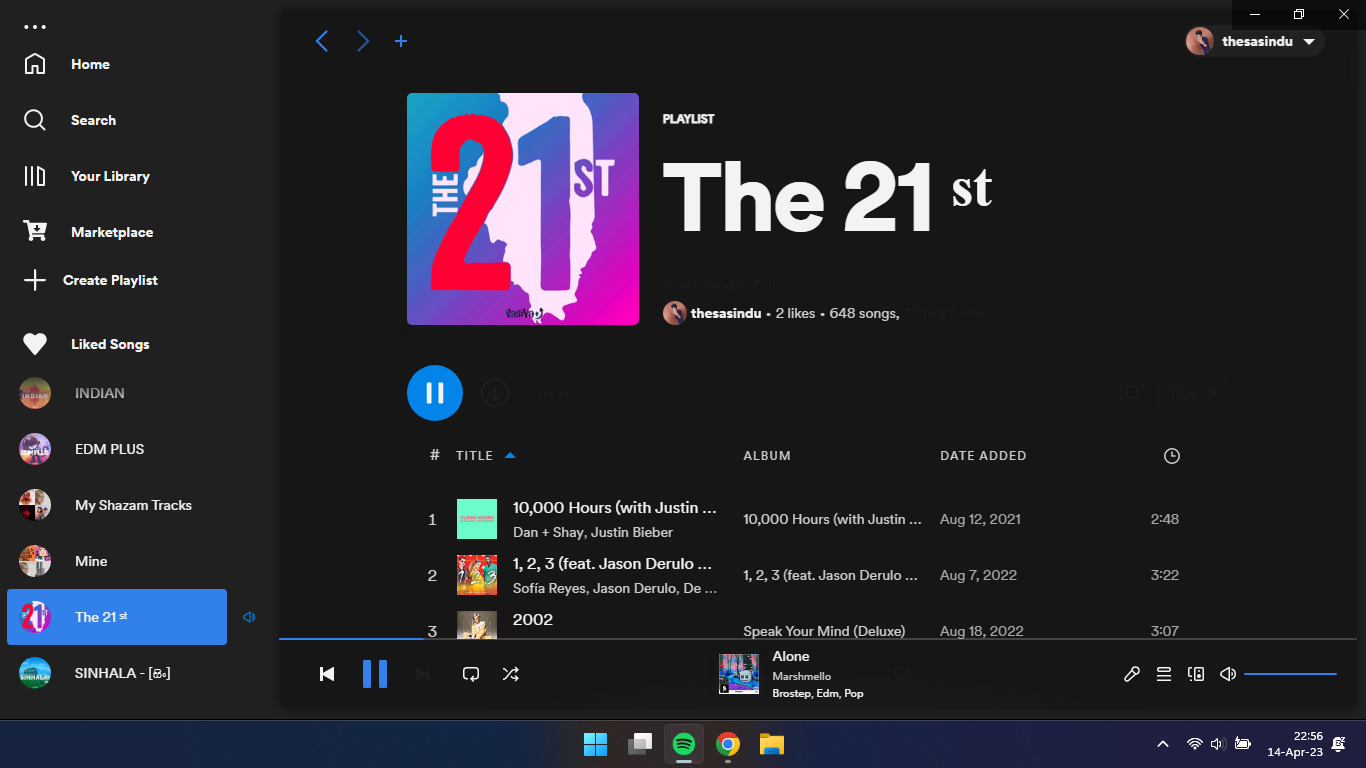
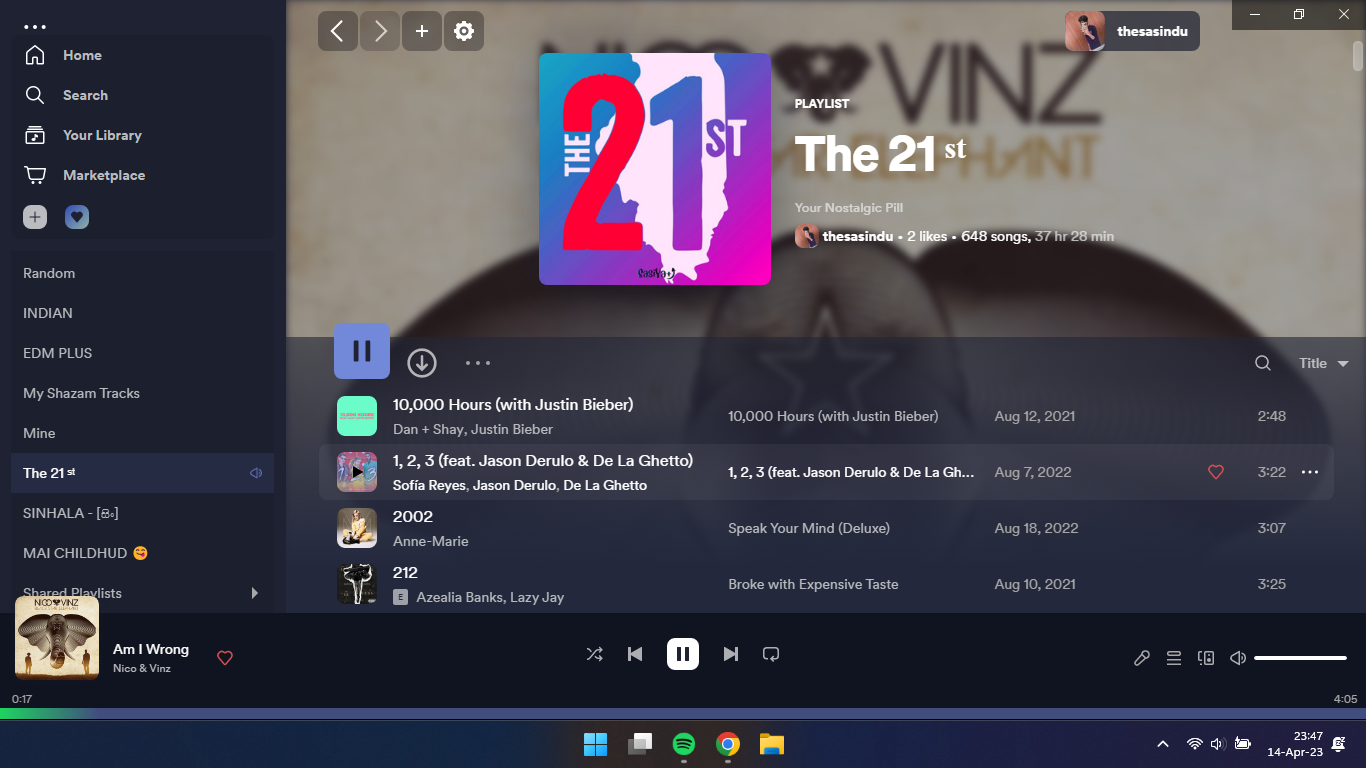
මේක දාගන්න එකේ අමතර වාසියක් වෙන්නෙ spotify premium නැති උන්ට සියලුම premium features free enable වෙනවා. (except offline download)
Windows වල නම් store එකේ තියන app එක දාගෙන ඉන්නවා නම් uninstall කරලා spotify web application එක දාගන්න ඕනෙ.
Spotify website එකෙන් ඇප් එක download කරලා install කර ගන්න.
ඊට පස්සෙ Windows නම් powershell (Windows Terminal) එක open කර ගන්න. Linux / MacOS නම් Terminal එක open කර ගන්න.
දැන් පහළ තියන code එක type කර ගෙන වෙන වෙනම run කරන්න.
Windows
iwr -useb https://raw.githubusercontent.com/spicetify/spicetify-cli/master/install.ps1 | iex
iwr -useb https://raw.githubusercontent.com/spicetify/spicetify-marketplace/main/resources/install.ps1 | iex
Linux / MacOS
curl -fsSL https://raw.githubusercontent.com/spicetify/spicetify-cli/master/install.sh | sh
curl -fsSL https://raw.githubusercontent.com/spicetify/spicetify-marketplace/main/resources/install.sh | sh
ඔන්න දැන් වැඩේ එළකිරි වෙලා තියෙන්නෙ. (ඉස්සර නම් මේ මගුල කට්ටක් කාල install කරන්න උනේ)
දැන් spotify තියනව Marketplace කියල අලුත් tab එකක් ඒකෙන් කියවල බලලා කැමති plugin එකක් theme එකක් install කරලා කැමති විදිහට customize කර ගන්න තියෙන්නෙ.
දැන් වැඩේ හරිනෙ හැබැයි ඉතින් හැම මාසෙම වගේ spotify ලා එයාලගෙ ඇප් එක update කරනවා නේ.. ඉතින් අපිත් මේ ගැජමැටික් එක upgrade කර ගන්න ඕනේ. එහෙම කරලා ඒක apply කර ගන්න ඕනෙ. නැත්නම් මේ tweak එක disable වෙලා යනවා. හරිම ලේසි වැඩක් තියෙන්නෙ.
Terminal එක open කර ගත්තා.
spicetify upgrade කියලා type කලා enter කලා..
ඊට පස්සෙ එයා ඒක upgrade කර ගන්නවා. ඊට පස්සෙ මේක අපි apply කර ගන්න ඕනෙ. ඒකට, spicetify restore backup apply කියලා දෙන්න..
දැන් වැඩේ හරි. In case මේක apply උනේ නැත්නම් spicetify apply / spicetify backup apply කියන command එකක් use කරන්න.
මගේ playlist දෙකක් දාන්නම් කැමති නම් අහපන්..
21st
EDMPLUS
spicetify github repository
මේක දාගන්න එකේ අමතර වාසියක් වෙන්නෙ spotify premium නැති උන්ට සියලුම premium features free enable වෙනවා.
(except offline download)Windows වල නම් store එකේ තියන app එක දාගෙන ඉන්නවා නම් uninstall කරලා spotify web application එක දාගන්න ඕනෙ.
Spotify website එකෙන් ඇප් එක download කරලා install කර ගන්න.
ඊට පස්සෙ Windows නම් powershell (Windows Terminal) එක open කර ගන්න. Linux / MacOS නම් Terminal එක open කර ගන්න.
දැන් පහළ තියන code එක type කර ගෙන වෙන වෙනම run කරන්න.
Windows
iwr -useb https://raw.githubusercontent.com/spicetify/spicetify-cli/master/install.ps1 | iex
iwr -useb https://raw.githubusercontent.com/spicetify/spicetify-marketplace/main/resources/install.ps1 | iex
Linux / MacOS
curl -fsSL https://raw.githubusercontent.com/spicetify/spicetify-cli/master/install.sh | sh
curl -fsSL https://raw.githubusercontent.com/spicetify/spicetify-marketplace/main/resources/install.sh | sh
ඔන්න දැන් වැඩේ එළකිරි වෙලා තියෙන්නෙ.
(ඉස්සර නම් මේ මගුල කට්ටක් කාල install කරන්න උනේ) දැන් spotify තියනව Marketplace කියල අලුත් tab එකක් ඒකෙන් කියවල බලලා කැමති plugin එකක් theme එකක් install කරලා කැමති විදිහට customize කර ගන්න තියෙන්නෙ.
comfy & dribbblish lunar මගේ personal fav theme
දැන් වැඩේ හරිනෙ හැබැයි ඉතින් හැම මාසෙම වගේ spotify ලා එයාලගෙ ඇප් එක update කරනවා නේ.. ඉතින් අපිත් මේ ගැජමැටික් එක upgrade කර ගන්න ඕනේ. එහෙම කරලා ඒක apply කර ගන්න ඕනෙ. නැත්නම් මේ tweak එක disable වෙලා යනවා. හරිම ලේසි වැඩක් තියෙන්නෙ.
Terminal එක open කර ගත්තා.
spicetify upgrade කියලා type කලා enter කලා..
ඊට පස්සෙ එයා ඒක upgrade කර ගන්නවා. ඊට පස්සෙ මේක අපි apply කර ගන්න ඕනෙ. ඒකට, spicetify restore backup apply කියලා දෙන්න..
දැන් වැඩේ හරි. In case මේක apply උනේ නැත්නම් spicetify apply / spicetify backup apply කියන command එකක් use කරන්න.
මගේ playlist දෙකක් දාන්නම් කැමති නම් අහපන්..
21st
EDMPLUS
spicetify github repository
Last edited:


