


හායි බ්රෝ ලා අදත් මම ගේනවා ඔයාලත් එක්ක බෙදාගන්න ආවේ වැදගත් වෙයි කියල හිතෙන දෙයක් . මම කලින් ඔයාලත් එක බෙදාගත්තා මම මට කියල හදාගත්ත App. මම අද ගෙනාවේ එකේම upgraded model එකක්. කියන්න ඕන මම මේක තනිකර හැදුවේ Google Gemini AI එකෙන්. මට ඕන කරන විදිහට Tailored APP එකක්. මේක Computer & Mobile දෙකම supported. මේක මම හදවගත්තේ Web App එකක් විදිහට. මම හරිම සරල විදිහට මේක ගැන කියල දෙන්නම්. මේකේ modules (forms/frames) කීපයක් තියෙනවා.ඒවා තමයි,
1.Overview/Dashboard - මෙතැනදී අපිට බලාගන්න පුළුවන් , summery එක.
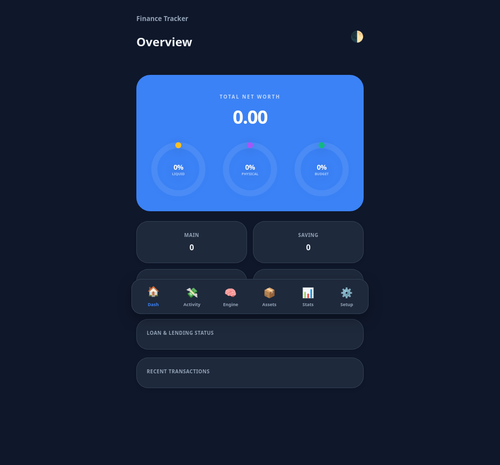
මේකේ තියෙනවා අපිට තියෙන Liquidate Assets , Physical Assets වගේම Monthly Budget Status , Account Status , Credit Card Status , Crypto Status ඒ වගේම අපි අරගෙන තියෙන වගේම අපෙන් අරගෙන තියෙන ණය ගැන තත්ත්ව, Recent 5 Transactions වගේ විස්තර.
2.Activity: Record/Transaction - මෙතනින් තමයි අපිට දවස ඇතුලත සිද්ද උනු ආදායම් හෝ වියදම් ඇතුලත් කරගන්නේ.
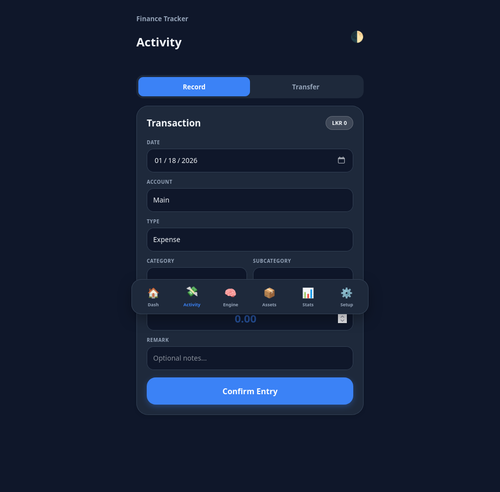
මෙතැනදී අපිට පුළුවන් දිනය, transaction එක කරපු account එක වගේම ඒක ආදායමක්ද / වියදමක්ද කියන එක වගේම ඒක මොන වර්ගයක ආදායමක් හෝ වියදමක්ද කියන එක තෝරන්නත්.
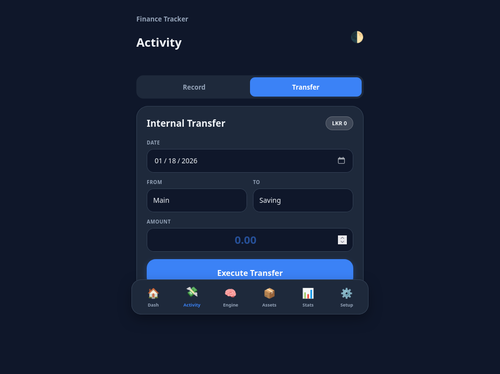
3.Activity: Transfer/Internal Transfer - මෙතනින් පුළුවන් වෙනවා අපේ තියෙන accounts ඇතුලෙම වෙන transfers ඇතුලත් කරගන්න.
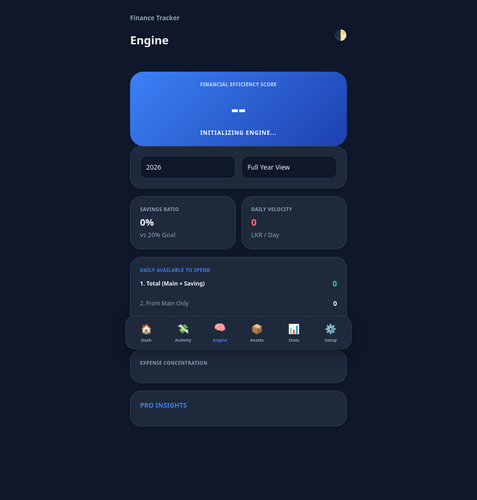
4.Engine - මෙතනින් අපිට අපේ expenditure patterns analysis එකක් දෙනවා.
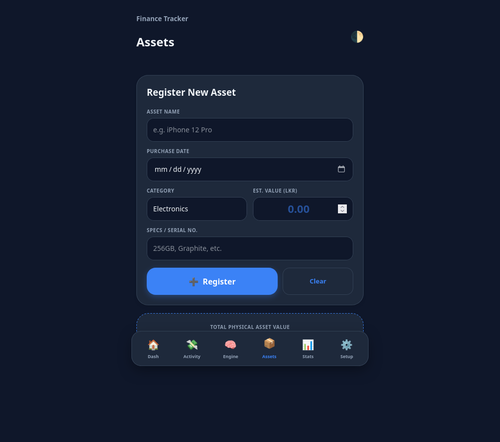
5.Assets - මෙතනින් පුළුවන් අපිට තියෙන physical assets system එකට ඇතුලත් කරගන්න.
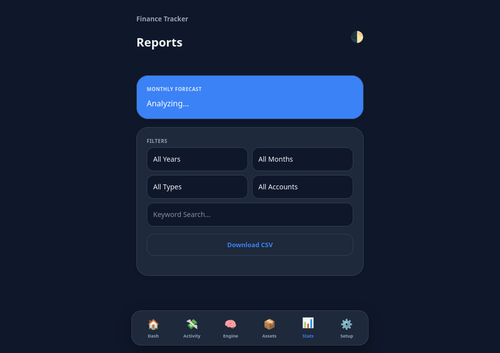
6.Reports - මෙතනින් අපිට පුළුවන් filtered reports generate කරගන්න වගේම ඒවා .csv file එකක් විදිහට export කරගන්නත්
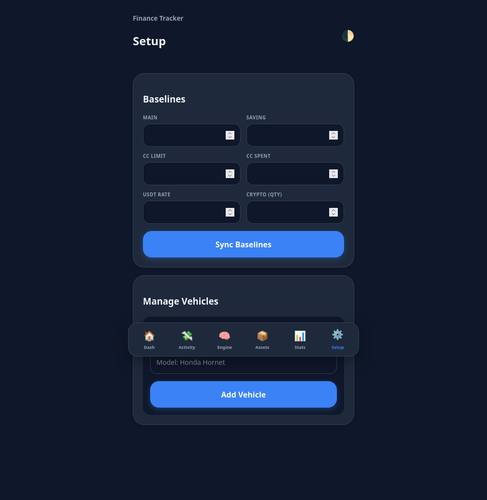
7.Setup - මෙතනින් අපිට පුළුවන් වෙනවා මේ App එකෙන් වැඩ කරන්න පටන් ගන්න පුළුවන් වෙන්න අපේ දැනට accounts වල තියෙන balance amounts ටික system එකට ඇතුලත් කරලා එතන ඉදන් system එක update කරගෙන යන්න. ඒ වගේම අපිට තියෙන වාහන වල විස්තරත් ඇතුලත් කරගන්න පුළුවන් (Assets වලට අමතරව මෙතනදීත් වාහන වල විස්තර ඇතුලත් කරන්න ඕනේ. මෙතනින් ඇතුලත් කරන vehicle details තමයි [Activity: Record/Transaction] වලදී පාවිච්චි කරන්නේ .
මේ තියෙන්නේ app එකේ HTML code එක. මේක notepad හරි notepad++ හරි file එකකට copy කරගෙන index.html කියල save කරගන්න වෙනම folder එකක් ඇතුලට.
https://limewire.com/d/4wV7s#B1pD5hrTaV
------ Post added on Jan 19, 2026 at 12:11 AM
මේ app එක use කරන්න කලින් අපිට ඕන වෙනවා මේකට අදාළ Online Database එක හදාගන්න වගේම App එක web host කරගන්නත් . ඒ වැඩ දෙකම අපිට free කරගන්න පුළුවන් පහල තියෙන සයිට් දෙකෙන්.
1.Online Database - https://supabase.com
මෙතැනදී අපිට වෙනවා account එකක් create කරගන්න signup වෙලා.
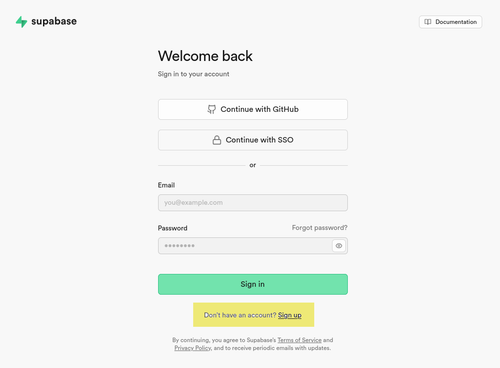
ඊට පස්සේ අපි project එකක් create කරගන්න ඕනේ .
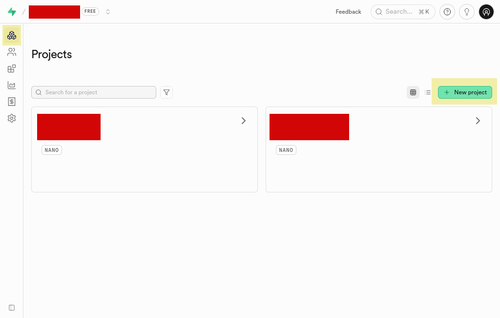
දැන් අපිට මේ database එක app එකත් එක්ක connect කරන්න ඕනේ. එකට අපි app eke html file එක notepad/notepad ++ වගේ editor app එකකින් open කරගෙන මෙන්න මේ detail එක database details දාල save කරගන්න ඕනේ.
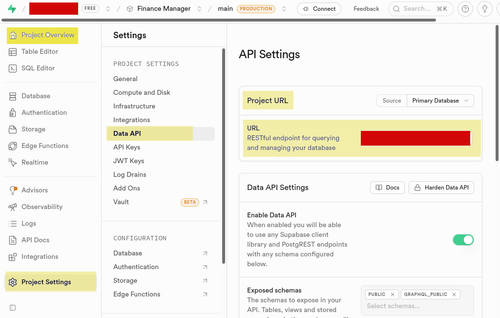
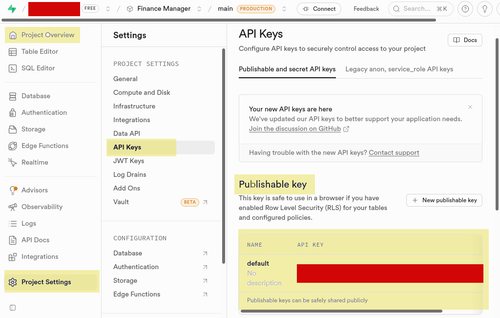

ඊට පස්සේ අපිට App එකට ගැලපෙන විදිහට Database/Table හදාගන්න ඕනේ. මම මෙතනින් දැන්නම් Table Schema SQL queries ටික දාන්නම් ඒ ටික පහල විදිහට SQL Editor එකේ paste කරලා Run කරන්න.
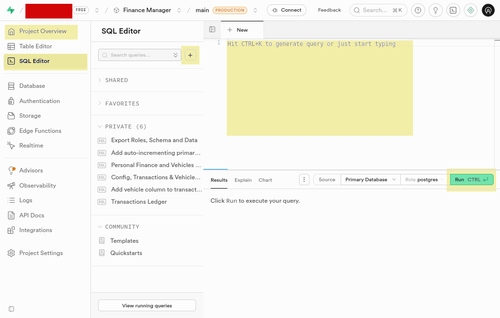
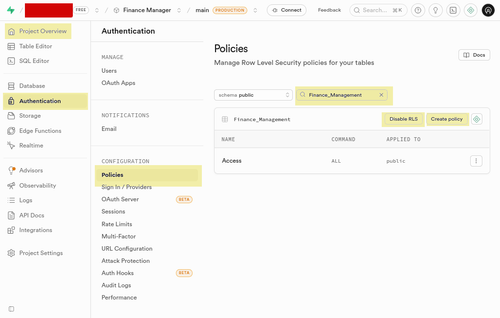
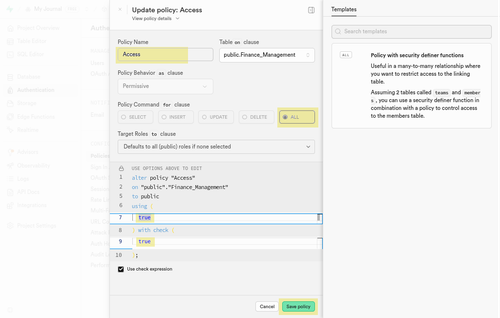
දැන් ඒ හදපු එක එක Table එකේ RLS (Row-Level Security) policy හදාගන්න ඕනේ, නැත්තන් අපිට Tables වලට App එකෙන් data access කරන්න බැරි වෙනවා. මෙතැනදී අපි හැම table එකකටම ඒ policy එක create කරන්න ඕනේ.
------ Post added on Jan 19, 2026 at 12:12 AM
1.Overview/Dashboard - මෙතැනදී අපිට බලාගන්න පුළුවන් , summery එක.
මේකේ තියෙනවා අපිට තියෙන Liquidate Assets , Physical Assets වගේම Monthly Budget Status , Account Status , Credit Card Status , Crypto Status ඒ වගේම අපි අරගෙන තියෙන වගේම අපෙන් අරගෙන තියෙන ණය ගැන තත්ත්ව, Recent 5 Transactions වගේ විස්තර.
2.Activity: Record/Transaction - මෙතනින් තමයි අපිට දවස ඇතුලත සිද්ද උනු ආදායම් හෝ වියදම් ඇතුලත් කරගන්නේ.
මෙතැනදී අපිට පුළුවන් දිනය, transaction එක කරපු account එක වගේම ඒක ආදායමක්ද / වියදමක්ද කියන එක වගේම ඒක මොන වර්ගයක ආදායමක් හෝ වියදමක්ද කියන එක තෝරන්නත්.
3.Activity: Transfer/Internal Transfer - මෙතනින් පුළුවන් වෙනවා අපේ තියෙන accounts ඇතුලෙම වෙන transfers ඇතුලත් කරගන්න.
4.Engine - මෙතනින් අපිට අපේ expenditure patterns analysis එකක් දෙනවා.
5.Assets - මෙතනින් පුළුවන් අපිට තියෙන physical assets system එකට ඇතුලත් කරගන්න.
6.Reports - මෙතනින් අපිට පුළුවන් filtered reports generate කරගන්න වගේම ඒවා .csv file එකක් විදිහට export කරගන්නත්
7.Setup - මෙතනින් අපිට පුළුවන් වෙනවා මේ App එකෙන් වැඩ කරන්න පටන් ගන්න පුළුවන් වෙන්න අපේ දැනට accounts වල තියෙන balance amounts ටික system එකට ඇතුලත් කරලා එතන ඉදන් system එක update කරගෙන යන්න. ඒ වගේම අපිට තියෙන වාහන වල විස්තරත් ඇතුලත් කරගන්න පුළුවන් (Assets වලට අමතරව මෙතනදීත් වාහන වල විස්තර ඇතුලත් කරන්න ඕනේ. මෙතනින් ඇතුලත් කරන vehicle details තමයි [Activity: Record/Transaction] වලදී පාවිච්චි කරන්නේ .
මේ තියෙන්නේ app එකේ HTML code එක. මේක notepad හරි notepad++ හරි file එකකට copy කරගෙන index.html කියල save කරගන්න වෙනම folder එකක් ඇතුලට.
https://limewire.com/d/4wV7s#B1pD5hrTaV
------ Post added on Jan 19, 2026 at 12:11 AM
මේ app එක use කරන්න කලින් අපිට ඕන වෙනවා මේකට අදාළ Online Database එක හදාගන්න වගේම App එක web host කරගන්නත් . ඒ වැඩ දෙකම අපිට free කරගන්න පුළුවන් පහල තියෙන සයිට් දෙකෙන්.
1.Online Database - https://supabase.com
මෙතැනදී අපිට වෙනවා account එකක් create කරගන්න signup වෙලා.
ඊට පස්සේ අපි project එකක් create කරගන්න ඕනේ .
දැන් අපිට මේ database එක app එකත් එක්ක connect කරන්න ඕනේ. එකට අපි app eke html file එක notepad/notepad ++ වගේ editor app එකකින් open කරගෙන මෙන්න මේ detail එක database details දාල save කරගන්න ඕනේ.
ඊට පස්සේ අපිට App එකට ගැලපෙන විදිහට Database/Table හදාගන්න ඕනේ. මම මෙතනින් දැන්නම් Table Schema SQL queries ටික දාන්නම් ඒ ටික පහල විදිහට SQL Editor එකේ paste කරලා Run කරන්න.
create table public."Config" (
id bigint generated by default as identity not null,
"Main" numeric null default 0,
"Saving" numeric null default 0,
"CCL" numeric null default 0,
"CCS" numeric null default 0,
"Rate" numeric null default '0'::numeric,
"Crypto" numeric null default 0,
constraint Config_pkey primary key (id)
) TABLESPACE pg_default;
create table public."Finance_Management" (
id bigint generated by default as identity not null,
"Lender_Name" text not null,
"Amount" double precision not null,
"Balance" double precision not null,
"Type" text not null,
"Status" text not null,
constraint Finance_Management_pkey primary key (id),
constraint Finance_Management_Lender_Name_key unique ("Lender_Name")
) TABLESPACE pg_default;
create table public."Finance_Management" (
id bigint generated by default as identity not null,
"Lender_Name" text not null,
"Amount" double precision not null,
"Balance" double precision not null,
"Type" text not null,
"Status" text not null,
constraint Finance_Management_pkey primary key (id),
constraint Finance_Management_Lender_Name_key unique ("Lender_Name")
) TABLESPACE pg_default;
create table public."Transaction_Records" (
id uuid not null default gen_random_uuid (),
"Date" text null,
"Type" text null,
"Category" text null,
"Subcategory" text null,
"Amount" numeric null,
"Remark" text null,
"Account" text null,
constraint Transaction_pkey primary key (id)
) TABLESPACE pg_default;
create table public."Vehicles" (
id uuid not null default gen_random_uuid (),
"Registration" text null,
"Make" text null,
"Model" text null,
"Type" text null,
constraint Vehicles_pkey primary key (id)
) TABLESPACE pg_default;
දැන් ඒ හදපු එක එක Table එකේ RLS (Row-Level Security) policy හදාගන්න ඕනේ, නැත්තන් අපිට Tables වලට App එකෙන් data access කරන්න බැරි වෙනවා. මෙතැනදී අපි හැම table එකකටම ඒ policy එක create කරන්න ඕනේ.
------ Post added on Jan 19, 2026 at 12:12 AM
Last edited:


