First unlock the modem
here is the guide to unlock E220
below is my attempt to unlock a huawei e220 datacard. so please understand, i do not take any responsibility for your actions with this information.
let's get it right, shall we...
preparation
1.
E220Update_11.117.09.04.00.B268.exe
2.
QC BQS Analyzer
3. Hex Editor
4.
E220 SimLock_UnLock.exe
5. E220 DataCard in your USB port
the work
run the E220 Firmware Update Wizard until datacard is detected and cancel it. your e220 will be detected more easily by QC BQS Analyzer.

run QC BQS Analyzer, choose 'Communication' - 'Use Com/USB Port'. a 'QC Com Diag Window' will appear. test your connection.
1. set your Serial Com Port (3G PC UI Interface, not the other one)
2. click 'Send Cmd'
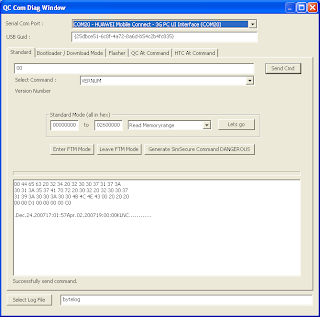
you'll get 'Successfully send command.' and output similiar to the textbox. If you got no response at all (no output or 'CommError'), you have to restart the process.
set 'Read EFS' from Standard Mode dropdown menu, click 'Lets go'. name the file (efs.bin), save it.

open saved file with hex editor, search for following hex-chain: 53-64-2C-00, and you should see the unlock code.
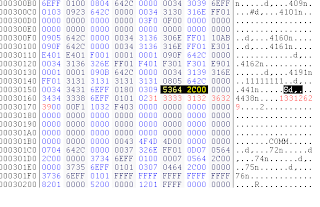
run E220 SimLock_UnLock.exe, enter your unlock code.
remarks
Hardware & Firmware Version : ^FHVER:11.117.09.04.00,CD33TCPUB"
(AT^FHVER)
Tested on : T-Mobile E220, INDOSAT E220


 ara KITBB pakg walata barida? Prepaid evata?


