How to use DirectFN TWS

DragonD

Well-known member
  • Nov 26, 2008
    3,508
    1,537
    113
    37.235065, -115.811117
    මම ගොඩක් ලඟදි තමා ස්ටොක් මාකට් එකට ජොයින් උනේ.
    මම පුලුවන් තරම් ඔන්ලයින් කරගන්න තමා බැලුවෙ නම්.
    මගේ බ්‍රොකර්ස් ල සපොර්ට් කරන්නෙ DirectFN TWS කියන සොෆ්ට්වෙයා එක හරහ විතරයි
    ඒක තනියෙන් ඉගෙන ගන්න නම් ගොඩක් අමාරුයි
    ශෙයා මාකට් එක ගැන වැඩි දෙයක් නොදන්න මට නම් කොහොමත් අමාරුයි
    මම පුලුවන් තරම් හෙව්වා ඒ මේක පාවිච්චි කරන්න ඉගෙන ගන්න ටියුටෝරියල් එකක් වත් නෑ
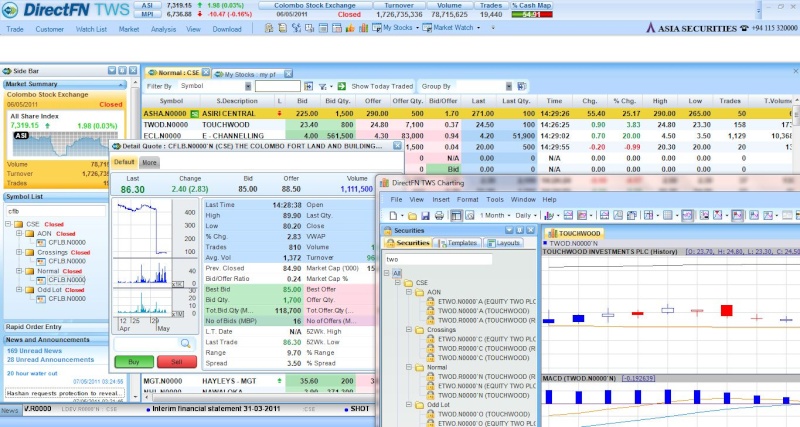
    captur12.jpg


    කවුරු හරි මේක භාවිතා කරන කෙනෙක් ඉන්නවා නම් පොඩ්ඩක් කොටස් මිලදී ගන්න හැටිවත් කියන දෙන්නකෝ...
     

    NJK4EVER

    Well-known member
  • Apr 14, 2009
    1,518
    130
    63
    Colombo
    to buy:
    1) right click on the company name from the list
    2) from the menu appearing select 'Trade'
    3) then select 'Buy' (if you want to buy), 'Sell' (if you want to sell)
    4) then the order book appears - don't change any setting
    5) adjust the share price and quantity
    6) click on 'Buy' or 'Sell' at the bottom of the order book..

    if this is not clear let me know..
    :)
     

    emsfast10

    Member
    Dec 18, 2008
    93
    0
    0
    to buy:
    1) right click on the company name from the list
    2) from the menu appearing select 'Trade'
    3) then select 'Buy' (if you want to buy), 'Sell' (if you want to sell)
    4) then the order book appears - don't change any setting
    5) adjust the share price and quantity
    6) click on 'Buy' or 'Sell' at the bottom of the order book..

    if this is not clear let me know..
    :)

    Meka hari machan.but oya software eka tikak complicated uba plwannan website eken karahan.Eka godak lesi.mama mage experience eken kiyanne mama tradings karanne 2009 idan
     

    DragonD

    Well-known member
  • Nov 26, 2008
    3,508
    1,537
    113
    37.235065, -115.811117
    to buy:
    1) right click on the company name from the list
    2) from the menu appearing select 'Trade'
    3) then select 'Buy' (if you want to buy), 'Sell' (if you want to sell)
    4) then the order book appears - don't change any setting
    5) adjust the share price and quantity
    6) click on 'Buy' or 'Sell' at the bottom of the order book..

    if this is not clear let me know..
    :)

    thnx bro

    Meka hari machan.but oya software eka tikak complicated uba plwannan website eken karahan.Eka godak lesi.mama mage experience eken kiyanne mama tradings karanne 2009 idan

    atta tama
    but website eke mulu stock market ekama pennana list ekak na [asiaseccurities]
     

    NJK4EVER

    Well-known member
  • Apr 14, 2009
    1,518
    130
    63
    Colombo
    Meka hari machan.but oya software eka tikak complicated uba plwannan website eken karahan.Eka godak lesi.mama mage experience eken kiyanne mama tradings karanne 2009 idan

    website eka lesi wenna athi machan... but mama trading patan aran one month witharai.. dan software eka hodata use karanna puluwan.. amarui kiya kiya ba kiya kiya hitiyoth ba ma thama.. :D