


මචන්ලා මම ඉස්සර ඔයාලට දුන්නා Vestacp කියලා Panel එකක් ඒක Use කරන එක අනාරක්ෂිතයි කියලා දැන් Internet එකේ VPS සම්බන්ධ Forum වල කතා වෙනවා. Vestacp Forum එකෙත් තිඩ් එකක් යනවා. අවුරුද්දකින් Vestacp Update එකක් ආවේ නැති නිසා පට්ට අවුල් කියලා. ඉතින් ඕකට විසදුමක් විදියට එකක් තියෙනවා දැන් myVesta කියලා Panel එකක් මේක Vestacp වල Fork එකක්. මේක ගොඩක් ආරක්ෂිතයි.
මේකේ ලැබෙන්නේ මෙන්න මේවා
Features of myVesta
මේක Install කරන හැටි බලමු.
මුලින් ම Debain 10 ඔබේ VPS එකට් Install කරගන්න.
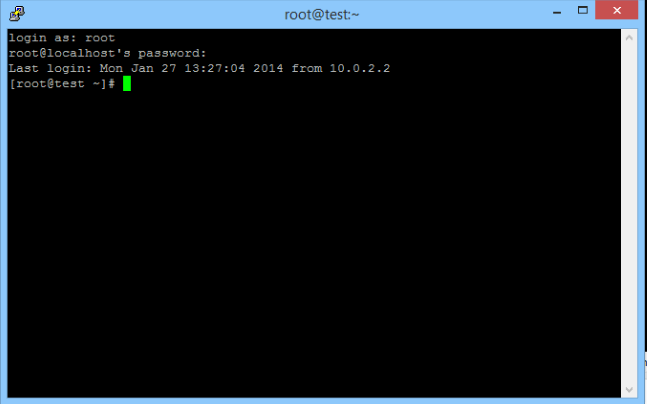
ඊළගට Putty හෝ වෙනත් ඕනෑම SSH client එකක් භාවිතා කරලා VPS එකට ලොග් වෙන්න
Packages Update කර ගැනීම සදහා
sudo apt-get update
curl Install කර ගැනීම සදහා
sudo apt-get install curl -y
installation script එක බාගත කර ගැනීම සදහා මුලින් ම පහත Command එක Type කරලා Enter ඔබන්න
curl -O http://c.myvestacp.com/vst-install-debian.sh
එය ධාවනය කිරීමට පහත Command එක Type කරලා Enter ඔබන්න
bash vst-install-debian.sh
Source - https://lktips.com/2020/07/02/myvestacp-web-hosting-control-panel-how-to-install/
ඔයාලට VPS ඕනම් මගෙන් ගන්න පුළුවන් 24/7/365 Support එකත් දෙනවා. මේ වගේ දේවල් Install කරගන්න බැරිනම් ඒවා කරලා දෙනවා https://lankawebhosting.net/
ඒ වගේම ඔයාලා වෙන Hosting එකකින් ගත්ත VPS එකකට මේ Panel එක හෝ වෙනත් Panel එකක් දාගන්න බැරිනම් මට කරලා දෙන්න පුලුවන් මම 5000/- අය කරනවා. සයිට් ටිකත් පැරණි හොස්ට් එකේ සිට VPS එකට මාරු කරලා දෙනවා. තව Anydesk මාර්ගයෙන් භාවිතා කරන ආකාරය ගැන කියලා දීලා භාවිතා කිරීමේදී එන ගැටළු වලට Free Help කරන්නත් පුලුවන් අවුරුද්දක්. මේක තමයි මගේ No 077 489 8282 / Telegram https://t.me/lankawebhosting
මේකේ ලැබෙන්නේ මෙන්න මේවා
Features of myVesta
- Support for Debian 10 (previous Debian releases are also supported, but Debian 10 is recommended)
- nginx templates that can prevent denial-of-service on your server
- Support for multi-PHP versions
- You can limit the maximum number of sent emails (per hour) per mail account and per hosting account, preventing hijacking of email accounts and preventing PHP malware scripts to send spam.
- You can see what PHP scripts are sending emails, when and to whom
- You can completely “lock” myVesta so it can be accessed only via secret URL, for example https://serverhost:8083/?MY-SECRET-URL
- During installation you will be asked to choose a secret URL for your hosting panel
- Literally no PHP scripts will be alive on your hosting panel (won’t be able to get executed), unless you access the hosting panel with secret URL parameter. Thus, when it happens that, let’s say, some zero-day exploit pops up – attackers won’t be able to access it without knowing your secret URL – PHP scripts from VestaCP will be simply dead – no one will be able to interact with your panel unless they have the secret URL.
- You can see for yourself how this mechanism was built by looking at:
- If you didn’t set the secret URL during installation, you can do it anytime. Just execute in shell:
- echo "<?php \$login_url='MY-SECRET-URL';" > /usr/local/vesta/web/inc/login_url.php
- We disabled dangerous PHP functions in php.ini, so even if, for example, your customer’s CMS gets compromised, hacker will not be able to execute shell scripts from within PHP.
- Apache is fully switched to mpm_event mode, while PHP is running in PHP-FPM mode, which is the most stable PHP-stack solution
- OPCache is turned on by default
- Auto-generating LetsEncrypt SSL for server hostname (signed SSL for Vesta 8083 port, for dovecot (IMAP & POP3) and for Exim (SMTP))
- You can change Vesta port during installation or later using one command line: v-change-vesta-port [number]
- ClamAV is configured to block zip/rar/7z archives that contains executable files (just like GMail)
- Backup will run with lowest priority (to avoid load on server), and can be configured to run only by night (and to stop on the morning and continue next night)
- You can compile Vesta binaries by yourself – src/deb/vesta_compile.sh
- You can even create your own APT repository in a minute
- We are using latest nginx version for vesta-nginx package
- With your own APT infrastructure you can take security of Vesta-installer infrastructure in your own hands. You will have full control of your Vesta code (this way you can rest assured that there’s 0% chance that you’ll install malicious packages from repositories that may get hacked)
- Binaries that you compile are 100% compatible with official VestaCP from vestacp.com, so you can run official VestaCP code with your own binaries (in case you don’t want the source code from this fork)
මේක Install කරන හැටි බලමු.
මුලින් ම Debain 10 ඔබේ VPS එකට් Install කරගන්න.
ඊළගට Putty හෝ වෙනත් ඕනෑම SSH client එකක් භාවිතා කරලා VPS එකට ලොග් වෙන්න
Packages Update කර ගැනීම සදහා
sudo apt-get update
curl Install කර ගැනීම සදහා
sudo apt-get install curl -y
installation script එක බාගත කර ගැනීම සදහා මුලින් ම පහත Command එක Type කරලා Enter ඔබන්න
curl -O http://c.myvestacp.com/vst-install-debian.sh
එය ධාවනය කිරීමට පහත Command එක Type කරලා Enter ඔබන්න
bash vst-install-debian.sh
Source - https://lktips.com/2020/07/02/myvestacp-web-hosting-control-panel-how-to-install/
ඔයාලට VPS ඕනම් මගෙන් ගන්න පුළුවන් 24/7/365 Support එකත් දෙනවා. මේ වගේ දේවල් Install කරගන්න බැරිනම් ඒවා කරලා දෙනවා https://lankawebhosting.net/
ඒ වගේම ඔයාලා වෙන Hosting එකකින් ගත්ත VPS එකකට මේ Panel එක හෝ වෙනත් Panel එකක් දාගන්න බැරිනම් මට කරලා දෙන්න පුලුවන් මම 5000/- අය කරනවා. සයිට් ටිකත් පැරණි හොස්ට් එකේ සිට VPS එකට මාරු කරලා දෙනවා. තව Anydesk මාර්ගයෙන් භාවිතා කරන ආකාරය ගැන කියලා දීලා භාවිතා කිරීමේදී එන ගැටළු වලට Free Help කරන්නත් පුලුවන් අවුරුද්දක්. මේක තමයි මගේ No 077 489 8282 / Telegram https://t.me/lankawebhosting


