මාර වැඩේ

JesonRulez

Well-known member
  • Jul 17, 2013
    18,684
    1,935
    113
    ළිං පතුල
    මචං,
    මම lap එකේ පාවිච්චි කරන්නේ Windows 8.1. දැන් දාල මාස 3ක් වගේ. C partition එකට 100GB space එකක් දීල තියෙනවා.

    ඒත් හදිස්සියේම ඒක 97GB filled කියල පෙන්නනවනේ බන්. මම C එක ඇතුලට ගිහින් ඒකෙ තියෙන files ඔක්කොගෙම size එකතු කරලා බැලුවා. 47GB විතරයි තියෙන්නේ.

    ඒ කියන්නේ 50GB විතර space එකක් අරගෙන තියෙනවා hidden file එකකින්. මම hidden files visible කරලත් තියෙන්නේ බන්. දැන් මේ ඉතුරු පොඩි space එකත් එන්න එන්නම අඩු වෙනවා දවස ගානෙම.


    skitch.png
    skitch.jpg


    මේකට මොකද බන් මම කරන්නේ? උපදෙසක් දීපන්. ලොකු උදව්වක්. :)


    BUMP එකක්වත් දාගෙන යන්න මචන්.
     
    Last edited:

    JesonRulez

    Well-known member
  • Jul 17, 2013
    18,684
    1,935
    113
    ළිං පතුල
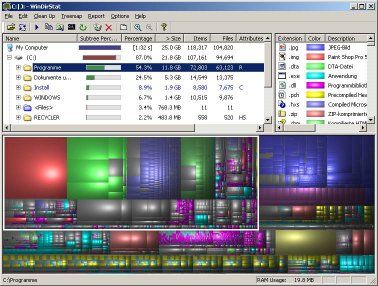
    මේක දාල හොයාගන්න


    windirstat.jpg

    මේක දාල බැලුවා මචන්, එතකොට used space එක 56 GB කියල වැටෙන්නේ. ඒත් windows explorer එකේ 97 GB used space කියලා නේ බන් පෙන්නන්නේ. මේ මොකද? :confused:
     

    markhaloce

    Member
    Mar 7, 2013
    10,298
    677
    0
    17
    The Real North
    මට xp පාවිච්චි කරන කාලෙ ඔහොම දෙයක් වුනා.. ඕක වයිරස් එකක්. බොරුවට ස්පෙස් නෑ කියල පෙන්නනව.. ස්පේස් නෑ කියන මැසේජ් එක දෙන නිසා සොෆ්ට්වෙයා එකක්වත් ඉන්ස්ටෝල් කරගන්න බෑ.. ඒ වුනාට ස්පේස් තියෙනව.. :( පෝමැට් තමා.
     

    cybernalin

    Member
    Nov 25, 2009
    3,784
    361
    0
    මේක දාල බැලුවා මචන්, එතකොට used space එක 56 GB කියල වැටෙන්නේ. ඒත් windows explorer එකේ 97 GB used space කියලා නේ බන් පෙන්නන්නේ. මේ මොකද? :confused:

    Open System in Control Panel.

    On the Advanced tab, under Performance, click Settings.

    On the Advanced tab, under Virtual memory, click Change.

    Under Drive [Volume Label], click the drive that contains the paging file you want to change.

    Under Paging file size for selected drive, click Custom size, and type a new paging file size in megabytes in the Initial size (MB) or Maximum size (MB) box, and then click Set. If you decrease the size of either the initial or maximum page file settings, you must restart your computer to see the effects of those changes. Increases typically do not require a restart.
     

    youtube

    Member
    Feb 22, 2012
    478
    115
    0
    It's a virus. I had a same problem. I tried and used several soft wares. But none of them worked. Finally I had to format it. If it run out your space, you'll be in trouble and take long time to restart. Windows Disk clean up will help for a day or two. But it's not a solution
     

    shenic

    Member
    May 9, 2013
    13,213
    1,290
    0
    Bermuda ∆
    * Linux cd එකකින් boot කරලා c එක check කරපන්. තියන කුණු ගොඩවල් මකලා දාපන්.

    * avast free එක install කරලා scan කරලා virus අයින් කරපන්.

    * වැඩ ඔක්කොම ok නම්, අනාගත යහපත තකා, windows services වල shell hardware detection කියන service එක stop කරලා disable කරපන්. :D

    * ඔය අනිත් එවුන් කියලා තියන ඒවත් කැමති විදිහට කරපන්.

    * කරන්න දෙයක් නැත්තම් windows දාපන්! :D
     
    • Like
    Reactions: JesonRulez