Java danuma bedaganna kamathi aya innawada?

amila325

Well-known member
  • Jul 11, 2006
    9,188
    33
    48
    මම කලින් ඔයාලට කියල දුන්නා Java compiler ඉන්න path එක set කරගන්න හැටි. ඒත් ඔයාලා command prompt එක close කරලා ආයිත් command prompt එකට ගිහින් javac කියල type කරලා බැලුවොත් ඔයාලට පෙනේවි machine එකට Java compiler හොයගන්න බැහැයි කියල message එකක් දෙනවා.

    දැන් මොකද කරන්නෙ??
    අපි machine එක shutdown කරලා ආයිත් login වෙන වාරයක් පාසා අපිට Java path set කරන්න වේවිද?

    එහෙම කරන්න ඕනි නැහැ.
    මම මේ කියන විදිහට Java වල path එක Windows වල System variable එකක් විදිහට set කලාම Windows start වෙද්දිම Java compiler ඉන්න තැන windows දැන ගන්නවා.

    මෙන්න පිළිවෙල :-

    1. System Properties වලට පිවිසීමට Windows key + Pause Break key එකවර press කරන්න. නැතිනම් My Computer මත rigth click කර Properties වලට පිවිසෙන්න.
    View attachment 25226

    2. එයින් Advanced Tab එක Select කරන්න.
    3. Environment Variables button එක click කරන්න.
    View attachment 25227

    4. එවිට ලැබෙන window එකෙහි System variables තුල Path Select කර, Edit click කරන්න.
    View attachment 25228

    5. එවිට Edit System Variable window එක open වේවි. එය තුල දැනට ඇති කිසිවක් වෙනස් නොකරන්න.
    6. දැන් මෙම code කොටස Variable value කියන කොටසේ අවසානයෙන් type කරගෙන OK කරන්න. නැවතත් OK , නැවතත් OK.

    Code:
           [B][SIZE="4"][COLOR="Red"]C:\Program Files\Java\jdk1.6.0\bin[/COLOR][/SIZE][/B]

    View attachment 25229

    ** මෙම ක්‍රියා පිලිවෙල කිරීමේදි ඔබ අතින් යම් වරදක් සිදු වුයේනම් සියල්ලම cancel කර, නැවත මුල සිට පිලිවෙලින් කරන්න.

    Gud one man meka tawa tikak tweak karannam.
    System variables yatathe new kiyana eka obala eke ena box eke
    variable name ekata JAVA_HOME kiyala denna
    variable value ekata java(jdk) install karapu folder eka denna
    ex. hithanna java install kare C:\Program Files\Java\jdk1.6.0 (1.6.0 kiyana eka oyala install karana version aka anuwa change wenawa denata nam 1.6.0_24 man hitanne)onna othana kiyala then
    variable name ekata C:\Program Files\Java\jdk1.6.0 kiyala type karala ok karanna

    eta passe path variable eka hoyagena eke ";C:\Program Files\Java\jdk1.6.0\bin" kiyana eka thiyenawanam eka ain karala ;%JAVA_HOME%\bin kiyala dunna nam hari :) :)

    nrmly oyalata JAVA_HOME eka set karanna ona wena welawal thiyenawa so eka mulinma karala thibbanam mara lesi :) :)...
    so JAVA_HOME eka set karama ithin path ekath oya widiyata set karana eka hodai :) :)
     

    amilabanuka

    Well-known member
  • Sep 30, 2006
    7,292
    881
    113
    Thama math hoyanooo....
    Gud one man meka tawa tikak tweak karannam.
    System variables yatathe new kiyana eka obala eke ena box eke
    variable name ekata JAVA_HOME kiyala denna
    variable value ekata java(jdk) install karapu folder eka denna
    ex. hithanna java install kare C:\Program Files\Java\jdk1.6.0 (1.6.0 kiyana eka oyala install karana version aka anuwa change wenawa denata nam 1.6.0_24 man hitanne)onna othana kiyala then
    variable name ekata C:\Program Files\Java\jdk1.6.0 kiyala type karala ok karanna

    eta passe path variable eka hoyagena eke ";C:\Program Files\Java\jdk1.6.0\bin" kiyana eka thiyenawanam eka ain karala ;%JAVA_HOME%\bin kiyala dunna nam hari :) :)

    nrmly oyalata JAVA_HOME eka set karanna ona wena welawal thiyenawa so eka mulinma karala thibbanam mara lesi :) :)...
    so JAVA_HOME eka set karama ithin path ekath oya widiyata set karana eka hodai :) :)

    This approach is much better since some Java based tools depend on these variables. Eg: Tomcat
     

    maxsa

    Member
    Aug 22, 2010
    6
    0
    0
    java Tip: 01

    ජාවා ගැන ගොඩක් හොද පොස්ට් දාල තිබ්බ කට්ටිය. maxsa !!!!

    කට්ටිය ගොඩක් use කරන්නේ පත් එක දිගේ ගිහින් .java file එක compile කරන්න ක්‍රමය
    (C:\User\Desktop\java\javaGUI ... etc). මම පොඩ්ඩක් sine එක easy කරලා දෙන්නම්.

    මුලින්ම Desktop එකේ JAVA කියල Folder එකක් හදාගන්න (ඔයගොල්ලන්ට ලේසි place එකක).

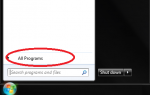
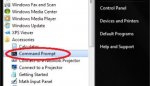
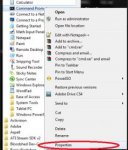
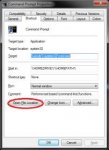
    ඊට පස්සේ ඔය පින්තුර වල තියෙන විදිහට
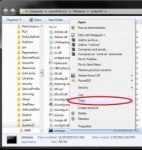
    All programs > Accessories > Command Prompt Right Click කරලා ගිහිල්ලා cmd.exe එක copy past කරලා දාගන්න අර අපි හදාගත්ත JAVA Folder එක ඇතුලට.

    1.png

    2.jpg

    3.jpg

    4.jpg

    5.jpg

    ඊළගට අර Copy Past කරපු cmd.exe double click කරලා බලන්න පත් එක ඔයගොල්ලන්ගේ Folder එකට සෙට් වෙලා ඇති. දැන් cmd එකේ ගහන්න ඕනේ java File name එක විතරයි (> javac A.java ). වැඩි esay ne da ????

    NOTE: cmd.exe එක copy past කරන්න කලින් අර
    Environment variable eka ගිහින් එක සෙට් කරගන්න. එක old පොස්ට් වල තිබ්බ නිසා මම දාන්නේ නැහැ.


    post eki aulaak thiyenawaa nam kiyana .. mage first post eka .. :nerd::nerd:
     

    rehrumesh

    Member
    Jun 17, 2008
    594
    56
    0
    ජාවා ගැන ගොඩක් හොද පොස්ට් දාල තිබ්බ කට්ටිය. maxsa !!!!

    කට්ටිය ගොඩක් use කරන්නේ පත් එක දිගේ ගිහින් .java file එක compile කරන්න ක්‍රමය
    (C:\User\Desktop\java\javaGUI ... etc). මම පොඩ්ඩක් sine එක easy කරලා දෙන්නම්.

    මුලින්ම Desktop එකේ JAVA කියල Folder එකක් හදාගන්න (ඔයගොල්ලන්ට ලේසි place එකක).

    ඊට පස්සේ ඔය පින්තුර වල තියෙන විදිහට
    All programs > Accessories > Command Prompt Right Click කරලා ගිහිල්ලා cmd.exe එක copy past කරලා දාගන්න අර අපි හදාගත්ත JAVA Folder එක ඇතුලට.

    View attachment 25276

    View attachment 25277

    View attachment 25278

    View attachment 25279

    View attachment 25280

    ඊළගට අර Copy Past කරපු cmd.exe double click කරලා බලන්න පත් එක ඔයගොල්ලන්ගේ Folder එකට සෙට් වෙලා ඇති. දැන් cmd එකේ ගහන්න ඕනේ java File name එක විතරයි (> javac A.java ). වැඩි esay ne da ????

    NOTE: cmd.exe එක copy past කරන්න කලින් අර
    Environment variable eka ගිහින් එක සෙට් කරගන්න. එක old පොස්ට් වල තිබ්බ නිසා මම දාන්නේ නැහැ.


    post eki aulaak thiyenawaa nam kiyana .. mage first post eka .. :nerd::nerd:

    Maxxa macho... great...:):):):):)
     

    h_abeysinghe

    Well-known member
  • Sep 4, 2008
    12,096
    435
    83
    32
    toronto,canada
    Last edited:

    h_abeysinghe

    Well-known member
  • Sep 4, 2008
    12,096
    435
    83
    32
    toronto,canada
    menna katiyata podi Quiz ekak :D
    meka ape skul eke dunna 1st basic Quiz eka :D
    onna patan gannwa :D isselama MCQ 10k tiyenwa
    4k writing tiyenwa :D
    total marks=21
    balanako serama karala kiyak tiyeda kiyala, :yes: mama nam 21/21 gattha :D me post eke MCQ dala anith eke writen question 4 danam :D

    MCQ
    1.Which is another name for package?
    a. object
    b. library
    c. method
    d. string

    2.Which is a set of guidelines for writing an application?
    a. algorithm
    b. code conventions
    c. comments
    d. class

    3.Which statement displays Hello, world! on the screen?
    a. System.out.println("Hello, world!");
    b. system.println("Hello, world!");
    c. System.println('Hello, world!');
    d. System.out.println('Hello, world!');

    4.Which is used to enclose single or multiline comments?
    a. \* *\
    b. /* */
    c. // //
    d. \\ \\

    5.What effect does \n have when included in an output string?
    a. A \n is displayed in the output.
    b. A N is displayed in the output.
    c. A tab (8 spaces) is displayed in the output.
    d. Output is moved to the next line.

    6.What effect does \t have when included in an output string?
    a. A \t is displayed in the output.
    b. Output is moved to the next line.
    c. A T is displayed in the output.
    d. A tab (8 spaces) is displayed in the output.

    7.The main() method is defined as
    a. public static void main(string[] args)
    b. public static void Main(String[] args)
    c. public static void main(String[] args)
    d. public static main(String[] args)

    8.Which describes the output displayed by the statement:
    System.out.format("%-10s %10s %8s", "Item", "Quantity", "Cost\n");
    a. Item,Quantity, and Cost will be left aligned.
    b. Item will be left aligned, Quantity and Cost will be right aligned.
    c. Item, Quantity, and Cost will be right aligned.
    d. Item will be right aligned, Quantity and Cost will be left aligned.

    9.What does the following symbol indicate in a flow chart?
    Symbol_Oval.gif

    a. Process
    b. Start or End
    c. Input or Output
    d. Selection

    10.What does the following symbol indicate in a flow chart?
    Symbol_Rectangle.gif

    a. Start or End
    b. Process
    c. Selection
    d. Input or Output


    Last edited:

    h_abeysinghe

    Well-known member
  • Sep 4, 2008
    12,096
    435
    83
    32
    toronto,canada
    WRITTEN QUESTIONS

    11.List TWO code conventions associated with comments.

    12.List ONE code convention related to indentation.


    13.Identify FOUR violations of Code Conventions in the above application.

    Code:
    /**
     * PrintInternetRules.java
     * Name: WongPuter
     * Description: Displays student rules for accessing the Internet.
    /*
    
    public class PrintInternetRules
      public static void main(String[] args) {
        System.out.println("Internet Rules\n");
          System.out.println("1. Use school issued login and password.");
          System.out.println("2. Do not download any files.")
          system.out.println("3. Do not reveal personal information.");
      }
    }

    14.Identify FOUR errors in the above application.
    Code:
    /**
     * PrintInternetRules.java
     * Description: Displays student rules for accessing the Internet.
    /*
    
    public class PrintInternetRules
      public static void main(String[] args) {
        System.out.println("Internet Rules\n");
          System.out.println("1. Use school issued login and password.");
          System.out.println("2. Do not download any files.")
          system.out.println("3. Do not reveal personal information.");
      }
    }
     

    h_abeysinghe

    Well-known member
  • Sep 4, 2008
    12,096
    435
    83
    32
    toronto,canada
    ANSWERS and Marks for each MCQ :D

    1.Which is another name for package?
    Marks: 1.0

    a. object
    image.php

    b. library
    image.php

    c. method
    image.php

    d. string
    image.php


    2.Which is a set of guidelines for writing an application?
    Marks: 1.0

    a. algorithm
    image.php

    b. code conventions
    image.php

    c. comments
    image.php

    d. class
    image.php


    3.Which statement displays Hello, world! on the screen?
    Marks: 1.0

    a. System.out.println("Hello, world!");
    image.php

    b. system.println("Hello, world!");
    image.php

    c. System.println('Hello, world!');
    image.php

    d. System.out.println('Hello, world!');
    image.php


    4.Which is used to enclose single or multiline comments?
    Marks: 1.0

    a. \* *\
    image.php

    b. /* */
    image.php

    c. // //
    image.php

    d. \\ \\
    image.php


    5.What effect does \n have when included in an output string?
    Marks: 1.0

    a. A \n is displayed in the output.
    image.php

    b. A N is displayed in the output.
    image.php

    c. A tab (8 spaces) is displayed in the output.
    image.php

    d. Output is moved to the next line.
    image.php


    6.What effect does \t have when included in an output string?
    Marks: 1.0

    a. A \t is displayed in the output.
    image.php

    b. Output is moved to the next line.
    image.php

    c. A T is displayed in the output.
    image.php

    d. A tab (8 spaces) is displayed in the output.
    image.php


    7.The main() method is defined as
    Marks: 1.0

    a. public static void main(string[] args)
    image.php

    b. public static void Main(String[] args)
    image.php

    c. public static void main(String[] args)
    image.php

    d. public static main(String[] args)
    image.php


    8.Which describes the output displayed by the statement:
    Marks: 1.0

    System.out.format("%-10s %10s %8s", "Item", "Quantity", "Cost\n");
    a. Item,Quantity, and Cost will be left aligned.
    image.php

    b. Item will be left aligned, Quantity and Cost will be right aligned.
    image.php

    c. Item, Quantity, and Cost will be right aligned.
    image.php

    d. Item will be right aligned, Quantity and Cost will be left aligned.
    image.php


    9.What does the following symbol indicate in a flow chart?
    Marks: 1.0

    Symbol_Oval.gif

    a. Process
    image.php

    b. Start or End
    image.php

    c. Input or Output
    image.php

    d. Selection
    image.php


    10.What does the following symbol indicate in a flow chart?
    Marks: 1.0

    Symbol_Rectangle.gif


    a. Start or End
    image.php

    b. Process
    image.php

    c. Selection
    image.php

    d. Input or Output
    image.php
     
    Last edited: