


Latest ads
-
V2ray VPN for Tunneling
- hu KANNA
- Updated:
-
 ඕනම රටකට සෙට් වෙන CV එකක්
- ErMurazor
- Updated:
-
 Hambantota 7 Acres Beachfront Land For Sell DownSouth , PerPerch Price 420 000
- 1024 Digital
- Updated:
-
 Baseus PI LITE INDOOR CAMERA
- ErMurazor
- Updated:
WINDOWS 10 නිකන් data කැපෙන එක හදන්නේ?
- Thread starter hardrockloverz
- Start date
You are using an out of date browser. It may not display this or other websites correctly.
You should upgrade or use an alternative browser.
You should upgrade or use an alternative browser.

වින්ඩෝස් අප්ඩේට් වෙනඑක නවත්තන්ඩ විදියක් නෑ නේ...
නෙට් එකේ සර්ච් කලාම නං වෙනවිදි වගයක් දාල තියෙනව
හිටහං බලන්ඩ..
නෙට් එකේ සර්ච් කලාම නං වෙනවිදි වගයක් දාල තියෙනව
හිටහං බලන්ඩ..

win 10 pro tyanawanam me steps tika karanna
open run
type gpedit.msc
go to
Computer Configuration\Administrative Templates\Windows Components\Windows Update\Configure Automatic Updates\
Put "Enabled"
on potions put
2- Notify for download and notify for install
apply n ok
Mehema kalama auto updates download wenne na.
wena data kepena widihak genanam mama danne na.
open run
type gpedit.msc
go to
Computer Configuration\Administrative Templates\Windows Components\Windows Update\Configure Automatic Updates\
Put "Enabled"
on potions put
2- Notify for download and notify for install
apply n ok
Mehema kalama auto updates download wenne na.
wena data kepena widihak genanam mama danne na.


ඔය විදියට තියපං..
Automatic තියන්නෙ නැතුව Notify to schedule start තියන්ඩ
Gime me updates for other Microsoft... කියන ඔප්ෂන් එක අන්චෙක් කරල තියෙන්ඩ (හරි ලකුණ නැතුව හිස් කොටුව තියන්ඩ)


ඔය විදියට තියපං..
Automatic තියන්නෙ නැතුව Notify to schedule start තියන්ඩ
Gime me updates for other Microsoft... කියන ඔප්ෂන් එක අන්චෙක් කරල තියෙන්ඩ (හරි ලකුණ නැතුව හිස් කොටුව තියන්ඩ)
ඔහොම තමා මචං තියෙන්නේ... වෙන මොනවටවත් data යන් නැද්ද? rawter එක නිකන් දුවනවා නේ ?


උඩ කියපු ඒවා කරලා තාමත් එහෙමම නම්. මේවා කරලා බලන්න මචන්.
Background Intelligent Transfer Service එක disable කරලා, Do not spy දාල බලන්න.
http://www.elakiri.com/forum/showpost.php?p=18885591&postcount=79
http://www.elakiri.com/forum/showpost.php?p=18890208&postcount=87
Background Intelligent Transfer Service එක disable කරලා, Do not spy දාල බලන්න.
http://www.elakiri.com/forum/showpost.php?p=18885591&postcount=79
http://www.elakiri.com/forum/showpost.php?p=18890208&postcount=87
වින්ඩෝස් අප්ඩේට් වෙනඑක නවත්තන්ඩ විදියක් නෑ නේ...
නෙට් එකේ සර්ච් කලාම නං වෙනවිදි වගයක් දාල තියෙනව
හිටහං බලන්ඩ..
මෙයාගෙන් පුළුවන් මචන්.
http://www.elakiri.com/forum/showpost.php?p=18885591&postcount=79
http://www.elakiri.com/forum/showpost.php?p=18885591&postcount=79
උඩ කියපු ඒවා කරලා තාමත් එහෙමම නම්. මේවා කරලා බලන්න මචන්.[/QU
Background Intelligent Transfer Service එක disable කරලා, Do not spy දාල බලන්න.
http://www.elakiri.com/forum/showpost.php?p=18885591&postcount=79
http://www.elakiri.com/forum/showpost.php?p=18890208&postcount=87
thnkx mchnnn

Another thing is without your notice windows 10 act as a peer to peer update sharing device.your pc allows your bandwidth to upload update to other pc's on the internet.
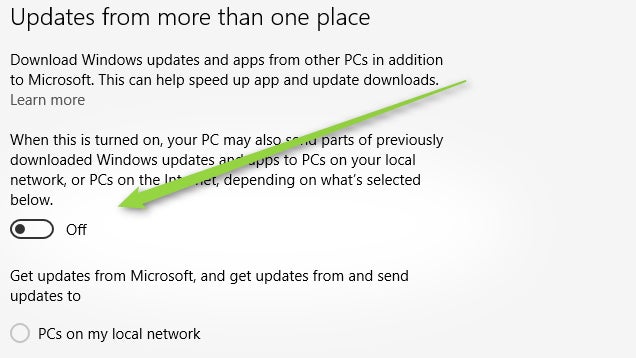
- Search for “Check for updates” in the Start menu.
- Under “Windows Update” choose “Advanced options.”
- Under “Choose how updates are installed” click “Choose how updates are delivered.”
- Disable the toggle under “Updated from more than one place.”
Last edited:
උඩ කියපු ඒවා කරලා තාමත් එහෙමම නම්. මේවා කරලා බලන්න මචන්.
Background Intelligent Transfer Service එක disable කරලා, Do not spy දාල බලන්න.
http://www.elakiri.com/forum/showpost.php?p=18885591&postcount=79
http://www.elakiri.com/forum/showpost.php?p=18890208&postcount=87
do not spy download wen na ne bun?

Another thing is without your notice windows 10 act as a peer to peer update sharing device.your pc allows your bandwidth to upload update to other pc's on the internet.
- Search for “Check for updates” in the Start menu.
- Under “Windows Update” choose “Advanced options.”
- Under “Choose how updates are installed” click “Choose how updates are delivered.”
- Disable the toggle under “Updated from more than one place.”
meka nan mehema thama macahn tyene?off karala.

මෙයාගෙන් පුළුවන් මචන්.
http://www.elakiri.com/forum/showpost.php?p=18885591&postcount=79
සනා මේක dawn ලොඩ් වෙන් න නේ ?

Similar threads

- Replies
- 18
- Views
- 377

- Replies
- 0
- Views
- 109


