Task Manager !!!

Buddhika072

Active member
  • Sep 16, 2008
    478
    147
    43
    Bahrain
    Mage PC eke Task Maneger Disebal kiyala watenawa. Kohomawath Task Maneger walata yanna be... PC eka Format nokara meka hadaganna hati kiyala dennakoo...
    wena User Account ekakin Awama hari. eath mata meka hadaganna udaw karanna.....
     
    Oct 26, 2008
    6,219
    8
    0
    Cyberspace
    Why is my Task Manager disabled, and how do I fix it?

    Meka try karala balanna yaluwa... :D

    Summary: Task manager can be disabled manually, but more commonly it's disabled by a virus. It's easy to re-enable once you're virus-free.


    My task manager has a "task manager has been disabled by the administrator" message. How did this happen and how can I correct this?


    Why: if you didn't do it yourself, the news isn't good.
    How to fix it: there are a couple of ways.
    Let's look at this more closely.
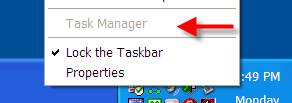
    The situation's pretty simple. If you right click on the clock in the Windows taskbar, the Task Manager item is grayed out:


    taskmanagergrey.png
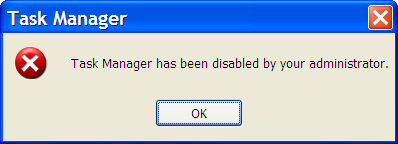
    Or, if you try to run taskmgr.exe manually, you get this message:
    taskmanagerpop.png


    So, how did this happen?


    As we'll see in a moment, there are settings you can access as an administrator that would allow you to disable and enable Task Manager in this way.
    You didn't do that, you say?


    Then a virus probably did.


    Disabling Task Manager is one way viruses try to make it harder for you to deal with their infections. Before proceeding any further, you should run a complete and up-to-date anti-virus scan of your machine. It's possible, perhaps even likely, that you've been infected.


    Once you come back virus-free, you can proceed with the fix.
    •​
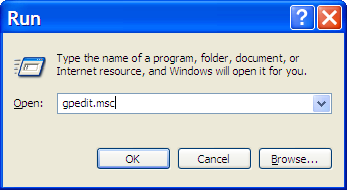
    If you have Windows XP Pro, there's a nifty user interface to directly edit the setting you want to repair. Click Start, then click Run and type in gpedit.msc:


    rungpeditmsc.png


    And press OK. This runs the Group Policy Editor.


    Once in the Group Policy Editor, expand in turn:
    • User Configuration
    • Administrative Templates
    • System
    • Ctrl+Alt+Del Options
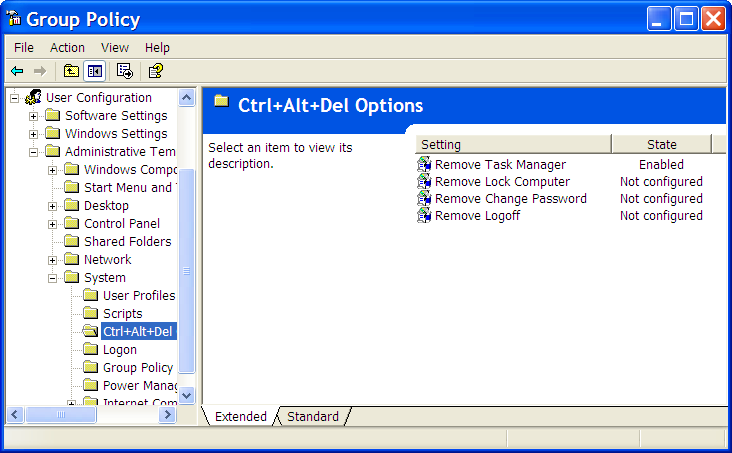
    You should see something much like this:


    gpeditcadoptions.png


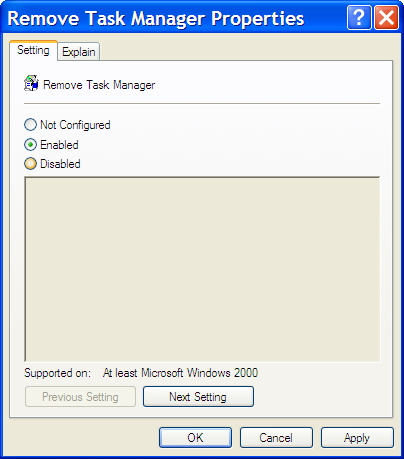
    Double click on Remove Task Manager to change its setting:


    gpeditremovetaskmanager.png


    It should be enough to click on Not Configured and then OK and Task Manager is available once again.
    •​
    If you don't have Windows XP Pro, then you'll need to edit the registry manually.


    Click Start, then click Run, type in regedit, and click on OK.


    Expand these registry keys in turn:
    • HKEY_CURRENT_USER
    • Software
    • Microsoft
    • Windows
    • CurrentVersion
    • Policies
    • System
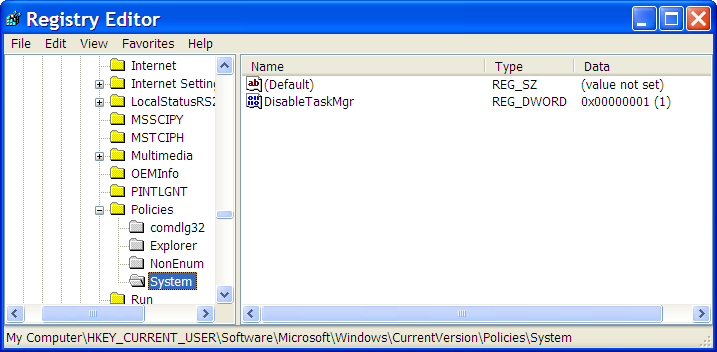
    You should see something similar to this:


    regdisabletaskmanager.png


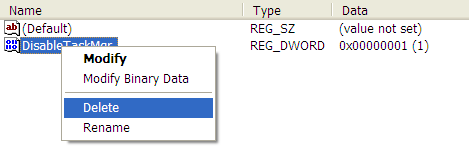
    Right Click on the DisableTaskMgr item:


    regdeletedisabletaaskmanager.png


    Click on Delete, confirm that you want to delete, and Task Manager should be available once again.


    One thing to note is that it's quite possible that if you're in an environment managed by a centralized policy, these settings may have no effect. Your IT administrator may set things up so as to disable task manager, and other things as well at the domain level. You'll need to ask them if this is the case.
     
    • Like
    Reactions: mic

    mic

    Member
    Nov 24, 2006
    1,333
    553
    0
    Meka try karala balanna yaluwa... :D

    Summary: Task manager can be disabled manually, but more commonly it's disabled by a virus. It's easy to re-enable once you're virus-free.


    My task manager has a "task manager has been disabled by the administrator" message. How did this happen and how can I correct this?


    Why: if you didn't do it yourself, the news isn't good.
    How to fix it: there are a couple of ways.
    Let's look at this more closely.
    The situation's pretty simple. If you right click on the clock in the Windows taskbar, the Task Manager item is grayed out:


    taskmanagergrey.png
    Or, if you try to run taskmgr.exe manually, you get this message:
    taskmanagerpop.png


    So, how did this happen?


    As we'll see in a moment, there are settings you can access as an administrator that would allow you to disable and enable Task Manager in this way.
    You didn't do that, you say?


    Then a virus probably did.


    Disabling Task Manager is one way viruses try to make it harder for you to deal with their infections. Before proceeding any further, you should run a complete and up-to-date anti-virus scan of your machine. It's possible, perhaps even likely, that you've been infected.


    Once you come back virus-free, you can proceed with the fix.
    •​
    If you have Windows XP Pro, there's a nifty user interface to directly edit the setting you want to repair. Click Start, then click Run and type in gpedit.msc:


    rungpeditmsc.png


    And press OK. This runs the Group Policy Editor.


    Once in the Group Policy Editor, expand in turn:
    • User Configuration
    • Administrative Templates
    • System
    • Ctrl+Alt+Del Options
    You should see something much like this:


    gpeditcadoptions.png


    Double click on Remove Task Manager to change its setting:


    gpeditremovetaskmanager.png


    It should be enough to click on Not Configured and then OK and Task Manager is available once again.
    •​
    If you don't have Windows XP Pro, then you'll need to edit the registry manually.


    Click Start, then click Run, type in regedit, and click on OK.


    Expand these registry keys in turn:
    • HKEY_CURRENT_USER
    • Software
    • Microsoft
    • Windows
    • CurrentVersion
    • Policies
    • System
    You should see something similar to this:


    regdisabletaskmanager.png


    Right Click on the DisableTaskMgr item:


    regdeletedisabletaaskmanager.png


    Click on Delete, confirm that you want to delete, and Task Manager should be available once again.


    One thing to note is that it's quite possible that if you're in an environment managed by a centralized policy, these settings may have no effect. Your IT administrator may set things up so as to disable task manager, and other things as well at the domain level. You'll need to ask them if this is the case.

    ela rep+
     

    kickmeo

    Member
    Nov 30, 2010
    529
    25
    0
    Untitled-11111.jpg

    මචන් මගේ win7 වල කාලයක් ඉදන් මෙහෙමයි (උඩ ටික නැහැ) මෙකට මොකද බන් කරන්න ඔනි උදව්වක් කරපන් plz macho
     

    dilrasan

    Well-known member
  • Oct 30, 2007
    42,761
    1
    4,849
    113
    40
    හත් ඉලව්වෙ!
    View attachment 39050

    මචන් මගේ win7 වල කාලයක් ඉදන් මෙහෙමයි (උඩ ටික නැහැ) මෙකට මොකද බන් කරන්න ඔනි උදව්වක් කරපන් plz macho

    aiyo oka simple...:D
    uda hariye double click karanna...:)
    ekiwwe oya dala thiyena screen shot eke task kiyala ekka thiyenawane column eka...anna ekata tikak udin thiyena space eke double click karanna..:)