Google Play for Android :::.

dushan90

Active member
  • Jan 22, 2008
    811
    50
    28
    Diagon Alley
    Paper Camera

    zMEcaZ6FxBTgp57eOZEKNk9jIqTbcj3Rf5QpOeb1NJHNAZ8Oo7St_VqFDMQawihcYvs=w705


    See the world through a novel, original, stylish and captivating lens.
    Real time cartoon and painting effects displayed on your camera feed! See the world through a new, original, stylish and captivating lens, have a wonder in your own home and discover how cool is now your world in cartoon!
    This is the ultimate collection of cartoon/sketch/comic book/half tone/noir/neon and many other effects painted directly in your camera, no more boring post-effects, it's all real time, you simply won't stop wandering, wherever you are, having a look at things and cartoon-ize them!
    You can wave your phone around and see the world change before your eyes, take pictures using any of the stylish cartoon effects or apply them to your existing photos.

    97O-9DZoul8Xe49mSGr7pSWv3yxuW90ht9ahvLi2OhdaYPko3N2POp9HnXZa3-XfccU
    z4bZ4mKP5i2-ROV-77MW1BnI2vqHwQxmZrwB8Pcm5LsugUBfh8zObv7ts2q9TrKAyw


    Download APK


    gtkisaru

    Well-known member
  • Dec 30, 2007
    10,265
    656
    113
    Los Ratmalanos.
    zMEcaZ6FxBTgp57eOZEKNk9jIqTbcj3Rf5QpOeb1NJHNAZ8Oo7St_VqFDMQawihcYvs=w705


    See the world through a novel, original, stylish and captivating lens.
    Real time cartoon and painting effects displayed on your camera feed! See the world through a new, original, stylish and captivating lens, have a wonder in your own home and discover how cool is now your world in cartoon!
    This is the ultimate collection of cartoon/sketch/comic book/half tone/noir/neon and many other effects painted directly in your camera, no more boring post-effects, it's all real time, you simply won't stop wandering, wherever you are, having a look at things and cartoon-ize them!
    You can wave your phone around and see the world change before your eyes, take pictures using any of the stylish cartoon effects or apply them to your existing photos.

    97O-9DZoul8Xe49mSGr7pSWv3yxuW90ht9ahvLi2OhdaYPko3N2POp9HnXZa3-XfccU
    z4bZ4mKP5i2-ROV-77MW1BnI2vqHwQxmZrwB8Pcm5LsugUBfh8zObv7ts2q9TrKAyw


    Download APK


    adeee..thank you machang.. eth podi awulak thiyanawa... oka root karapu phones walata witharada weda karanne??

    mokada oka install kara mama eth menna mehema enawa
    Sorry!
    The application Paper Camera(process com.dama.papaercamera)has stopped unexpectedly. Please try again. [Force close]
    :(
     

    dushan90

    Active member
  • Jan 22, 2008
    811
    50
    28
    Diagon Alley
    adeee..thank you machang.. eth podi awulak thiyanawa... oka root karapu phones walata witharada weda karanne??

    mokada oka install kara mama eth menna mehema enawa

    :(

    Ado how come? Even I'm using this with no issues. You don't need to have root access to use this. Machan phone eka restart ekak karala balapan.
     

    dushan90

    Active member
  • Jan 22, 2008
    811
    50
    28
    Diagon Alley
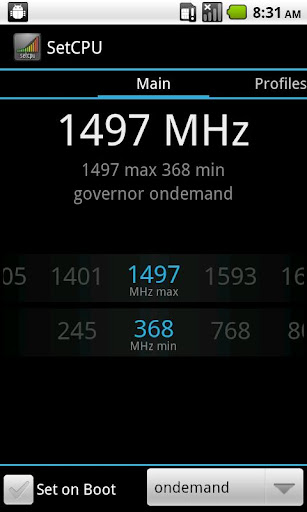
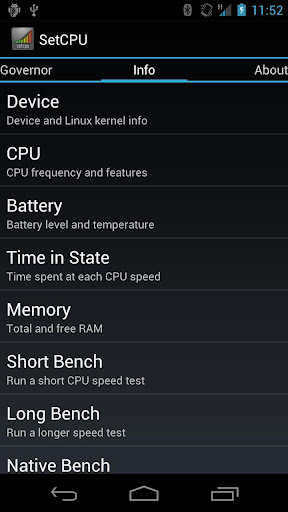
    SetCPU for Root Users

    Description

    SetCPU is a tool for changing the CPU settings (capable of overclock and underclock) on a rooted Android phone, including the Galaxy Nexus, Nexus S, Motorola Droid, Nexus One, G1, G2, Samsung Galaxy S II, myTouch 4G, Motorola Xoom, or one of many other devices to improve performance or save battery.

    SetCPU also allows you to set up powerful profiles to change the CPU speed under certain conditions, such as what app is running, when the phone is asleep or charging, when the battery level drops below a certain point, when the phone's temperature is too high, or during certain times of day. See the screenshots for examples of how you might set up profiles.

    SetCPU's wide feature set make it useful to beginners and enthusiasts alike. Accelerate your processor to unleash your phone's multitasking potential, or dial your CPU's speed down to save battery.
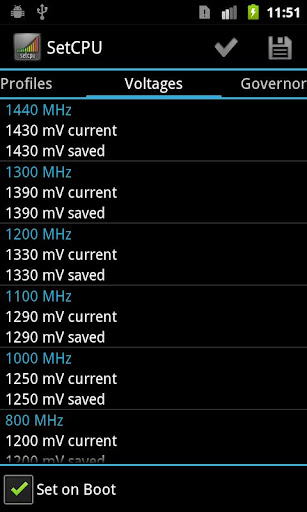
    SetCPU also includes a "voltage control" menu, available to certain devices with custom kernels that support it, to control undervolting to save even more battery. Keep in mind that undervolting is only available for certain kernels.

    Recent Changes:
    Additional permission: Read logs is used for efficient app condition checking. That is currently all it's used for.

    3.0.0:
    Profiles tab
    - Completely rewrote profiles.
    - Older profiles will automatically be converted into new profiles.
    - Added app and day of week in addition to the older conditions, and more are coming.
    - Profiles now support combining conditions under logical trees, with nestable "and," "or," and "not" operators available. It is now possible to easily build complex profiles that take the place of multiple profiles in the older version.
    - Actions can now be selected individually.
    - Profiles can now be marked as "non-exclusive," which means they will not block profiles with lower priorities from evaluating. In this case, the profiles with lower priorities will perform only actions which have not been performed by profiles with higher priorities. SetCPU will keep evaluating profiles until it reaches an "exclusive" profile that evaluates as true.
    - All number selectors in profiles are now in the style of the frequency selector in the main tab.
    - The new file extension for exported profile settings is ".setcpu.json."
    - To prevent ambiguous situations, it's no longer possible to select priorities that have been used by other profiles.
    - The CPU temperature sensor on OMAP4 and some other devices should now be supported for profiles. The option will appear if available.
    - Notifications are now set as an action per profile and can now be non-persistent.
    - SetCPU will still use the main screen as a "default profile" to set if no other profiles are active. It is now possible to specify an alternate default profile by creating an exclusive profile with no conditions at priority 0.
    - SetCPU now asks for a file name before backing up profiles to storage.
    - It is now possible to share profiles without having the internal/external storage mounted.

    Main tab
    - IO scheduler selection has been added via a drop down menu in the main tab.

    Bugfixes
    - Fixed a bug where the short benchmark always reported 0 ms.
    - Fixed the labels in the pie graph in system info.
    - Fixed some common crashes.

    Permissions:
    Root: SetCPU needs root permissions to modify the CPU speed and other settings.

    Start at boot: SetCPU will start a profiles service at boot, if enabled. It also sets default boot settings, if enabled. SetCPU does not run in the background if profiles are not enabled, and becomes inactive after settings, if any, are applied.
    Wake lock: This prevents the phone from sleeping while stress testing and benchmarking.
    Write external storage: SetCPU needs to read from and write to the SD card or internal storage to back up profiles.
    Read phone state: The "in call" condition needs this to determine if the user is making a phone call or not, and trigger the profile if the user wants to.

    6K1x5cvkz-_JSsaGbbKzFOpMvYrkddB6oYpsK7w1aLQcIORzUHroN9TsGLm67VP7UFc
    dq4Nt7X8uhr6zyLQuG1rVm5so4ZLYB7_ggDeMpm8SuoXzupihR4PfdpV_t6YH3ftw2Y
    IaPfmSJs4n0WBMNn_0SxRIIgT5UZozfxEPf4rqaGkl06auzDbrGIv9PkVSD0lYfv90c


    Download APK
     

    dushan90

    Active member
  • Jan 22, 2008
    811
    50
    28
    Diagon Alley
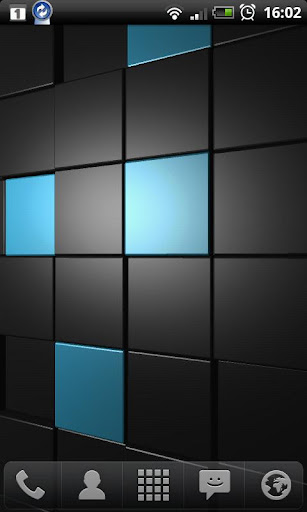
    Cubescape 3D Live Wallpaper

    6Nuw4bjuu27EU8A8BpxQVPO1qYtKygkThVnSKhqr32hMiHCrH2gLiwXkwWZfpU7lkR8=w705


    Cubescape 3D Live Wallpaper

    A wall of pulsating cubes with tap reactivity and advanced per-pixel lighting. Customisation includes
    • Colour themes, choose any colour
    • Speed, displacement
    • Lighting options
    • Tap to swap colours

    4KpR328rbj7tlUpD90SjEIFekF6xZwPf3yKzD6mqs0EGPyyTtQVc7IUQaoUcFFC981xr
    0IsrWIqRpSL0AehY-BYCKfcMkO_wV3zQz9JyYtvALnEaRVE1rs2QItvobIzmiuvjZNA
    HPqpinRhU_kwLBJOYAsOgxDz_1guA858B3AN26dFLe2VzOdyrZNBrKxGCKlMHq1tlwc


    EMHlwga01IHL8kXvB-EITWMsKwXfMwG62XnDs5YSIGNr3MSnslu7coKUhTc8ucWOR64p
    tDlNt_erIRA-Id9fucx1msuBBTjrmRdUl41UUUIIn1bSTjbmnWYmvshSemfjncXQATM


    Download APK


    dushan90

    Active member
  • Jan 22, 2008
    811
    50
    28
    Diagon Alley
    Evernote Hello

    Pwwv6xDI5DeqUL1m49zapjSU-VZ3Q_KQHT8aakk6b4_LguyX6LSo9SVffVvIho9Qfg=w705


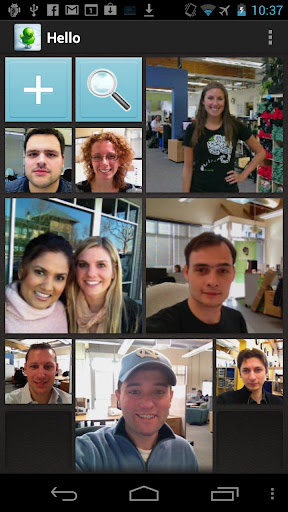
    Evernote Hello helps you remember everyone you meet.
    Remembering people is hard. Evernote Hello makes it easy.
    Whether you're meeting someone for the first time, trying to remember a person's name, or recalling important aspects of a previous encounter, Evernote Hello is here to help. Here's how:
    - See the faces of everyone you have met in a beautiful mosaic layout
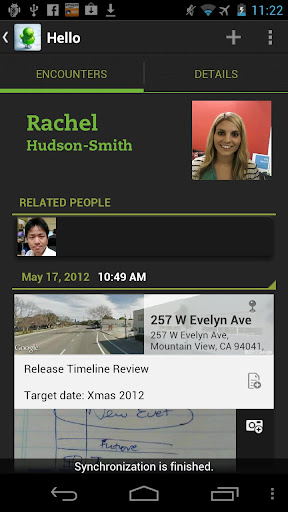
    - View a history of all the encounters you've had with individuals
    - Remember all aspects of your meetings: location, notes, photos, and faces
    - Tie Evernote Hello to LinkedIn to create fast, rich profiles
    - See notes related to your encounters that are in your Evernote account
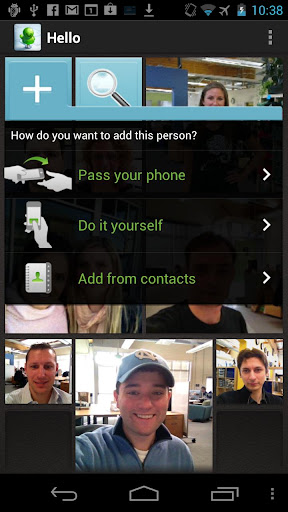
    There are three easy ways to bring the people you meet into Evernote Hello:
    - Create a quick profile and snap their photo
    - Pull in their information from your address book
    - Allow them to enter their contact information
    It's up to you.
    Say goodbye to business cards and forgetting people with Hello.
    Evernote Hello is part of the Evernote family of product, which are designed to help you remember everything.

    vS49Cs20PRCpJScsKf7ye91ELYIYjfmeJxQGmQDAhaDujRar18dfFrDHbfU0YZjcnQ
    dXFJbtVRwzS3FnGUdLq3Usoga6ceaTTYSKI2pM4VCGTIASX_NYoPiKWy2ttOTw3HKA
    FFuL_vWdlVLQyng0rGAdOKw--X_1yOaFflXWuYILcAnuRiZ7HXMLUgMLzfqAQnli20b2


    dushan90

    Active member
  • Jan 22, 2008
    811
    50
    28
    Diagon Alley
    Smthngs

    Android-app for one of the best GTD online services
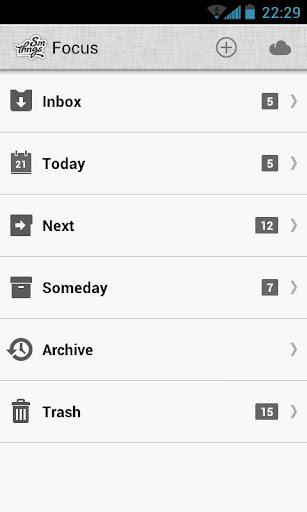
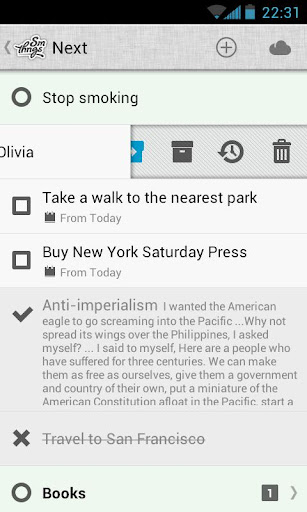
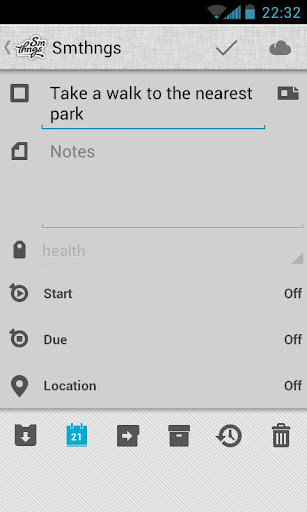
    Smthngs is the best way to add, organize and share your tasks in your Android smartphone. It based on classical Getting Things Done (GTD) methods, which were improved and rethought.
    • It has a simple and understandable interface, that works perfectly even for users, that have never heard anything about GTD.
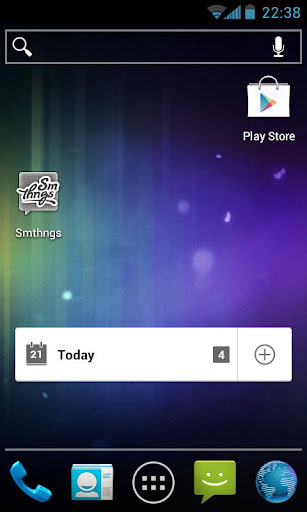
    • Smthngs works both in online and offline modes. When Internet is on, all your tasks and data are stored in remote servers, in «the cloud». When connection aborts, data is stored locally (it will transfer automatically when connection regains).
    • You can be registered in an app.

    Smthngs-Android-Login.jpg
    Qn_N4f5MCY7K-xdtXQsYhqmWbs7T_ZU4eBa6zWLTSozQlcg308vx5vQASwdPcSl3Ipw
    Dx3kvR9SkwJCbaLGdJWrYKIIBLX95VuBYfuqjq8tBCdRtFXlcdd3VUCCm3AhLgoBvw
    NaXHJLGaqvunQIfs2g80wCmXEt3QmU_NCt42YonpydGZJBpl8VsTPRl3lkSbpZS1SX_K


    NEpmoNgP35Cl8ke-HvDhNXMQf3mGR5AQFDWxtx35Ez980EQgPUrk_A9Myl4hIeDHxlEK
    Smthngs-Android-Widgets1.jpg
    Smthngs-Android-Widgets2.jpg


    Download

     
    Mobile ODIN Pro

    PA2_ULOm6LSnW_a1PkuQS8HTVjIEfW6YUwzQ6d49nM5rqQJuSVtwz0jjTGo1IMjRVjs=w705


    Overview: Mobile ODIN - Full firmware flashing straight from the device itself!
    Requirements: Android 2.1 and up


    Mobile ODIN - Full firmware flashing straight from the device itself!
    Mobile ODIN is the on-device firmware flasher of choice. Just throw those firmware files on your (internal or external) SD card, start Mobile ODIN and flash away.
    !!! Your device must be rooted to be able to use Mobile ODIN. Check the list below to see if your device is supported !!!
    If you use the EverRoot option, Mobile ODIN will root the firmware while you flash it. Checking out that new leaked firmware? No reason to lose root!
    Currently supported devices:
    - Samsung Galaxy S GT-I9000
    - Samsung Galaxy S GT-I9000B
    - Samsung Galaxy S GT-I9000M
    - Samsung Galaxy S GT-I9003
    - Rogers Captivate SGH-I896
    - AT&T Captivate SGH-I897
    - Samsung Galaxy Tab 7" GT-P1000
    - Samsung Galaxy S2 GT-I9100
    - Samsung Galaxy S2 GT-I9100T
    - AT&T Galaxy S2 SGH-I777
    - Sprint Epic 4G Touch SPH-D710
    - Samsung Galaxy Note GT-N7000
    New in v2.00:
    - Samsung Galaxy S2 SHW-M250S
    - Samsung Galaxy Note GT-I9220
    - Samsung/Google Galaxy Nexus (GSM) Maguro/Yakju/GT-I9250
    - Samsung/Google Galaxy Nexus (CDMA/LTE) Toro/Mysid/SCH-I515 (no cdma radio flashing)
    - Samsung Galaxy Tab 7.7" GT-P6800
    - Samsung Galaxy Tab 7.7" Wi-Fi GT-P6810
    - Samsung Galaxy 5 GT-I5500
    - Samsung Galaxy 5 GT-I5500B
    - Samsung Galaxy 5 GT-I5500L
    - Samsung Galaxy 5 GT-I5500T
    - Samsung Galaxy 5 GT-I5500M
    - Samsung Galaxy 5 GT-I5503
    - Samsung Galaxy 5 GT-I5503T
    - Samsung Galaxy 5 GT-I5508
    New in v2.10:
    - Samsung Galaxy Tab 7.0 Plus GT-P6200
    - Samsung Galaxy Tab 7.0 Plus Wi-Fi GT-P6210
    New in v2.36:
    - Samsung Galaxy S2 SHW-M250K
    - Samsung Galaxy S2 SC-02C
    New in v2.40:
    - Samsung Galaxy S2 GT-I9100M
    - Samsung Galaxy S3 GT-I9300
    More devices to come!
    Flashing with Mobile ODIN does NOT increase your custom kernel flash counter or make the yellow warning triangle appear.
    For discussion, check out the forum thread on XDA-Developers.com: http://forum.xda-developers.com/showthread.php?t=1347899
    ----- MANUAL -----
    Flashing with Mobile ODIN is easy. You start off by starting the app. The app will check your system has everything the app needs to continue (like root). It may need to download an additional package, so it is advised you have Wi-Fi available.
    Now you should see the main Mobile ODIN screen. It will list a set of partitions. Clicking a partition will allow you to select a file from your SD card to flash to that partition. Do not worry about selecting the wrong file - Mobile ODIN will not let you. Separate files (named after the partition) as well as .tar and .tar.md5 files are supported.
    From the desktop ODIN you may be used to "PDA", "PHONE", and "CSC" buttons. All three of these buttons have been replaced by the "Open file ..." button. This button will open the file you select from the SD card, and find all the partitions it can flash inside that file. So if you select a .tar file containing kernel and modem, the Kernel and Modem partitions will be set up to use that .tar file for flashing.
    Now that we have selected what we want to flash, if you have the Pro version you can proceed to the EverRoot section. The EverRoot options allows you to root your firmware while it is being flashed. Never again will you be without root! Select here which apps you want to inject in the firmware that is being flashed.
    Now that we are all done selecting partitions and configuring EverRoot, we continue to "Flash firmware". Mobile ODIN will gather all the information it needs and perform the flash. Before starting, however, it will check that your battery level is over 50%, and if applicable offer to verify MD5 checksums on the files you have selected to flash. If all is well, it will reboot into recovery mode, and flash the firmware you have selected.
    ----- DEVICE SUPPORT -----
    See the forum thread on XDA-Developers.com ( http://forum.xda-developers.com/showthread.php?t=1347899 ) for more information on how to get your device supported.


    F8DdV5hyxmkKCXLXuIK36FJNdH_RJWWYklVdDSUe2kE9yKpuOPReWMu4KedlRCZMGhM
    Ngd9tbfdOWCpQxVpUAWHVyU36y4t1YVAU8tPVGAGpQygaGPEfczB_kdDE75WC6OxYg


    BUY


    FREE


    chirichiri.jpg