


Latest ads
-
V2ray VPN for Tunneling
- hu KANNA
- Updated:
-
 ඕනම රටකට සෙට් වෙන CV එකක්
- ErMurazor
- Updated:
-
 Hambantota 7 Acres Beachfront Land For Sell DownSouth , PerPerch Price 420 000
- 1024 Digital
- Updated:
-
 Baseus PI LITE INDOOR CAMERA
- ErMurazor
- Updated:
You are using an out of date browser. It may not display this or other websites correctly.
You should upgrade or use an alternative browser.
You should upgrade or use an alternative browser.


Wave Control Pro



Overview: Control Your Music With a Wave of Your Hand!
Requirements: Android 2.2 and up
Uses the proximity sensor on your phone to allow control of your music playback and calls by waving your hand over your phone.
Better than lockscreen controls since there's no need to turn on your screen or even touch your phone at all!
-Want the next song? Just wave!
-Need to silence your ringer quickly? Just wave!
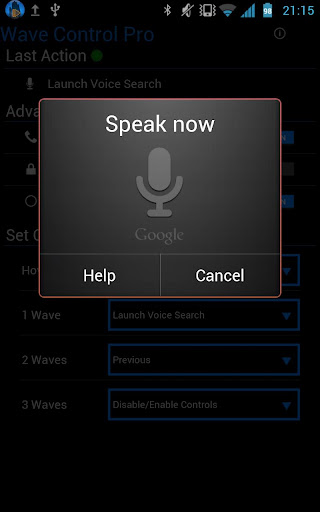
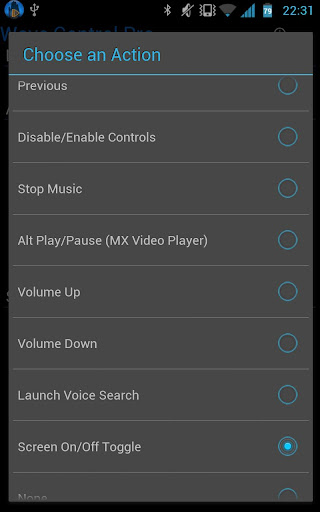
Extra commands for Pro: Stop Music, Alt Play/Pause (for MX Video Player), Volume Up, Volume Down, Launch Google Voice Search, Turn Screen On, Turn Screen Off, None to disable a gesture
Great for:
At your desk - Don't waste time unlocking your phone
Driving - Don't take your eyes off the road to change songs
Cooking - Control your music with your hands covered in dough
Cleaning - Don't worry about getting dirt and grime all over your screen
Eating - Don't worry about smearing all that burger juice on your phone
Working Out- Don't fall off the treadmill trying to unlock your phone
Coming Soon:
More Features - feel free to email any requests you have
Any Music app that supports "Headset Controls" such as these:
Spotify
Rocket Player
PowerAmp Menu -> More -> Settings -> Headset -> Respond to Headset Buttons
Pandora
last.FM
Slacker Radio
Uber Music
Samsung Music Player (Galaxy S2 and Note.. not Galaxy S, Y, Ace)
Google Music
MixZing Menu -> Settings -> Headset and Buttons -> Enable Headset Controls
doubleTwist Settings -> Player Settings -> Use headset controls
Winamp Menu -> Control Headset
DoggCatcher
PodPlayer+
.. Email me your experience with other players!
Easy to use, just wave your hand over the sensor (usually located just next to the earpiece on your phone).
Holding it there (hover) - Pause/Resume
One wave across - Next Song
Two waves across - Previous Song
Three times - Enable/Disable the controls
NEW
Call Controls Option
One wave silences the ringer
Two waves answers or ends the call
*Be sure to enable Headset Button Control in your player of choice
Some Notes:
Launch Voice Search and Screen Off have some issues with Galaxy Nexus and/or ICS... finding a workaround.
Tip for the hover gesture: if you move your hand away too quickly it'll register a wave
After an action, there is a 1 second delay before another gesture will be registered
Will work with any player that accepts headset (media button) controls
If the screen is off or another app is in focus, phone vibrates once on pause control and twice on resume controls
Practice your wave techniques by checking the "Last Action"
If you're getting another player responding to the commands, check if that app has the option to disable headset button controls
**IMPORTANT**
The sensor WILL behave differently on different phones. I don't have the resources to have a bunch of phones around to test on. If there is a problem with the app, please email me at [email protected] and give me a chance to figure it out before leaving a bad review!
And… there is a chance this app may not be compatible with your phone.. sorry. I'll do my best to keep the compatibility list up to date so future users won't run into issues.
Preliminary Incompatibility List:
*HTC EVO 4G (erratic sensor reading cause commands to trigger on their own)
Permissions Needed:
Wake Lock: So it will work when the screen is off on some phones
Read Phone State: So it can switch modes when phone is ringing or in-call
Vibrate: To use when screen if off or app not in focus
Write Settings: For Screen Off functionality
Get Tasks: For Screen Off for Nexus phones
Developed on a Samsung Galaxy Note
What's in this version:
V1.52: Bug fixes, Pro: Screen On/Off combined into one Toggle command, workaround for Nexus phones Screen Off




Overview: Control Your Music With a Wave of Your Hand!
Requirements: Android 2.2 and up
Uses the proximity sensor on your phone to allow control of your music playback and calls by waving your hand over your phone.
Better than lockscreen controls since there's no need to turn on your screen or even touch your phone at all!
-Want the next song? Just wave!
-Need to silence your ringer quickly? Just wave!
Extra commands for Pro: Stop Music, Alt Play/Pause (for MX Video Player), Volume Up, Volume Down, Launch Google Voice Search, Turn Screen On, Turn Screen Off, None to disable a gesture
Great for:
At your desk - Don't waste time unlocking your phone
Driving - Don't take your eyes off the road to change songs
Cooking - Control your music with your hands covered in dough
Cleaning - Don't worry about getting dirt and grime all over your screen
Eating - Don't worry about smearing all that burger juice on your phone
Working Out- Don't fall off the treadmill trying to unlock your phone
Coming Soon:
More Features - feel free to email any requests you have
Any Music app that supports "Headset Controls" such as these:
Spotify
Rocket Player
PowerAmp Menu -> More -> Settings -> Headset -> Respond to Headset Buttons
Pandora
last.FM
Slacker Radio
Uber Music
Samsung Music Player (Galaxy S2 and Note.. not Galaxy S, Y, Ace)
Google Music
MixZing Menu -> Settings -> Headset and Buttons -> Enable Headset Controls
doubleTwist Settings -> Player Settings -> Use headset controls
Winamp Menu -> Control Headset
DoggCatcher
PodPlayer+
.. Email me your experience with other players!
Easy to use, just wave your hand over the sensor (usually located just next to the earpiece on your phone).
Holding it there (hover) - Pause/Resume
One wave across - Next Song
Two waves across - Previous Song
Three times - Enable/Disable the controls
NEW
Call Controls Option
One wave silences the ringer
Two waves answers or ends the call
*Be sure to enable Headset Button Control in your player of choice
Some Notes:
Launch Voice Search and Screen Off have some issues with Galaxy Nexus and/or ICS... finding a workaround.
Tip for the hover gesture: if you move your hand away too quickly it'll register a wave
After an action, there is a 1 second delay before another gesture will be registered
Will work with any player that accepts headset (media button) controls
If the screen is off or another app is in focus, phone vibrates once on pause control and twice on resume controls
Practice your wave techniques by checking the "Last Action"
If you're getting another player responding to the commands, check if that app has the option to disable headset button controls
**IMPORTANT**
The sensor WILL behave differently on different phones. I don't have the resources to have a bunch of phones around to test on. If there is a problem with the app, please email me at [email protected] and give me a chance to figure it out before leaving a bad review!
And… there is a chance this app may not be compatible with your phone.. sorry. I'll do my best to keep the compatibility list up to date so future users won't run into issues.
Preliminary Incompatibility List:
*HTC EVO 4G (erratic sensor reading cause commands to trigger on their own)
Permissions Needed:
Wake Lock: So it will work when the screen is off on some phones
Read Phone State: So it can switch modes when phone is ringing or in-call
Vibrate: To use when screen if off or app not in focus
Write Settings: For Screen Off functionality
Get Tasks: For Screen Off for Nexus phones
Developed on a Samsung Galaxy Note
What's in this version:
V1.52: Bug fixes, Pro: Screen On/Off combined into one Toggle command, workaround for Nexus phones Screen Off


Wave Control Pro v2.0.1
(Latest Version)
Uses the proximity sensor on your phone to allow control of your music playback by waving your hand over your phone. No need to turn on your screen or even touch your phone at all!
As seen on:
*Lifehacker* http://lifehacker.com/5903676/wave-c...ver-the-screen
*Huffington Post* http://www.huffingtonpost.com/2012/0...n_1440305.html
*Pro Version*
-No Ads
-More Commands
-Assign Which Gesture Does Which Command
Coming Soon:
More Features - feel free to email any requests you have
Update the UI
Easy to use, just wave your hand over the sensor (usually located just next to the earpiece on your phone).
Holding it there will Pause/Resume
One wave across will go to the Next Song
Two waves across will go to the Previous Song
Three times (needs to be fast) will Pause or Resume the controls
*Be sure to enable Headset Button Control in your player of choice
Some Notes:
There is a little less than a second to register your waves.
Tip for the hover gesture: if you move your hand away too quickly it'll register a wave
After an action, there is a 1 second delay before another gesture will be registered
Will work with any player that accepts headset (media button) controls
If the screen is off or another app is in focus, phone vibrates once on pause control and twice on resume controls
Practice your wave techniques by checking the "Last Action"
If you're getting another player responding to the commands, check if that app has the option to disable headset button controls
**IMPORTANT**
I have read that the sensor will behave differently on different phones. I don't have the resources to have a bunch of phones around to test on. If there is a problem with the app, please email me at [email protected] and give me a chance to figure it out before leaving a bad review!
And… there is a chance this app may not be compatible with your phone.. sorry. I'll do my best to keep the compatibility list up to date so future users won't run into issues.
Permissions Needed:
Wake Lock: So it will work when the screen is off
Read Phone State: So it won't do anything when you're on a call
Vibrate To use when screen if off or app not in focus
What's in this version:
V2.01: Fixed bug causing crash on start for V2.0
V2.0: New Layout! Launch to Background Option, Sensor Test, Voice Search fix for ICS, Removed "Get Tasks" permission.. I *think* it won't crash on Nexus phones..

(Latest Version)
Uses the proximity sensor on your phone to allow control of your music playback by waving your hand over your phone. No need to turn on your screen or even touch your phone at all!
As seen on:
*Lifehacker* http://lifehacker.com/5903676/wave-c...ver-the-screen
*Huffington Post* http://www.huffingtonpost.com/2012/0...n_1440305.html
*Pro Version*
-No Ads
-More Commands
-Assign Which Gesture Does Which Command
Coming Soon:
More Features - feel free to email any requests you have
Update the UI
Easy to use, just wave your hand over the sensor (usually located just next to the earpiece on your phone).
Holding it there will Pause/Resume
One wave across will go to the Next Song
Two waves across will go to the Previous Song
Three times (needs to be fast) will Pause or Resume the controls
*Be sure to enable Headset Button Control in your player of choice
Some Notes:
There is a little less than a second to register your waves.
Tip for the hover gesture: if you move your hand away too quickly it'll register a wave
After an action, there is a 1 second delay before another gesture will be registered
Will work with any player that accepts headset (media button) controls
If the screen is off or another app is in focus, phone vibrates once on pause control and twice on resume controls
Practice your wave techniques by checking the "Last Action"
If you're getting another player responding to the commands, check if that app has the option to disable headset button controls
**IMPORTANT**
I have read that the sensor will behave differently on different phones. I don't have the resources to have a bunch of phones around to test on. If there is a problem with the app, please email me at [email protected] and give me a chance to figure it out before leaving a bad review!
And… there is a chance this app may not be compatible with your phone.. sorry. I'll do my best to keep the compatibility list up to date so future users won't run into issues.
Permissions Needed:
Wake Lock: So it will work when the screen is off
Read Phone State: So it won't do anything when you're on a call
Vibrate To use when screen if off or app not in focus
What's in this version:
V2.01: Fixed bug causing crash on start for V2.0
V2.0: New Layout! Launch to Background Option, Sensor Test, Voice Search fix for ICS, Removed "Get Tasks" permission.. I *think* it won't crash on Nexus phones..


Machanla I made a group for all the members from Sri Lanka in XDA 

http://forum.xda-developers.com/group.php?groupid=730
Kattiyama join wenna la
http://forum.xda-developers.com/group.php?groupid=730
Kattiyama join wenna la


Machanla I made a group for all the members from Sri Lanka in XDA
http://forum.xda-developers.com/group.php?groupid=730
Kattiyama join wenna la
Done

machan mama galaxy note ekak gannawa 65kata...hodai neda aulak ahema neheneDone


Machanla I made a group for all the members from Sri Lanka in XDA
http://forum.xda-developers.com/group.php?groupid=730
Kattiyama join wenna la
machan mama galaxy note ekak gannawa 65kata...hodai neda aulak ahema nehene
mekada machan.....
http://www.gsmarena.com/samsung_galaxy_note_n7000-4135.php
Vignette



Use 76 customisable photo effects and 57 frames in any combination, to create retro/vintage styles, LOMO/Diana/Holga toy camera styles, Polaroid/instant camera styles and much more.
Plus cross-process, duotone, charcoal, tilt-shift, photo-booth, double-exposure effects and more.
Vignette is also a full-featured camera application:
• Take pictures at your camera’s full resolution, even with effects (paid version only)
• Use the flash and front-facing cameras on most devices
• Self-timer, time-lapse and steady-shot modes
• Digital 10× zoom
• Store location data in pictures (geotag)
• Use the volume rocker as a shutter button
• Launch from the lock screen in Android 4.0+
• Remote shutter with Bluetooth remote, wired headset or Sony Ericsson LiveView
• Time- and date-stamp pictures
• Rule-of-thirds and golden ratio composition guides
• Optimised for taking pictures underwater
• Share pictures via third-party apps
Vignette does not require an internet connection to process pictures like some apps, and does not upload your pictures to a central server like Instagram. Your pictures do not leave your phone until you choose to share them.

ow bn meka thamai moko hodada,,mekata danna hoda app tikakuth hoyaganna one,,monday gannawa

Domino Run


Description
Place your dominoes in the correct order and topple them all to win!
Domino Run is an addictive and challenging puzzle game. Rearrange your dominoes on the platforms and topple them all with one push. Use special domino types to bridge gaps, destroy platforms and more. Play 70 levels of increasing difficulty across 3 worlds. Once you've solved the levels, try to beat our times and match the minimum moves!
Hint for new players: You can still move blocks while other dominoes are tumbling. If you're stuck in level 1-15 you may want to remember this.
Try the free Lite version before you buy!
The full version gives you:
* More levels
* More worlds
* Future content updates

Domino Run is an addictive and challenging puzzle game. Rearrange your dominoes on the platforms and topple them all with one push. Use special domino types to bridge gaps, destroy platforms and more. Play 70 levels of increasing difficulty across 3 worlds. Once you've solved the levels, try to beat our times and match the minimum moves!
Hint for new players: You can still move blocks while other dominoes are tumbling. If you're stuck in level 1-15 you may want to remember this.
Try the free Lite version before you buy!
The full version gives you:
* More levels
* More worlds
* Future content updates

Skitch


Description
Annotate, edit and save your photos & scribbles… fast
Skitch, the popular desktop app has gone mobile. Annotate an image with arrows, shapes and text. Sketch something new and markup an existing photo, then save your creations to Evernote or share them with other applications.
Drawing attention to your images has never been easier. Here are some ways to use Skitch:
- When you’re at a conference, take a snapshot of the people you meet, annotate it with their names and save it into Evernote.
- Annotate any image, screenshot or photo saved in Evernote thanks to a streamlined Skitch/Evernote integration.
- Download a screenshot attached to email. Open it in Skitch and add your comments. Save to Evernote for later review.
- Take a snapshot of something awesome, resize it, draw an arrow, add a caption, then post the image on Twitter or Facebook.
- Grab a picture of a whiteboard in a meeting or lecture, add a comment and save to Evernote.
- Quickly sketch out a map, diagram or unicorn!
Powerful features to help you get even more out of Skitch:
- Zoom and crop images.
- Create smooth, lines and scribbles to explain an idea.
- Add text using a special high-contrast coloring scheme for readability.
- Markup text with the semi-opaque highlighter tool.
- Re-position and delete shapes, text and drawings at any time.
- Share your work with with any application that accepts images.
Skitch is fast and fun!
Skitch, the popular desktop app has gone mobile. Annotate an image with arrows, shapes and text. Sketch something new and markup an existing photo, then save your creations to Evernote or share them with other applications.
Drawing attention to your images has never been easier. Here are some ways to use Skitch:
- When you’re at a conference, take a snapshot of the people you meet, annotate it with their names and save it into Evernote.
- Annotate any image, screenshot or photo saved in Evernote thanks to a streamlined Skitch/Evernote integration.
- Download a screenshot attached to email. Open it in Skitch and add your comments. Save to Evernote for later review.
- Take a snapshot of something awesome, resize it, draw an arrow, add a caption, then post the image on Twitter or Facebook.
- Grab a picture of a whiteboard in a meeting or lecture, add a comment and save to Evernote.
- Quickly sketch out a map, diagram or unicorn!
Powerful features to help you get even more out of Skitch:
- Zoom and crop images.
- Create smooth, lines and scribbles to explain an idea.
- Add text using a special high-contrast coloring scheme for readability.
- Markup text with the semi-opaque highlighter tool.
- Re-position and delete shapes, text and drawings at any time.
- Share your work with with any application that accepts images.
Skitch is fast and fun!
ow bn meka thamai moko hodada,,mekata danna hoda app tikakuth hoyaganna one,,monday gannawa
patta patta
Security & Antivirus Premier


Description
Webroot SecureAnywhere Mobile Premier Security and Anti-virus.Webroot phone and tablet security and antivirus.
Webroot SecureAnywhere Mobile Premier is the most advanced antivirus, Internet security & identity protection for Android™ smartphones & tablets. Complete mobile security with App Inspector, remote data wipe, lost device mapping, virus shield, SIM card lock, network monitor & more.
“Webroot offers advanced features not found in competing products.”—PC Magazine
“Best of the security applications for Android phones.”—Tech of Web
“A must for Android users.”—Uberphones
Key Features & Benefits:
THE BEST ANTIVIRUS FOR ANDROID:
• Automatically scans your apps and files for viruses, spyware, Trojans
• Antivirus security shields block malware before it has a chance to install
• Alerts you when your device and settings are vulnerable to attack
SECURE WEB BROWSING:
• Automatically scans web links and URLs to block phishing and other harmful content
LOST DEVICE PROTECTION:
• Remote Access – Use your Mobile Security Website (https://mobile.webroot.com/auth/login) or another mobile device to remotely lock, wipe, or locate your device
• Device Lock – Remotely locks your device if it’s lost or stolen*
• Device Wipe – Remotely wipes your contacts, text messages, other personal information*
• Device Scream – Sounds an alert to help you locate your device nearby
• Device Locate – See your device’s location on a map*
• SIM Card Lock – Automatically locks device when your SIM card is removed*
CALL/SMS BLOCKING:
• Spam blocking – Blocks text spam and unwanted calls*
• Virus blocking – Automatically blocks messages containing malicious URLs
APP INSPECTOR:
• Scans all apps and identifies those that can:
o Access to your Email/SMS messages
o Cost you money
o Access sensitive information
o Track your location
o Drain your battery
• Battery Monitor provides battery status and power usage by apps
• Network Monitor provides details of apps that are accessing the network
SUPPORT:
• Please join us on the Webroot Mobile forum, submit any questions and product feedback https://forums.webroot.com
FOOTPRINT:
• Runs quietly in the background
• Light on device memory and battery utilization
• Checks for security updates automatically to ensure latest antivirus and security protection
* 3G/4G data connection or wifi required for some features
ABOUT WEBROOT ANTIVIRUS APPS:
Webroot offers the best free and Premier antivirus downloads for Android devices. Webroot SecureAnywhere Mobile Premier for Android™ boasts Premier antivirus software with enhanced security features and complete mobile protection for Android devices

Webroot SecureAnywhere Mobile Premier is the most advanced antivirus, Internet security & identity protection for Android™ smartphones & tablets. Complete mobile security with App Inspector, remote data wipe, lost device mapping, virus shield, SIM card lock, network monitor & more.
“Webroot offers advanced features not found in competing products.”—PC Magazine
“Best of the security applications for Android phones.”—Tech of Web
“A must for Android users.”—Uberphones
Key Features & Benefits:
THE BEST ANTIVIRUS FOR ANDROID:
• Automatically scans your apps and files for viruses, spyware, Trojans
• Antivirus security shields block malware before it has a chance to install
• Alerts you when your device and settings are vulnerable to attack
SECURE WEB BROWSING:
• Automatically scans web links and URLs to block phishing and other harmful content
LOST DEVICE PROTECTION:
• Remote Access – Use your Mobile Security Website (https://mobile.webroot.com/auth/login) or another mobile device to remotely lock, wipe, or locate your device
• Device Lock – Remotely locks your device if it’s lost or stolen*
• Device Wipe – Remotely wipes your contacts, text messages, other personal information*
• Device Scream – Sounds an alert to help you locate your device nearby
• Device Locate – See your device’s location on a map*
• SIM Card Lock – Automatically locks device when your SIM card is removed*
CALL/SMS BLOCKING:
• Spam blocking – Blocks text spam and unwanted calls*
• Virus blocking – Automatically blocks messages containing malicious URLs
APP INSPECTOR:
• Scans all apps and identifies those that can:
o Access to your Email/SMS messages
o Cost you money
o Access sensitive information
o Track your location
o Drain your battery
• Battery Monitor provides battery status and power usage by apps
• Network Monitor provides details of apps that are accessing the network
SUPPORT:
• Please join us on the Webroot Mobile forum, submit any questions and product feedback https://forums.webroot.com
FOOTPRINT:
• Runs quietly in the background
• Light on device memory and battery utilization
• Checks for security updates automatically to ensure latest antivirus and security protection
* 3G/4G data connection or wifi required for some features
ABOUT WEBROOT ANTIVIRUS APPS:
Webroot offers the best free and Premier antivirus downloads for Android devices. Webroot SecureAnywhere Mobile Premier for Android™ boasts Premier antivirus software with enhanced security features and complete mobile protection for Android devices
Similar threads

- Replies
- 110
- Views
- 18K

- Replies
- 24
- Views
- 3K

- Replies
- 21
- Views
- 2K


- Replies
- 154
- Views
- 22K


- Replies
- 1
- Views
- 571
