


Latest ads
-
V2ray VPN for Tunneling
- hu KANNA
- Updated:
-
 ඕනම රටකට සෙට් වෙන CV එකක්
- ErMurazor
- Updated:
-
 Hambantota 7 Acres Beachfront Land For Sell DownSouth , PerPerch Price 420 000
- 1024 Digital
- Updated:
-
 Baseus PI LITE INDOOR CAMERA
- ErMurazor
- Updated:
You are using an out of date browser. It may not display this or other websites correctly.
You should upgrade or use an alternative browser.
You should upgrade or use an alternative browser.

TuneIn Radio Pro
V6.3
Machan! Meke updated version ekak mama meeta issella daala thiyenawa.
Check this out
Meka machan version 6.5

Listen to the world.
TuneIn is a new way to listen to music, sports and news from every corner of the earth, with over 70,000 radio stations and 2 million on-demand programs. The Pro version of this service lets you record all of this to your Android phone or tablet.
With TuneIn Radio Pro, you can:
★ Search for a song, artist or show to find radio stations around the world playing it live
★ Record, pause and rewind any station as you listen *Pro Exclusive!*
★ Tune in to CBS, ESPN, TEDTalks and more!
★ Add stations and songs to your presets
★ Wake up with the alarm clock. Fall asleep with the sleep timer
★ Play your programs in the background while you use other apps
Download APK

Buy for $0.99 at Google Play


Machan! Meke updated version ekak mama meeta issella daala thiyenawa.
Check this out
Meka machan version 6.5


Sri Lanka Train Schedule v1.6
Menna ape bhandeyak

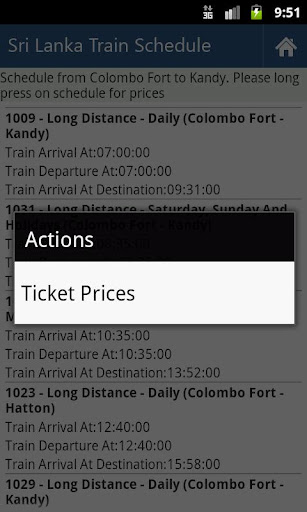
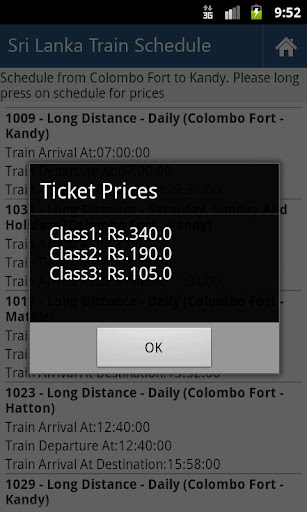
Award winning mobile application of eSwabhimani 2011 for the initiative of delivering government e-services which are connected to Lanka Gate through smart phone mobile interface.
From this application you can get Train Schedule, Train Delays and Ticket Prices of Sri Lanka Railways. This application is developed for ICTA Sri Lanka and released under GNU/GPL. Developed by Chatura Dilan Perera.
For more information visit: http://www.govforge.icta.lk/gf/project/androidts/
Screenshots
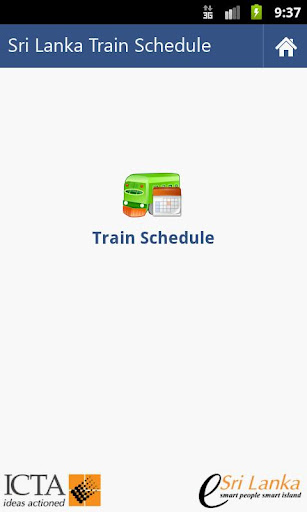
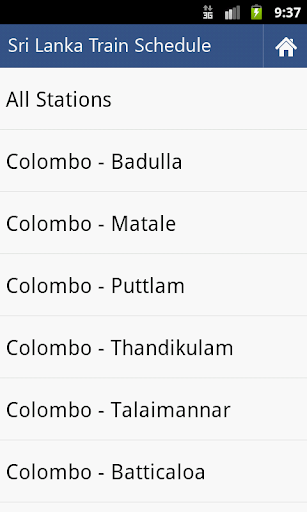
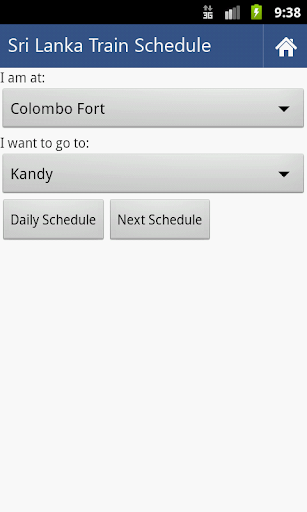
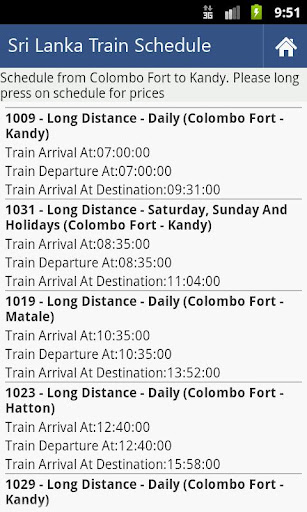
Download
Menna ape bhandeyak
Award winning mobile application of eSwabhimani 2011 for the initiative of delivering government e-services which are connected to Lanka Gate through smart phone mobile interface.
From this application you can get Train Schedule, Train Delays and Ticket Prices of Sri Lanka Railways. This application is developed for ICTA Sri Lanka and released under GNU/GPL. Developed by Chatura Dilan Perera.
For more information visit: http://www.govforge.icta.lk/gf/project/androidts/
Screenshots
Download


Machan awrora Mobile ODIN Pro 3.04 apk eka danna ko puluwan nam =)
here u go
http://www.mediafire.com/?okw7gk48gdrvzwh
Mobile ODIN Pro 3.40

Description
Mobile ODIN - Full firmware flashing straight from the device itself!
Mobile ODIN is the on-device firmware flasher of choice. Just throw those firmware files on your (internal or external) SD card, start Mobile ODIN and flash away.
! Your device must be rooted to be able to use Mobile ODIN. Check the list below to see if your device is supported !
If you use the EverRoot option, Mobile ODIN will root the firmware while you flash it. Checking out that new leaked firmware? No reason to lose root!
Currently supported devices:
- Samsung Galaxy S GT-I9000/B/M
- Samsung Galaxy S GT-I9003
- Rogers Captivate SGH-I896
- AT&T Captivate SGH-I897
- Samsung Galaxy Tab 7" GT-P1000
- Samsung Galaxy S2 GT-I9100/T
- AT&T Galaxy S2 SGH-I777
- Sprint Epic 4G Touch SPH-D710
- Samsung Galaxy Note GT-N7000
New in v2.00:
- Samsung Galaxy S2 SHW-M250S
- Samsung Galaxy Note GT-I9220
- Samsung/Google Galaxy Nexus (GSM) Maguro/Yakju/GT-I9250
- Samsung/Google Galaxy Nexus (CDMA/LTE) Toro/Mysid/SCH-I515 (no cdma radio flashing)
- Samsung Galaxy Tab 7.7" GT-P6800/P6810
- Samsung Galaxy 5 GT-I5500/B/L/T/M
- Samsung Galaxy 5 GT-I5503/T
- Samsung Galaxy 5 GT-I5508
New in v2.10:
- Samsung Galaxy Tab 7.0 Plus GT-P6200/P6210
New in v2.36:
- Samsung Galaxy S2 SHW-M250K
- Samsung Galaxy S2 SC-02C
New in v2.40:
- Samsung Galaxy S2 GT-I9100M
- Samsung Galaxy S3 GT-I9300
New in v2.45:
- Samsung Galaxy S2 SCH-R760 (US Cellular)
New in v3.00:
- Samsung Galaxy S3 GT-I9300T
- Samsung Galaxy S3 GT-I9308
- AT&T Galaxy S3 SGH-I747
- Canadia Galaxy S3 SGH-I747M
- TMOUS Galaxy S3 SGH-T999
- Sprint Galaxy S3 SPH-L710
- Samsung Galaxy Tab 10.1" GT-P7500/P7510
- Samsung Galaxy Tab 2 7" GT-P3100/P3110/P3113
- Samsung Galaxy Tab 2 10" GT-P5100/P5110/P5113
New in v3.10:
- US Cellular Galaxy S3 SCH-R530
- VZW Galaxy S3 SCH-I535 (unlocked)
- Samsung Galaxy Note GT-N7000B
- Samsung Galaxy Note 10.1" GT-N8000
- Samsung Galaxy Note 10.1" Wi-Fi GT-N8010/N8013
New in v3.25:
- Samsung Galaxy Tab 7.0 Plus GT-P6200L
New in v3.40:
- Samsung Galaxy S3 LTE SHV-E210S
- Samsung Galaxy Note 2 GT-N7100
Flashing with Mobile ODIN does NOT increase your custom kernel flash counter or make the yellow warning triangle appear.
For discussion and support: http://forum.xda-developers.com/showthread.php?t=1347899
- MANUAL -
Flashing with Mobile ODIN is easy. You start by starting the app and the app will check your system has everything it needs to continue (like root). It may need to download an additional package, so it is advised you have Wi-Fi available.
Now you should see the main Mobile ODIN screen. It will list a set of partitions. Clicking a partition will allow you to select a file from your SD card to flash to that partition. Do not worry about selecting the wrong file - Mobile ODIN will not let you. Separate files (named after the partition) as well as .tar and .tar.md5 files are supported.
From the desktop ODIN you may be used to "PDA", "PHONE", and "CSC" buttons. All three of these buttons have been replaced by the "Open file ..." button. This button will open the file you select from the SD card, and find all the partitions it can flash inside that file. So if you select a .tar file containing kernel and modem, the Kernel and Modem partitions will be set up to use that .tar file for flashing.
Now that we have selected what we want to flash, if you have the Pro version you can proceed to the EverRoot section. The EverRoot options allows you to root your firmware while it is being flashed. Never again will you be without root! Select here which apps you want to inject in the firmware that is being flashed.
Now that we are all done selecting partitions and configuring EverRoot, we continue to "Flash firmware". Mobile ODIN will gather all the information it needs and perform the flash. Before starting, however, it will check that your battery level is over 50%, and if applicable offer to verify MD5 checksums on the files you have selected to flash. If all is well, it will reboot into recovery mode, and flash the firmware you have selected.
https://play.google.com/store/apps/details?id=eu.chainfire.mobileodin.pro
http://www.mediafire.com/?okw7gk48gdrvzwh

Description
Mobile ODIN - Full firmware flashing straight from the device itself!
Mobile ODIN is the on-device firmware flasher of choice. Just throw those firmware files on your (internal or external) SD card, start Mobile ODIN and flash away.
! Your device must be rooted to be able to use Mobile ODIN. Check the list below to see if your device is supported !
If you use the EverRoot option, Mobile ODIN will root the firmware while you flash it. Checking out that new leaked firmware? No reason to lose root!
Currently supported devices:
- Samsung Galaxy S GT-I9000/B/M
- Samsung Galaxy S GT-I9003
- Rogers Captivate SGH-I896
- AT&T Captivate SGH-I897
- Samsung Galaxy Tab 7" GT-P1000
- Samsung Galaxy S2 GT-I9100/T
- AT&T Galaxy S2 SGH-I777
- Sprint Epic 4G Touch SPH-D710
- Samsung Galaxy Note GT-N7000
New in v2.00:
- Samsung Galaxy S2 SHW-M250S
- Samsung Galaxy Note GT-I9220
- Samsung/Google Galaxy Nexus (GSM) Maguro/Yakju/GT-I9250
- Samsung/Google Galaxy Nexus (CDMA/LTE) Toro/Mysid/SCH-I515 (no cdma radio flashing)
- Samsung Galaxy Tab 7.7" GT-P6800/P6810
- Samsung Galaxy 5 GT-I5500/B/L/T/M
- Samsung Galaxy 5 GT-I5503/T
- Samsung Galaxy 5 GT-I5508
New in v2.10:
- Samsung Galaxy Tab 7.0 Plus GT-P6200/P6210
New in v2.36:
- Samsung Galaxy S2 SHW-M250K
- Samsung Galaxy S2 SC-02C
New in v2.40:
- Samsung Galaxy S2 GT-I9100M
- Samsung Galaxy S3 GT-I9300
New in v2.45:
- Samsung Galaxy S2 SCH-R760 (US Cellular)
New in v3.00:
- Samsung Galaxy S3 GT-I9300T
- Samsung Galaxy S3 GT-I9308
- AT&T Galaxy S3 SGH-I747
- Canadia Galaxy S3 SGH-I747M
- TMOUS Galaxy S3 SGH-T999
- Sprint Galaxy S3 SPH-L710
- Samsung Galaxy Tab 10.1" GT-P7500/P7510
- Samsung Galaxy Tab 2 7" GT-P3100/P3110/P3113
- Samsung Galaxy Tab 2 10" GT-P5100/P5110/P5113
New in v3.10:
- US Cellular Galaxy S3 SCH-R530
- VZW Galaxy S3 SCH-I535 (unlocked)
- Samsung Galaxy Note GT-N7000B
- Samsung Galaxy Note 10.1" GT-N8000
- Samsung Galaxy Note 10.1" Wi-Fi GT-N8010/N8013
New in v3.25:
- Samsung Galaxy Tab 7.0 Plus GT-P6200L
New in v3.40:
- Samsung Galaxy S3 LTE SHV-E210S
- Samsung Galaxy Note 2 GT-N7100
Flashing with Mobile ODIN does NOT increase your custom kernel flash counter or make the yellow warning triangle appear.
For discussion and support: http://forum.xda-developers.com/showthread.php?t=1347899
- MANUAL -
Flashing with Mobile ODIN is easy. You start by starting the app and the app will check your system has everything it needs to continue (like root). It may need to download an additional package, so it is advised you have Wi-Fi available.
Now you should see the main Mobile ODIN screen. It will list a set of partitions. Clicking a partition will allow you to select a file from your SD card to flash to that partition. Do not worry about selecting the wrong file - Mobile ODIN will not let you. Separate files (named after the partition) as well as .tar and .tar.md5 files are supported.
From the desktop ODIN you may be used to "PDA", "PHONE", and "CSC" buttons. All three of these buttons have been replaced by the "Open file ..." button. This button will open the file you select from the SD card, and find all the partitions it can flash inside that file. So if you select a .tar file containing kernel and modem, the Kernel and Modem partitions will be set up to use that .tar file for flashing.
Now that we have selected what we want to flash, if you have the Pro version you can proceed to the EverRoot section. The EverRoot options allows you to root your firmware while it is being flashed. Never again will you be without root! Select here which apps you want to inject in the firmware that is being flashed.
Now that we are all done selecting partitions and configuring EverRoot, we continue to "Flash firmware". Mobile ODIN will gather all the information it needs and perform the flash. Before starting, however, it will check that your battery level is over 50%, and if applicable offer to verify MD5 checksums on the files you have selected to flash. If all is well, it will reboot into recovery mode, and flash the firmware you have selected.
https://play.google.com/store/apps/details?id=eu.chainfire.mobileodin.pro
http://www.mediafire.com/?okw7gk48gdrvzwh
Menna ape bhandeyak
Award winning mobile application of eSwabhimani 2011 for the initiative of delivering government e-services which are connected to Lanka Gate through smart phone mobile interface.
From this application you can get Train Schedule, Train Delays and Ticket Prices of Sri Lanka Railways. This application is developed for ICTA Sri Lanka and released under GNU/GPL. Developed by Chatura Dilan Perera.
For more information visit: http://www.govforge.icta.lk/gf/project/androidts/
Screenshots
Download
Machan awrora Mobile ODIN Pro 3.04 apk eka danna ko puluwan nam =)
Mobile ODIN Pro 3.40
Description
Mobile ODIN - Full firmware flashing straight from the device itself!
Mobile ODIN is the on-device firmware flasher of choice. Just throw those firmware files on your (internal or external) SD card, start Mobile ODIN and flash away.
! Your device must be rooted to be able to use Mobile ODIN. Check the list below to see if your device is supported !
If you use the EverRoot option, Mobile ODIN will root the firmware while you flash it. Checking out that new leaked firmware? No reason to lose root!
Currently supported devices:
- Samsung Galaxy S GT-I9000/B/M
- Samsung Galaxy S GT-I9003
- Rogers Captivate SGH-I896
- AT&T Captivate SGH-I897
- Samsung Galaxy Tab 7" GT-P1000
- Samsung Galaxy S2 GT-I9100/T
- AT&T Galaxy S2 SGH-I777
- Sprint Epic 4G Touch SPH-D710
- Samsung Galaxy Note GT-N7000
New in v2.00:
- Samsung Galaxy S2 SHW-M250S
- Samsung Galaxy Note GT-I9220
- Samsung/Google Galaxy Nexus (GSM) Maguro/Yakju/GT-I9250
- Samsung/Google Galaxy Nexus (CDMA/LTE) Toro/Mysid/SCH-I515 (no cdma radio flashing)
- Samsung Galaxy Tab 7.7" GT-P6800/P6810
- Samsung Galaxy 5 GT-I5500/B/L/T/M
- Samsung Galaxy 5 GT-I5503/T
- Samsung Galaxy 5 GT-I5508
New in v2.10:
- Samsung Galaxy Tab 7.0 Plus GT-P6200/P6210
New in v2.36:
- Samsung Galaxy S2 SHW-M250K
- Samsung Galaxy S2 SC-02C
New in v2.40:
- Samsung Galaxy S2 GT-I9100M
- Samsung Galaxy S3 GT-I9300
New in v2.45:
- Samsung Galaxy S2 SCH-R760 (US Cellular)
New in v3.00:
- Samsung Galaxy S3 GT-I9300T
- Samsung Galaxy S3 GT-I9308
- AT&T Galaxy S3 SGH-I747
- Canadia Galaxy S3 SGH-I747M
- TMOUS Galaxy S3 SGH-T999
- Sprint Galaxy S3 SPH-L710
- Samsung Galaxy Tab 10.1" GT-P7500/P7510
- Samsung Galaxy Tab 2 7" GT-P3100/P3110/P3113
- Samsung Galaxy Tab 2 10" GT-P5100/P5110/P5113
New in v3.10:
- US Cellular Galaxy S3 SCH-R530
- VZW Galaxy S3 SCH-I535 (unlocked)
- Samsung Galaxy Note GT-N7000B
- Samsung Galaxy Note 10.1" GT-N8000
- Samsung Galaxy Note 10.1" Wi-Fi GT-N8010/N8013
New in v3.25:
- Samsung Galaxy Tab 7.0 Plus GT-P6200L
New in v3.40:
- Samsung Galaxy S3 LTE SHV-E210S
- Samsung Galaxy Note 2 GT-N7100
Flashing with Mobile ODIN does NOT increase your custom kernel flash counter or make the yellow warning triangle appear.
For discussion and support: http://forum.xda-developers.com/showthread.php?t=1347899
- MANUAL -
Flashing with Mobile ODIN is easy. You start by starting the app and the app will check your system has everything it needs to continue (like root). It may need to download an additional package, so it is advised you have Wi-Fi available.
Now you should see the main Mobile ODIN screen. It will list a set of partitions. Clicking a partition will allow you to select a file from your SD card to flash to that partition. Do not worry about selecting the wrong file - Mobile ODIN will not let you. Separate files (named after the partition) as well as .tar and .tar.md5 files are supported.
From the desktop ODIN you may be used to "PDA", "PHONE", and "CSC" buttons. All three of these buttons have been replaced by the "Open file ..." button. This button will open the file you select from the SD card, and find all the partitions it can flash inside that file. So if you select a .tar file containing kernel and modem, the Kernel and Modem partitions will be set up to use that .tar file for flashing.
Now that we have selected what we want to flash, if you have the Pro version you can proceed to the EverRoot section. The EverRoot options allows you to root your firmware while it is being flashed. Never again will you be without root! Select here which apps you want to inject in the firmware that is being flashed.
Now that we are all done selecting partitions and configuring EverRoot, we continue to "Flash firmware". Mobile ODIN will gather all the information it needs and perform the flash. Before starting, however, it will check that your battery level is over 50%, and if applicable offer to verify MD5 checksums on the files you have selected to flash. If all is well, it will reboot into recovery mode, and flash the firmware you have selected.
https://play.google.com/store/apps/details?id=eu.chainfire.mobileodin.pro
http://www.mediafire.com/?okw7gk48gdrvzwh
thxxxxxx machanla...mata enna beri vena velavata thread eka update karanavata...

thxxxxxx machanla...mata enna beri vena velavata thread eka update karanavata...
You're welcome


Root Explorer (File Manager)

Root Explorer is the ultimate file manager for root users. Access the whole of android's file system (including the elusive data folder!).
Features include SQLite database viewer, Text Editor, create and extract zip or tar/gzip files, extract rar archives, multi-select, execute scripts, search, remount, permissions, bookmarks, send files (via email, bluetooth etc), image thumbnails, APK binary XML viewer, change file owner/group, create symbolic link, "Open With" facility, MD5, create shortcuts.
Screenshots


Download APK
Link to Google Play
macho root explora eka dapanko
Root Explorer is the ultimate file manager for root users. Access the whole of android's file system (including the elusive data folder!).
Features include SQLite database viewer, Text Editor, create and extract zip or tar/gzip files, extract rar archives, multi-select, execute scripts, search, remount, permissions, bookmarks, send files (via email, bluetooth etc), image thumbnails, APK binary XML viewer, change file owner/group, create symbolic link, "Open With" facility, MD5, create shortcuts.
Screenshots


Download APK
Link to Google Play
Eka machan
thxxxxxx machanla...mata enna beri vena velavata thread eka update karanavata...
elassss

Similar threads

- Replies
- 110
- Views
- 18K

- Replies
- 24
- Views
- 3K

- Replies
- 21
- Views
- 2K


- Replies
- 154
- Views
- 22K


- Replies
- 1
- Views
- 572
