


Blog එකට facebook like button එකක් දාගනිමු
පොඩ් වෙනසකටත් එක්ක අද මම හිතුවා blog එකට facebook like button එකක් add කරගන්න විදිය ලියන්න. හරිම ලේසියි. copy paste පාරවල් ට්කක් තියෙන්නෙ. ඉස්සරෝම මෙ යටින් තියන code එක copy කරගන්න.
<div style='float:right'> <b:if cond='data ost.isFirstPost'> <script>(function(d){ var js, id = 'facebook-jssdk'; if (d.getElementById(id)) {return;} js = d.createElement('script'); js.id = id; js.async = true; js.src = "//connect.facebook.net/en_US/all.js#xfbml=1"; d.getElementsByTagName('head')[0].appendChild(js); }(document));</script> </b:if> <fb:like expr:href="dataost.url" layout='standard' send='true' show_faces='false' font="arial" action="like" colorscheme="light"></fb:like> </div>
දැන් Blogger Account එකට log වෙලා Design > Edit HTML ගිහින් “Expand Widget Templates” කියන check box එක click කරන්න. ඊට පස්සෙ <dataost.body/> tag එක හොයාගෙන ඒත් එක්කම යටින් copy කරගත්ත code එක paste කරන්න.

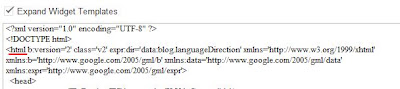
දැන් fb namespace එක add කරගන්න ඕනෙ. එකට <html (html tag එක පටන් ගන්න තැන) හොයාගෙන ඊට ඉස්සරහින් xmlns:fb="https://www.facebook.com/2008/fbml" copy paste කරන්න.
දැන් save කරන්න. හැබැයි ඉතින් template එක මාරු කලොත් මේ ටික මුල ඉදන් කරන්න වෙනවා.
පොඩ් වෙනසකටත් එක්ක අද මම හිතුවා blog එකට facebook like button එකක් add කරගන්න විදිය ලියන්න. හරිම ලේසියි. copy paste පාරවල් ට්කක් තියෙන්නෙ. ඉස්සරෝම මෙ යටින් තියන code එක copy කරගන්න.
<div style='float:right'> <b:if cond='data
ost.isFirstPost'> <script>(function(d){ var js, id = 'facebook-jssdk'; if (d.getElementById(id)) {return;} js = d.createElement('script'); js.id = id; js.async = true; js.src = "//connect.facebook.net/en_US/all.js#xfbml=1"; d.getElementsByTagName('head')[0].appendChild(js); }(document));</script> </b:if> <fb:like expr:href="dataost.url" layout='standard' send='true' show_faces='false' font="arial" action="like" colorscheme="light"></fb:like> </div>දැන් Blogger Account එකට log වෙලා Design > Edit HTML ගිහින් “Expand Widget Templates” කියන check box එක click කරන්න. ඊට පස්සෙ <data
ost.body/> tag එක හොයාගෙන ඒත් එක්කම යටින් copy කරගත්ත code එක paste කරන්න.
දැන් fb namespace එක add කරගන්න ඕනෙ. එකට <html (html tag එක පටන් ගන්න තැන) හොයාගෙන ඊට ඉස්සරහින් xmlns:fb="https://www.facebook.com/2008/fbml" copy paste කරන්න.

දැන් save කරන්න. හැබැයි ඉතින් template එක මාරු කලොත් මේ ටික මුල ඉදන් කරන්න වෙනවා.


