Google Play for Android :::.

Next Launcher 3D 1.18

UPDATESPIN6.GIF
Next Launcher 3D 1.18

Overview: Next Launcher, designed by GO Dev Team, is officially released now!
Requirements: Android Device OS 2.2 and up
Price: $15.99
PbPYeAPxq-tIAkJBVUm5hWbhzX0cFMquoHo5naX_CABl1yRmlePIhog3KC-GpLLL-g2p=w705

-E3ovdcrr-RfS5hLpx4rUQzqUdqUC_LEZpt_Yaj7zM4MXHO0dJxfAJcG8OQfza4C6M4
5JgNeOkxtW3e7HLW5joN24BnhkIlugjXlQWs9bBR-_hqElXW5hG_9zpIw3RhQz5ggdxZ
qKAhmT47listaBimwYHJD6n6GSGbQq0YeNSIcRd8VNo7pIJs6quRM-bir01Hl_Y6NP4
xmVNSdQVcRx2nu5P7CR4Cnm5v85FTMc7YT6DbcWLjzOYbIc7D2V9g4KRzmIX548WD7yu


_-MG8N2zLWidsVEfE4eU2gHxSmXB0CWP_tlcuxhA8LHkz1Q040cq6_SGdg0KPXorNWuH
Z3ptB8K4iJfZI1MDkfCCcqeq3s5gL3MyZhs97sG0hx5MG3TL8DVzMiH1DM_u8L1kURY
4yGlTgVAwm-lZcjDCF30CR66sml70VxK-PXLRSBkwLgsUHH51IcjkD7GzMf4zaIjWnBk
6YXhFwag89TUNZDehUtqzl7RN-6bWvYJP92Nw1I8VPK4lD4pj-HbxQQaSBRTiHdhcu8


At the end of 2012, we have a surprise for you! Next Launcher, designed by GO Dev Team, is officially released now!


Next Launcher is a new launcher application which is full of glorious 3D elements and dynamic effects. Fancy 3D visual elements, gorgeous transition effects and humanized gestures bring you a unique and splendid operation experience and visual enjoyment.

Next Launcher Features:
1. Various operation for icons: icons support rotation, reset, select, align and so on. Operation is easy and fantastic.
2 .Unlimited screen layout: placing icons or widgets randomly which forms your own home screen.
3. Stereoscopic screen preview: lots of screen display effects, dazzling animation of screen switching about adding or deleting screen.
4. Quick screen management: adding different kinds of elements in screen edit including application icons, folders and widgets. It’ll support changing wallpapers and themes soon.
5. Rotatable dock: inverting upward or downward the Dock can quickly switch among home screen, screen edit and screen preview.
6. Powerful app drawer: icons can be arranged by names or by time, and folders can be created by overlaying icons. Batch mode and operation of adding apps to screen are also available.
7. Beautiful scrolling effects: a variety of app drawer scrolling effects that provide a distinctive screen switching experience.
8. Fancy 3D widgets: 3D widgets that are based on Next Launcher are coming soon!

Tips:
1.Please make sure your device has installed Google Play.
2.Phone performance:Android 2.3.3 and up; Dual-core models is better.
3. Suggestion:Watch the video of Next Launcher first, to know about the cool operation of the product.
If you encounter any problems or have any suggestions for our Next Launcher, please do not hesitate to tell us. Thank you very much!


What's New in Next Launcher 3D version: v1.18
1.(New) Next Launcher themes management page
2.(New) Add six homescreen transition effects
3.(Improve) Wallpaper dynamic effect switcher
4.(Improve) Supports long press free area of dock to add shortcuts
5.(Improve) New settings notification
6.(Improve) User experience of preferences
7.(Fix) Some FC bugs

Price: $15.99

downloadwi.gif


Password : hasi


bohokal

Well-known member
  • Nov 21, 2006
    2,502
    250
    83
    machanla loku help ekak onee.mage S2 eka root karala 32gb sd card ekak gahala tiyenne..kisima awulak nathuwa elata wada kara...ewunata dan app ekak install karanakota "couldnt install to default location" kiyala watenawa.sd card eka unmount karoth samahara app walata hari..eth samahara ewata naa..boot up menu ekata cache wipe kara..internet eke tiyena godak dewal karala baluwa..anik eka memory godak tibbath hitapu hatiye low disk space kiyala watenawa...podi idea ekak deepallako
     
    The Dark Knight Rise
    yxV-l98ysWB6U7S7rx6ABeQ5RQUCQOUO0E1EqtTUFu03sV68QjW-cG31ZfNohoPg6A=w705


    NwxbXkXoZG0L2paygEEotIypSfQiKC8q7MCExJ2qU2SWlrSxx7syO67G0i3o1iVZQw
    UOtSPVzFg0ISflB4CCak4uVYeo09L5gKD84lZ2aQsYS21_9kJnyeD9Ag_ElK0zm_q5XY


    rXwXE-2gSfiaj4FROPqqI60Mz7F6cbbtH5AquHwmRrNf-DsdK2x_8sQTUlCqHFpgAyM
    hZYTP-BYPhBh5HtH-T8owKSoY4h7ZIsJSqdF7H0pbX9priVNDiVSINdY1Lk15EkmWSha


    The Dark Knight Rises Apk v1.1.3
    The Dark Knight Rises Free Download
    Requirements: Android 2.2+
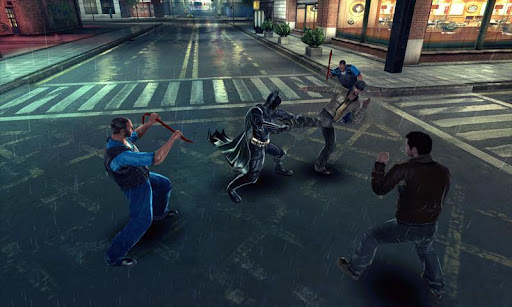
    Overview: Become Batman and save Gotham City from the biggest threat it's ever faced.
    The epic conclusion to filmmaker Christopher Nolan’s Batman trilogy arrives on iPhone and iPad in the exclusive video game inspired by the movie.​

    THE EXCLUSIVE GAME INSPIRED BY THE DARK KNIGHT RISES
    -After being gone for eight years, Bruce Wayne gets back into action as Batman. Waiting for him are the mysterious Selina Kyle, and Bane, a lethal adversary on a crusade to tear apart Batman’s legacy piece by piece.​
    -Meet all of Batman’s allies and regain your strength to protect Gotham City from Bane.​
    -Become completely immersed in the story thanks to likenesses of all the movie’s main characters like Catwoman, Lucius Fox and Commissioner Gordon.​

    AN EPIC GAMING EXPERIENCE
    -Dozens of missions plus random events will make you feel all the thrill of being a superhero. Deal with hostage situations, bomb squads, jailbreaks and car chases to prove that you’re the true protector of Gotham.​
    -A thrilling fighting system that puts you right in the heart of the action thanks to many different moves and cinematic effects.​
    -Collect items hidden within the city to unlock upgrades and new fighting skills for Batman.​

    PLAY AS THE DARK KNIGHT
    -Access Batman’s complete arsenal and learn how to take full advantage of each tool. Use the Grapnel to cross the city or to defeat foes, throw the Batarang to knock out your enemies or to hit a distant button; the possibilities are infinite.​
    -When kicks and gadgets are of no use, The Dark Knight relies on his vehicles to get the job done. Drive the Bat-Pod for special vigilante missions or pilot The Bat for fast travel across the city.​

    EXPERIENCE GOTHAM AS YOU NEVER HAVE BEFORE
    -Explore the entire city of Gotham and its different districts spread across a huge map and enjoy stunning graphics for total immersion in the dark universe of Batman.​

    What's in this version: (Updated : Feb 4, 2013)

    New in this update:
    Improved performance​
    Gameplay tweaks​
    Optimized game size compared to previous version​
    New permission required: Kill background processes.​
    The game uses this permission to ensure better stability and performance.​

    This game has no advertisements

    $6.99

    downloadwi.gif


    ======================
    GLZip 2.1
    ======================
    Password : hasi

     

    AWRORA

    Well-known member
  • Mar 27, 2008
    15,186
    1,414
    113
    සිංහල බෞද්ධ රටේ...
    Ultimate Backup Pro v2.0.1

    Ultimate Backup Pro
    V 2.0.1


    tt9KIzgvwVc9mccGmAWLSxvch35k02itKew0uouvkO4GEDJVJj2STNCecHBw0L0TMPZc=w705


    QCDMQkETAjuxmcBI3yBYQsvIZHeTFL8l7sIMu3asSnX7-AnjWtytB-NxG9dHY2Jw6g=h230
    IJY6KY_Q_jLvVx3MIv-2tHfhM7urbPC7M41PrerRpTXTD0KMMjkkqL-WjqXoZNHHbErV=h230
    F6DbMMj9HRpuMid-wllvTwrDzeBnBXzIYDJ2sKAJkJnKBP-mFw-8tYLXTvMgcj3m1qbP=h230
    hr-uGp_1fes4BL86ggCCfzTVZVxvO1aHgyqN1oWNmlqIYgxBsoVIzorRgwdJZghyFg=h230


    r9s9vcVdCdaPgaAA4_eOHp9lmzw26mK4y_S2UQFCl9GfpWXZkLrh22Cs4G9u8qxiSIkr=h230
    yLg3LGY7Ea98AyhR2RmrPmF2L-jjt-KFSdbNQxyJJO4utQlTpmFhQ_gYZmn1MGzLtg=h230
    VxIvk8nN6ooyFvo0JndPGWET2R0orIFh4VeOaGzYax5fSCzK4UU6I1R1laaV5paykwE=h230


    Description

    Ultimate Backup combines all the top "app manager" apps on the market into one app with a sexy UI. Ultimate Backup has all the main features from apps like Titanium Backup, Advanced Task Manager, APK Manager, MyBackup, ShareMyApps, App 2 SD, and moreWhy would you spend more money on other apps that do the same thing and look ugly? Have reliability, save money and enjoy the best app manager on the market by downloading now. Also, check out ROM Toolbox Pro. ROM Toolbox Pro combines this app with many others.
    For fast and friendly support please email us at [email protected]. We will be glad to help answer your questions and troubleshoot with you.
    Features:
    === Backup / Restore ===
    ☆ Batch backup & restore
    ☆ Schedule weekly backups
    ☆ Restore apps from Clockwork Recovery backups
    ☆Backup/Restore mms, bookmarks, accounts, etc.
    ☆ Automatically backup apps when they are installed
    ☆ Automatically delete backups when uninstalled (off by default)
    ☆ Send backups via gmail/email or dropbox
    ☆ Sort backups by already installed, same as installed, older versions, etc.
    ☆ Backup/restore app data (Root required)
    ☆ Backup/restore Android Market link (Root required)
    ☆ Explore contents of backups
    ☆ Batch delete backups

    === Task Manager ===
    ☆ Ignore list
    ☆ Batch end-task
    ☆ Kill misbehaving apps
    ☆ View memory usage
    ☆ Show/hide different processes

    === Uninstall Apps ===
    ☆ Batch uninstaller
    ☆ Automated uninstall (Root required)

    === Share Apps ===
    ☆ E-mail your apps to friends
    ☆ Copy to clipboard
    ☆ Shrink market links with bit.ly
    ☆ Share with other applications which accept text (SMS, facebook, google reader, etc...)
    ☆ HTML support

    === Apps 2 SD ===
    ☆ View all apps that can move to the SD card
    ☆ Batch move apps to the SD card
    ☆ Move *any* user app to the SD card (Root Required)

    === Other Features ===
    ☆ Freeze/Defrost system & user apps (Root required)
    ☆ Market Doctor (Link *any* app to the Android Market) - (Root required)
    ☆ Break market links (Root Required)
    ☆ Clean up dalvik-cache (Root Required)
    ☆ Zipalign all apks (Root Required)
    ☆ Fix permissions on all apps (Root Required)
    ☆ Wipe data or cache for apps
    ☆ Force close apps (Root Required)
    ☆ Filter apps by: downloaded, all, running, on SD card, can move to SD, system, phone, has cache, missing backup, frozen
    ☆ Sort by: name, date and size


    new1n.gif
    MX Player Pro v1.7.11 (Patched)


    THIS IS THE AD-FREE VERSION OF MX PLAYER.
    MX Player - The best way to enjoy your movies.
    4sQMbUbwb7deofdFb1aP15NB80OwBWMuf6FvXLVWy_KN9BpBeMxbEUPMGKIm20s22Q=w705


    _dXyNRv0zBH7g5EZHy7oOkal-GPQrSZnQ53uD0aWh__RTmW4SyW9YNceHXn-bkUxiw
    1y-4oqSBQbzFB3BZRRwPL87R5ZXTIqajvHqokjIyXatlpfKgRk1LvTTxTBzx4QbSUA


    wrFd7Lr-XaZ-CcI3QdupdezxKtKCtqHBMjXleIlzwZnE3ZnAJrwk5glHj9XagBgXcsE
    vh8p6ImrFY1sR7A2xXA5OZUo6OUcpipxOI0caUkvDOL9uPifOHBpaB1hZ24SVlIRCO97


    MULTI-CORE DECODING - MX Video Player is the first Android video player that performs multi-core decoding. According to the test results on dual-core devices, it shows up to 70% performance improvement than single-core devices.

    CPU OPTIMIZATION - Provides highly optimized CODECs and Rendering Engines for the processors including ARM® NEON™ and NVIDIA® Tegra™ 2.

    MULTI-TOUCH VIDEO ZOOM CONTROL - Zoom while playing your video in and out using multi-touch gestures.

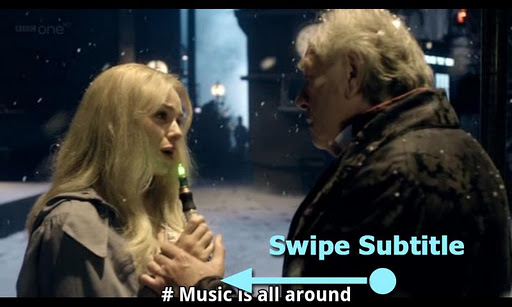
    SUBTITLE SCROLL - Scroll on subtitle text and playback position will be adjusted to match previous or next subtitle timing.

    BETTER SUBTITLE READABILITY - Increased subtitle readability with thicker border and shadow around text.

    FULL HONEYCOMB SUPPORT

    Supported File Types :

    SubRip(.srt)
    Sub Station Alpha(.ssa/.ass)
    MicroDVD(.sub/.txt)
    SubViewer2.0(.sub)
    SAMI(.smi/.sami)
    MPL2(.mpl/.txt)
    PowerDivX(.psb/.txt)
    TMPlayer(.txt)
    Matroska (.mkv) Subtitle Track. (text, ass/ssa only)

    What's in this version : (Updated : Feb 9, 2013)

    Added support for double tap gesture; Toggle play/pause.
    Added support for Samsung multiwindow.
    Added an option to hide position text while seeking video. Check Playback screen > Menu > Display > Settings > Navigation > Display position text while seeking video
    Changed Kids Lock behavior; If kids lock is in use, do not exit playback screen even if last video is finished.
    Fixed h/w+ playback failure on Google Nexus 10.
    Fixed dialogs not to hide behind main window in Android 4.2

    Required Android O/S : 2.1+

    $4.95

    downloadwi.gif


    DJ-AsAnka

    Well-known member
  • Aug 1, 2010
    2,033
    384
    83
    MetaVerse
    babiato.co
    Google Play Store v3.10.10 patched

    Google Play Store v3.10.10 patched

    Requirements: Android 2.2+
    Overview: Play Anywhere, All your entertainment in one place, Google Play is your one-stop shop for all your favorite entertainment.

    gooleplay.jpg


    Google Play is your one-stop shop for all your favorite entertainment. With over 450,000 apps, millions of songs and books, and thousands of movies, Google Play has something for everyone. Before you decide what you want, sample a free music or book, view app ratings, reviews, and screenshots, or watch a movie trailer. Google Play is a more connected, powerful experience.

    The power of the cloud
    How cool would it be if your entertainment was just available anywhere? Now it is. Buy a book on your Android phone and read it on the web at play.google.com. http://goo.gl/ovsCS Buy a new album on your Android tablet and listen to it on your desktop at work. Rent a movie online and watch it anywhere on your phone. That’s the beauty of the cloud. You can read, listen and watch all your favorite content anywhere you want. No software required and no wires or syncing needed, and the best part - Google Play cloud is free to use.

    Share what you love
    Discover, shop, enjoy, and share music, movies, books, and apps anytime, anywhere. When you discover an amazing song, a nail-biting thriller or memorable movie, the first thing you want to do is share it with your friends. On Google Play sharing your favorite entertainment just got easier. You can easily share posts about your favorite books, music, movies, games or apps to your circles on Google+, email, or text message in a single click.

    Play with music
    Find music you love
    Google Play has hand-picked rising artists and great bands from your favorite genres. With music on Google Play, you’ll get personalized recommendations based on what you listen to most. And when you're not shopping for new music, rediscover your library by creating an Instant Mix.

    Buy now, listen now, sync never
    There are hundreds of free songs and millions more to buy on Google Play. The music you choose is automatically stored in your Google Play music library and instantly ready to play on your computer, Android phone or tablet.

    Your music, anytime, anywhere
    Access your Google Play music library anywhere, anytime - no syncing, no wires. Stream music instantly on the Web and listen on your Android phone or tablet with the Google Play Music app. Not online? No problem. Just pin your favorites to your mobile device for offline playback.

    Organize your music
    Keep all your music in one place. Anything you get on Google Play is automatically stored in your music library and you can even add up to 20,000 of your own songs for free. With your music saved online, you can stop worrying about storage space and start enjoying your collection anywhere.

    Give your friends a free listen
    Sharing is caring. When you buy music on Google Play, you can share a free listen with your friends on Google+. And you get a free listen when they share what they've bought with you. It's sharing, discovering and buying music made simple.

    Play with books
    Find new books
    Discovering your favorite books and authors has never been easier. With Google Play, shop the world's largest selection of eBooks - from thrillers to comedy, cookbooks, bestselling fiction, and everything in between - find over 4 million books to choose from, including millions of free titles. With Google Play, your next great read is always at your fingertips.

    Buy anytime, anywhere
    Shop on the web or on your device, find the eBooks you love, and start reading instantly. Choose from millions of titles, browse new releases, sample books for free, and find the latest up-and-coming authors.

    Share what you love
    Sharing the books you love with family and friends is just a click away. With Google Play you can easily post your favorite reads to your circles on Google+, via email, or text message, right from the pages of your book, without skipping a beat.

    Your books in the cloud
    With Google Play enjoy seamless syncing and easy access across your devices. All your books are stored in the cloud, so your entire library is always with you, accessible from any connected device. And with offline reading, it’s never been simpler to dive into your favorite books when you are offline, out of range, or in the air. Start reading on your tablet, continue on the web, and finish that chapter on your phone. You’ll pick up the story just where you left off, always on the right page.

    Customize your reading experience
    Read your books any way you like them on Google Play. Easily switch between day or nighttime mode, view in landscape or portrait, choose your font, text size, line height, and customize to your heart’s content.

    Play with apps and games
    There is an app for everyone
    Race to the finish line. Score a goal. Buy stocks. Read the news. Buy movie tickets. Update your status. Personalize your phone with live wallpapers, ringtones, and widgets. With over 450,000 Android apps and games your phone truly is your mobile entertainment system, organizer and portable computer all wrapped in one.

    Find new apps and games
    Looking for new apps? Check out our staff picks, hand-picked by our editorial team, browse apps by category or just search for them. You can also read reviews and ratings from other app and games users, and even add your own.

    Get the latest updates
    App developers are always updating their amazing apps with new features, tools and fixes. Google Play makes keeping your favorite apps up to date easy. Select ‘update automatically’ in your app settings and your app will always be updated. Or choose to update all your apps in one click. It’s that simple.

    Get your favorite app, anywhere
    Just found a new app on the web and can’t wait to try it? Install it from Google Play on the Web without ever touching your device. The app you install is now available on the device you choose - instantly.

    Play with movies
    Find the movies you love
    Choose from an incredible selection of thousands of movies on Google Play including HD titles, new releases, award-winning films or your favorite classics. Whether you’re in the mood for comedy, drama, animation, action or a documentary, there’s a movie that’s right for you.

    Watch it now or later
    Rent movies and watch them instantly. Alternatively, download your movie for offline viewing and view it later using the Google Play Movies app or watch it directly on the Web.

    Watch it anywhere
    Watch Google Play movies anywhere -- your couch, your friends’ house or in-flight. When you rent a movie with Google Play you can watch it on your phone, tablet or any Web connected PC.

    What's in this version:
    1.Can use app protected with Google LVL (License Verification Library) without cracking.....
    2.No need to patch with Lucky patcher any more.....
    3.Can NOT download paid apps for FREE!.....
    4.Disable auto updates for Google Play Store......
    5.Not works with Billing and License Verification to Proxy.....
    6.Removes device and country restrictions.....
    7.Remove items from your "My Apps lists"

    This app has no advertisements

    Download Instructions:Thanks to ChelpuS & SaNXeVC
    Code:
    [URL="http://anonym.to/?http://ul.to/2xsiefnw"]http://ul.to/2xsiefnw[/URL]
    mirror:
    Code:
    [URL="http://anonym.to/?http://rapidgator.net/file/63115643"]http://rapidgator.net/file/63115643[/URL]

    Instructions:
    1.Install latest Lucky Patcher
    2.Run Lucky Patcher > Menu > Select 'Patch to Android'
    3.Select √ 'Signature Verify always True' and 'Disable Zip Signature Verify' > Apply > Yes
    4.After reboot go to 'Patch to Android' and check (Patch applied). If applied exit from Lucky patcher. otherwise do 3rd step again.
    5.Backup current Google play with Titanium backup if you want to restore original version in case.
    6.Rename downloaded 'GoogleMarket.by.Chelpus.TrueLicenseMod.apk' and transfer to sd card.
    GingerBread users > rename to 'Vending.apk'
    ICS / Jelly Bean users > rename to 'PhoneSky.apk'
    7.Open Root Explorer and copy/replace renamed apk to '/system/app/' folder
    8.Set permissions rw-r--r-- and Reboot
    9.Done. All Apps on Device with LVL is licensed. (Tested to GoldenDict, TitaniumBackup, PowerAmp and other) :rofl:
     

    AWRORA

    Well-known member
  • Mar 27, 2008
    15,186
    1,414
    113
    සිංහල බෞද්ධ රටේ...
    Google Play Store v3.10.10 patched

    Requirements: Android 2.2+
    Overview: Play Anywhere, All your entertainment in one place, Google Play is your one-stop shop for all your favorite entertainment.

    gooleplay.jpg


    This app has no advertisements

    Download Instructions:Thanks to ChelpuS & SaNXeVC
    Code:
    [URL="http://anonym.to/?http://ul.to/2xsiefnw"]http://ul.to/2xsiefnw[/URL]
    mirror:
    Code:
    [URL="http://anonym.to/?http://rapidgator.net/file/63115643"]http://rapidgator.net/file/63115643[/URL]
    Instructions:
    1.Install latest Lucky Patcher
    2.Run Lucky Patcher > Menu > Select 'Patch to Android'
    3.Select √ 'Signature Verify always True' and 'Disable Zip Signature Verify' > Apply > Yes
    4.After reboot go to 'Patch to Android' and check (Patch applied). If applied exit from Lucky patcher. otherwise do 3rd step again.
    5.Backup current Google play with Titanium backup if you want to restore original version in case.
    6.Rename downloaded 'GoogleMarket.by.Chelpus.TrueLicenseMod.apk' and transfer to sd card.
    GingerBread users > rename to 'Vending.apk'
    ICS / Jelly Bean users > rename to 'PhoneSky.apk'
    7.Open Root Explorer and copy/replace renamed apk to '/system/app/' folder
    8.Set permissions rw-r--r-- and Reboot
    9.Done. All Apps on Device with LVL is licensed. (Tested to GoldenDict, TitaniumBackup, PowerAmp and other) :rofl:


    :cool::cool::cool::cool::cool:
     

    kawshalyaknight

    Well-known member
  • May 12, 2010
    945
    300
    63
    NewYork
    මචන් මගෙ තියෙන්නෙ neo v එකක්,මේකට හොදට සිංහල වැඩකරන software එකක් හොයල දෙන්නකො,මම දාපු ගොඩක් software වල සින්හල පේන්නෙ නෑ නෙ බන් ඇයි එ ? FB වලත් පෙනෙන්නෙ නෑ නෙ :-(
     

    AWRORA

    Well-known member
  • Mar 27, 2008
    15,186
    1,414
    113
    සිංහල බෞද්ධ රටේ...
    මචන් මගෙ තියෙන්නෙ neo v එකක්,මේකට හොදට සිංහල වැඩකරන software එකක් හොයල දෙන්නකො,මම දාපු ගොඩක් software වල සින්හල පේන්නෙ නෑ නෙ බන් ඇයි එ ? FB වලත් පෙනෙන්නෙ නෑ නෙ :-(


    menna me font file eka System>fonf (root explorer valin) folder ekata copy karapan machan...soft danna one ne ethakota


    http://www.mediafire.com/?buwtswdqy2cw5bi
     
    • Like
    Reactions: wijebahu