Google Play for Android :::.

actinide

Well-known member
  • Feb 21, 2009
    7,494
    1
    1,012
    113
    Between Life & Death
    V.300 Change-log 2013.01.24


    • Home base updated to leaked Xperia T JB fw (5.1.A.0.7)
    • Music widget for Walkman app - use Walkman port by Rizal Lovins from Here (only use widget from this pack,don't use widget in rizal's port cos it will force close home for almost all of non Xperia devices)
    • Widgets fixed,should work fine on any device now
    • Track ID app + widget & Sony Torch app + widget included
    • Faster animations on Home screens and entering app drawer
    • Auto rotation enabled mode,
    • For xHDPI with 5x4 app drawer
    • For HDPI with 4x4 app drawer
    • 6x4 app drawer without Auto rotation for xHDPI separate version
    • 5x4 app drawer without Auto rotation for HDPI separate version
    • Special 7x5 app drawer without Auto rotation for xHDPI separate version
    • Separate zip with widget pack


    Package includes


    • Xperia Clock Widgets
    • Xperia Weather Widget
    • Xperia Track ID app + widget
    • Xperia Torch app + widget
    • Xperia Recent calls Widget
    • Xperia On\Off Tools Widget
    • Sony Notes app + widget
    • Xperia Z Home

    Instructions


    • Take a CWM Backup
    • Choose the zip you want to use for your device resolution and copy it to sd card
    • Copy widgets zip & wallpapers zips to sd card
    • Flash via cwm & reboot
    • Clear data of Xperia Home in Settings\apps\all applications\Xperia Home & Enjoy !


    Downloads

    http://forum.xda-developers.com/showpost.php?p=37127518&postcount=485 ;)


    pattai... :D
     

    tharinda76

    Well-known member
  • Oct 25, 2007
    50,144
    1,888
    113
    Sri Lankan Traffic Alerts and GPS Tracker

    a_5-dhgODGU75XGmNFYcJ7IDZqy9xXJu_oe9qwqrhKKFX5wDJcs8_0mDCmANMahHmw=w124


    Google Play :

    DOWNLOAD
     

    polwattacom

    Well-known member
  • Jul 19, 2008
    5,989
    1,039
    113
    USA
    මචන්ලා මා ගාව තියෙන්නේ LG optimus එකක්. එකේ model එක LG -P 500 version එක 2.3.3 . මේකේ තියෙන්නේ එක cam එකයි. එක තියෙන්නේ back සිදේ එකේ. මේ cam එක skype එකේ video chat වලට support කරන්නේ නැහැ. මුකුත් application එකක් දන්නේ නැද්ද මේ cam එක skype වලදී පාවිච්චි කරන්න.
     

    AWRORA

    Well-known member
  • Mar 27, 2008
    15,186
    1,414
    113
    සිංහල බෞද්ධ රටේ...
    mkadda denata thyana hodama battery saver app eka Glaxy Y phne ekakta match wena.

    menna machan...;)


    GO Power Master Premium


    j_wa9pmvbb93tHXUzzlyIiQ4EF__N3cmXDTnWzgPhHerf3Zs13204kYUoi2eAW6dyQ=w705


    0KsRF4e0VxUXRnDGWphgR9yxBSWjybrVXZHO3ABO9zH_p3ijYw9MWN_0NDsUUVRsxJs=h230
    DGUTNI_EfzsjvGo72jBSfafoSZduRckISBNKXtyDZoy2qmigp4ik97S0tz1NKunSqA=h230
    odNJRJI187W_IpmyN9noDeIsG4ET6bLdMIrLMkNWCZ0TJ1_ef78s6mqdxronSsDu-DI=h230


    h1Vow5yXMtsJZjabrzbpIT0157DSqf3Ng_rweAl_L0eb0pxl2ashvN1jNUIIdqZlkA=h230
    3QxYwNrOWxOXVbI4lV7xRMyTUSYmqPKIEUHBb0I0BM7_j-9vrmv2z7Natmb5Nvzz7OA=h230


    Description

    Designed by GO Dev Team, GO Power Master #over 10 Million Users Choice# is a powerful, smart, and easy to use battery saving tool which able to prolong the battery endurance time by 50%. It intelligently manages your battery use to your own needs and runs automatically after configured. *Powerful
    With one click, GO Power Master optimizes power consumption by managing wifi, mobile data, audio, Bluetooth, screen brightness, synchronization, apps and other battery draining component. It helps decrease power loss and prolong battery endurance time.

    *Smart
    With pre-set modes and smart toggle control, GO Power Master enables you to configure the battery saving schedule to your unique needs. After configuration, it runs by itself and intelligently switches modes, turns on/off toggles as with different battery level, phone status, or time. It can't be more easier!

    *Features:
    - pre-set 3 default and 2 custom battery saving modes
    - one key battery consumption optimization
    - smart mode switching by battery power/time
    - smart toggle on/off control when screen off
    - apps power consumption monitoring and analyzing
    - calls, reading, network, audio, video, phone idling endurance time calculating
    - battery temperature monitoring and abnormal status alert
    - battery information shown in status bar
    - white list for apps
    - widgets with 4*1 and 1*1 size
    - various themes for notification bar and widgets
    - detailed battery user manual

    *More advanced features with Pro Version:
    - editable default modes to your unique needs
    - smart mode switching when charging battery
    - smart synchronization on/off
    - Bluetooth turn off when not in use
    - detailed power consumption for specific app
    - charging record helping built a healthy charging habit
    - delicate themes specially for Pro Version

    *How to add the Power Master widgets?
    Long press the home screen, select “Widget” and select “GO Power Master (4*1)”. Make sure there is enough space on your home screen.


    chart


    chirantha19890821

    Well-known member
  • Apr 21, 2009
    10,465
    14,252
    113
    Dubai, UAE
    JZ9PTNDjOlVn6PscbhU4GtJF6jJYMWf3wtJj0smHKTUoLwLE1riF8ZhC5pOs8_BfKw=w705


    Description

    A camera app designed to help serious photographers take better photographs.As an amateur photographer that loves to exploit exposure adjustments to capture great images, I was frustrated that I could not find a camera app that allowed quick and easy exposure (EV) adjustment.
    I set out to build the camera app that I myself wanted. For me, quick access to camera settings to manage image capture is just as valuable as seeing the photo preview on the screen. One touch exposure changes is key, as I use that on almost every "good enough to print" image attempt.
    I wanted a quick way to mark (star) my best images. Maybe you are familiar with the workflow of a hole punch on the edge of 35mm film. I wanted to recreate that workflow, so Shot Control allows you to easily star your best photographs, and copies them in their own directory. You can't delete starred photos by accident, you must unstar them first...a feature that goes nicely with the option to disable delete confirmations...star the best, then quickly delete the rest.
    I've been building Shot Control since August 2011 in my free time, released it in January 2012, and continue to evolve it over time into a tool that helps me take better photographs, and helps me better enjoy photography.
    If you also enjoy and appreciate Shot Control, I encourage you to leave a 5 star comment. If for any reason you are not satisfied, I am always willing to issue a refund at any time, for any reason.
    Here are some user comments...
    "Simply put: this is a great tool for every mobile photographer out there. Having all of the camera controls on the main screen is heavenly, & you are able to adjust white balance, flash, exposure, & basically everything else without opening a menu. I love that you can map camera functions to the volume rocker. The developer is extremely responsive & the app is constantly being fine-tuned & refined. He is clearly committed to making this the most flat-out functional camera app on the market. Get it!" - Comment from Trent
    "It's so easy to use and equally functional." - Comment From Zac
    "Everything you need from a camera app on screen and in easy reach. This is the best. " - Comment From Jason
    "The Shot Control interface is very intuitive, and having the "roll" integrated into the main screen makes things even easier." - Comment From Mitch
    "I love that I don't need menus to get to the adjustments and filters. Great work!" - Comment From January
    "Shutter button remapping alone is worth the purchase." - Comment from kvn
    "Really complements the Galaxy Nexus camera. Giving the user more control of the camera which will result in better photos." - Comment from Stephen
    Key Features:
    - Multiple Touch Focus/Meter regions on ICS (on supported devices with Android 4.0)
    - Direct access to exposure control and zoom
    - One tap access to ISO, White Balance, Scene Modes, Focus Modes, and Flash Mode Settings (based on device abilities)
    - Custom mapping for hardware buttons (like volume down for focus, volume up for shutter)
    - Pre-focus function
    - 35mm style film roll integrated with the viewfinder display
    - Star your favorite photos, which will be added to their own "Stars - Shot Control" group in the stock gallery app on most phones.
    - With "Instant Upload" enabled in Google+, photos with stars will be "instant uploaded" to G+/Picasa as if they were taken with the stock camera app.
    Please use the “Submit Bug Report” if you have issues on your device, available by pressing the menu button. I can't reply to comments posted in the market.


    මෙතනින් බාගන්න :)

    File Not Found kiyala enoooooooooooooooo.....!!!!

     
    Free 50GB Box.com
    zd8tzl.png


    1. Go to
    or

    and register for a normal free 5GB account.

    2. They will send you a valadation Email, accept this and you will have 5GB free.

    3. Install "
    Free 50GB"


    and open it, input your email address and password (I have been assured by the dev of this app that no email address or username, is stored by the app or sent to him or anything like that, but if you are unsure, just change your password after the upgrade to 50GB using your web browser and in account settings).

    4. Press "Upgrade to 50GB!!!" you will see a toast saying you have been upgraded to 50GB

    5. Log into your account, either via the normal Box app or web browser and you will see you have been upgraded from 5 to 50GB!.

    Enjoy this space ;)
     

    chirantha19890821

    Well-known member
  • Apr 21, 2009
    10,465
    14,252
    113
    Dubai, UAE
    Menna ape bhandeyak

    w0d5Jjm5DIb6SLzuXjvR7hBg7hK34ZyIWIMOGOWpjesBrjCaQb-E7nZdBbLpib7ydQ=w705


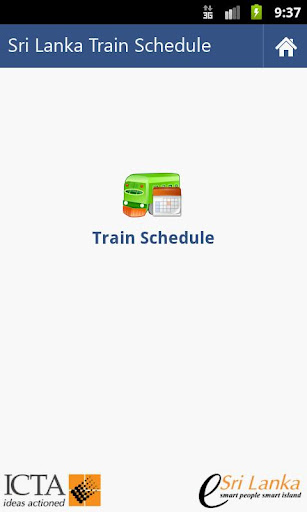
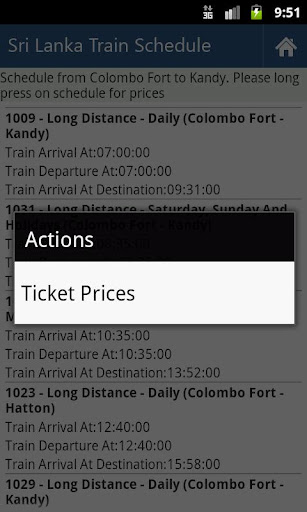
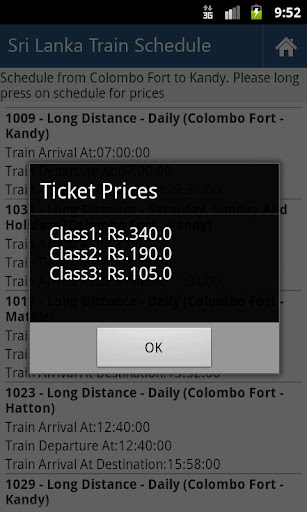
    Award winning mobile application of eSwabhimani 2011 for the initiative of delivering government e-services which are connected to Lanka Gate through smart phone mobile interface.

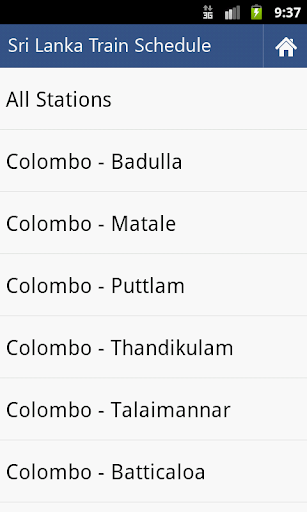
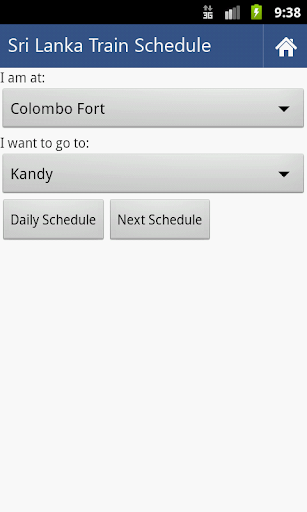
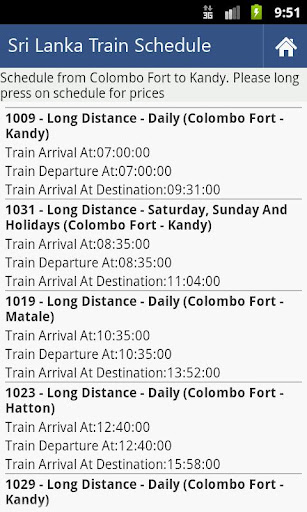
    From this application you can get Train Schedule, Train Delays and Ticket Prices of Sri Lanka Railways. This application is developed for ICTA Sri Lanka and released under GNU/GPL. Developed by Chatura Dilan Perera.
    For more information visit: http://www.govforge.icta.lk/gf/project/androidts/

    Screenshots

    dkn67sudD8zd3SKZ71QjX3-MEs-Hw13uh2ULPlnYaxr8L57kxF51lyU3pQrPlyeetA
    zxdND8vx4LJBo9Pc81s_G6dMPmH9qKr4RmZmsOEllbJc_4DuL1n5GB1hm9z0Usdy1Fps
    iOGBbpeTwG4IHEhxO0RHYuval9pT-YXvjSRdhHJmYOUWJFAwN1FFd4_ARamVzg6YOLQ
    3PaBy2IZvAw0sIhFsGXpGZ7Ogh5V5COiTjw4QlnbRY4zk5GA7aK4mcS0awHYhCSoTxA
    _LSmOeAblbJ-CtkzsmHVksGvDnwOVBYnd2pFXCeBH7lOPFNuOuRe8AbMrUz0pdHVvzE
    J8OtwhAq2owC9f-kiG7H1pmZc_rZWEpnHdANePo4povpP2CwnUbSO5vRYUbPmeoBiRo


    Download

    Meka nam sahenna watinawa.....

    Thanx bro...

    Rep+